take control
Now choose a massage technique. Your Human Touch massage chair lets you customize your
massage using a wide variety of massage modes. Choose from three stationary massage modes and
a rolling massage, or combine them. Use the Range button to tailor your vertical massage range,
or the Zone and Position buttons to target your massage to a specific area. Or, let the chair take
control—just select one of the four auto massage programs, which alternate massage modes to
achieve four unique experiences. And don’t forget the soothing warm-air heat! No matter how you
use it, Human Touch Technology offers maximum massage flexibility and refreshing benefits.
8
9
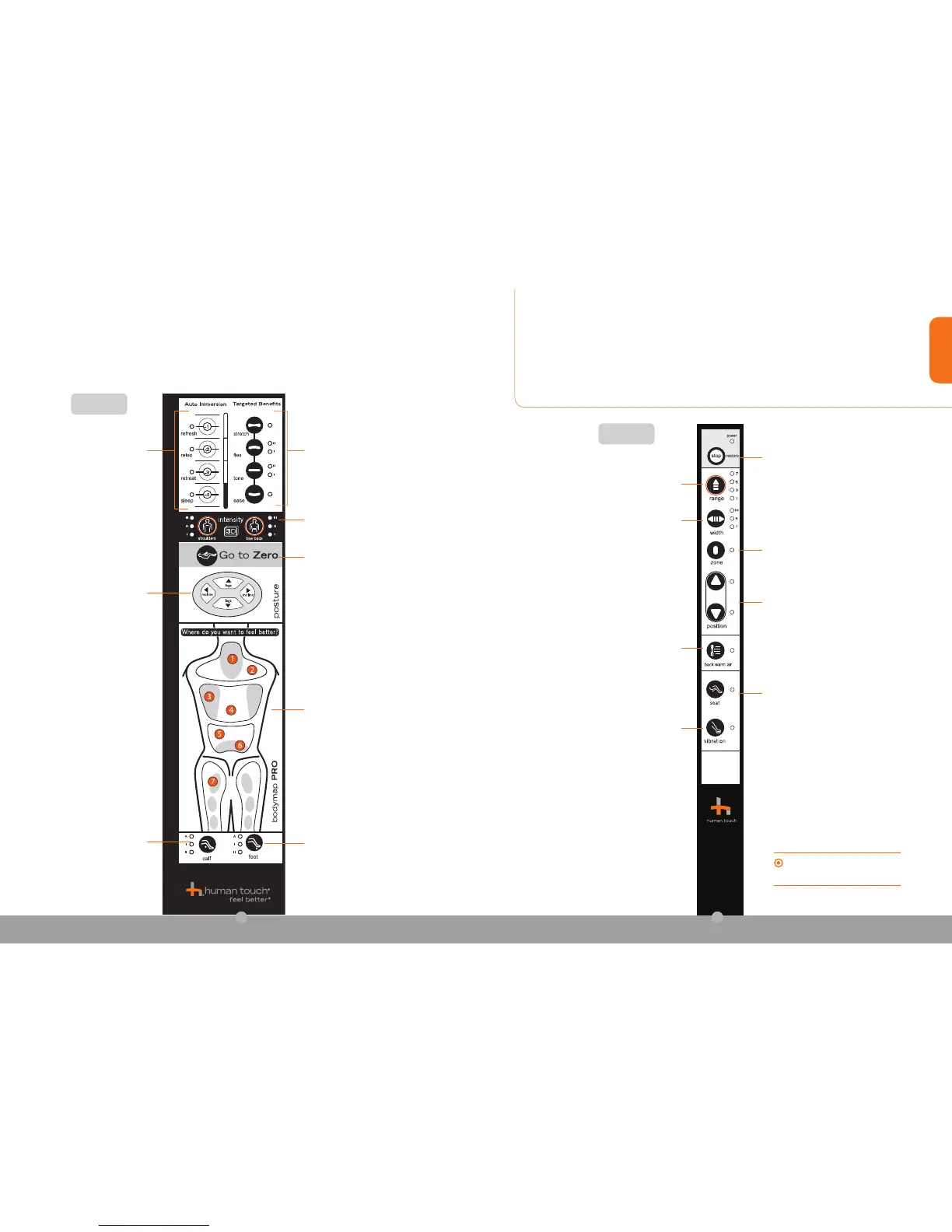
Auto Massage Programs –
Four unique auto programs
automatically massage you for 15
minutes, using a variety of massage
modes. The corresponding LED
lights to indicate which massage
mode is currently in use.
Targeted Muscle Benefits — Four
massage modes let you customize
your massage. (See page 10)
Calf — Press to toggle through
two fixed calf massage speeds
and an auto massage program.
Foot — Press to toggle through two
fixed foot massage speeds and an
auto massage program.
Intensity 3D — Set the upper and lower
back 3D massage intensity independently
to soft (I), medium (II), or intense (III).
Front
Go to Zero (One-step press and
hold) — Fully reclines the backrest
and raises the footrest, placing your
body in a neutral-posture position.
Posture — Adjust the chair to
a comfortable position.
NOTE: When you incline the
backrest, the footrest raises
before the backrest inclines; this
is a safety feature.
Bodymap PRO
(See page 11)
Side
stop/park/restore — Press and hold to
retract the footrest and return the chair
to the upright position.
Range — Choose from seven settings
to personalize your vertical massage
range.
Width — Focus or diffuse massage
pressure by selecting the wide, medium, or
narrow setting. This feature works with Flex
and Ease massage modes. Select the width
setting after selecting a massage mode.
Zone — Targets your massage
toasix-inchzone.Usethe
Position buttons to focus your
massage on the desired area.
Position —Usethisbuttonalongwithany
stationary massage mode, to set the massage
head to the desired position on the backrest.
You can press this button before or after
selecting the massage mode.
Vibration — Activates the foot vibration.
Air Seat Massage — Activates the unique
seat massage, which uses two rows of rapidly
inflating/deflating air cells and a layer of Visco
foam to create a precision seat massage.
Back Warm Air — Activates the warm air
lumbar heat. NOTE: After deactivating the
heat, the LED turns off but the fan continues to
run to cool down the heater. This is normal.
When you’re not using the remote, store it in
the convenient pocket on the left side of the
seat cushion, so it’s out of the way.



 To Next Page