ENEN
3 4
Product information Humble One:
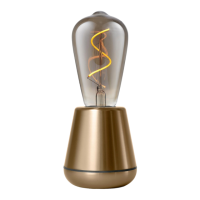
The Humble One is a wireless lamp, available in multiple finishes, with a built-in
rechargeable battery. The light source is a 3V 1W LED filament bulb emitting 2200K
(warm white) light. A fully charged lamp remains lit for at least 40 hours (at full
brightness) but can last up to 140 hours (at the lowest brightness).
WARNING: READ CAREFULLY BEFORE USE!
Place the lamp on a dry, horizontal surface. Do not expose the lamp to excessive heat. The
lamp is intended for indoor use, but can be used outdoors without an adapter. Protect
it against water and store inside after use. Check the voltage of your power supply; the
voltage must be between 100 and 240V AC. Check the cable on the adapter provided for
damage. When the lamp is switched on, do not stare at the light source at full brightness,
as this may cause eye damage. The lamp is not a toy: keep away from children.
Instructions for use
Charging the lamp with cable: Insert the Type-C USB plug into the slot near the bottom
of the lamp. Plug any adapter for a mobile device (with a USB-A output) into the wall
socket. Depending on the wattage of your adapter, charging will take approximately 3-4
hours.
Charging the lamp wirelessly: Place your Humble on any Qi-standard charging dock.
Depending on the wattage of your adapter, charging will take approximately 4-5 hours.
There are three indicator lights located next to the Type-C USB slot. While the battery is
charging; the lights will flash in order for 10 seconds. LED 1 flashing: battery level is 6%-
33%. LED 2 flashing: battery level is 34%-66%. LED 3 flashing: battery level is 67%-95%.
If the battery is fully charged, all three LEDs will remain lit.
Starting position: the lamp is switched off. Press the (+) button once: the light will turn on
at low brightness (candle). Press it a second time: medium brightness (ambient). Press it a
third time: full brightness (work). Press it a fourth time: the light will switch off.
Each time the brightness settings are adjusted, the lamp will show its current battery
level for 10 seconds. If you’ve purchased a Humble remote, you can find these brightness
settings as physical buttons on the display, together with a battery indicator button.
Charge the lamp when it no longer lights up. If the battery does not charge, contact your
Humble dealer. Never try to replace the battery yourself.
Changing the bulb
The Humble One contains a LED light bulb that you can replace by yourself. Please note
that the Humble One base only works with low-voltage Humble bulbs. When the light
source reaches the end of its life, please replace with an original Humble bulb available
at: www.humblelights.com
Cleaning the lamp
Clean the lamp carefully with a damp cloth (if necessary with a gentle soap) and
dry carefully before turning back on. Do not use any cleaning products that contain
chemicals.
Replacing the battery
The Humble One base contains a battery which cannot be replaced or disassembled by
anyone other than an official Humble reseller. It must be recycled or disposed separately
from household waste. Please contact your Humble reseller if you need a replacement
battery.


 To Next Page
 Loading...