EasyManua.ls Logo

Humphree Lightning - CONTROL PANEL; Touch Screen Gestures; Display Features

Default Icon
13 pages
Print Icon
To Next Page IconTo Next Page
To Previous Page IconTo Previous Page
Loading...
8 9
5. CONTROL PANEL
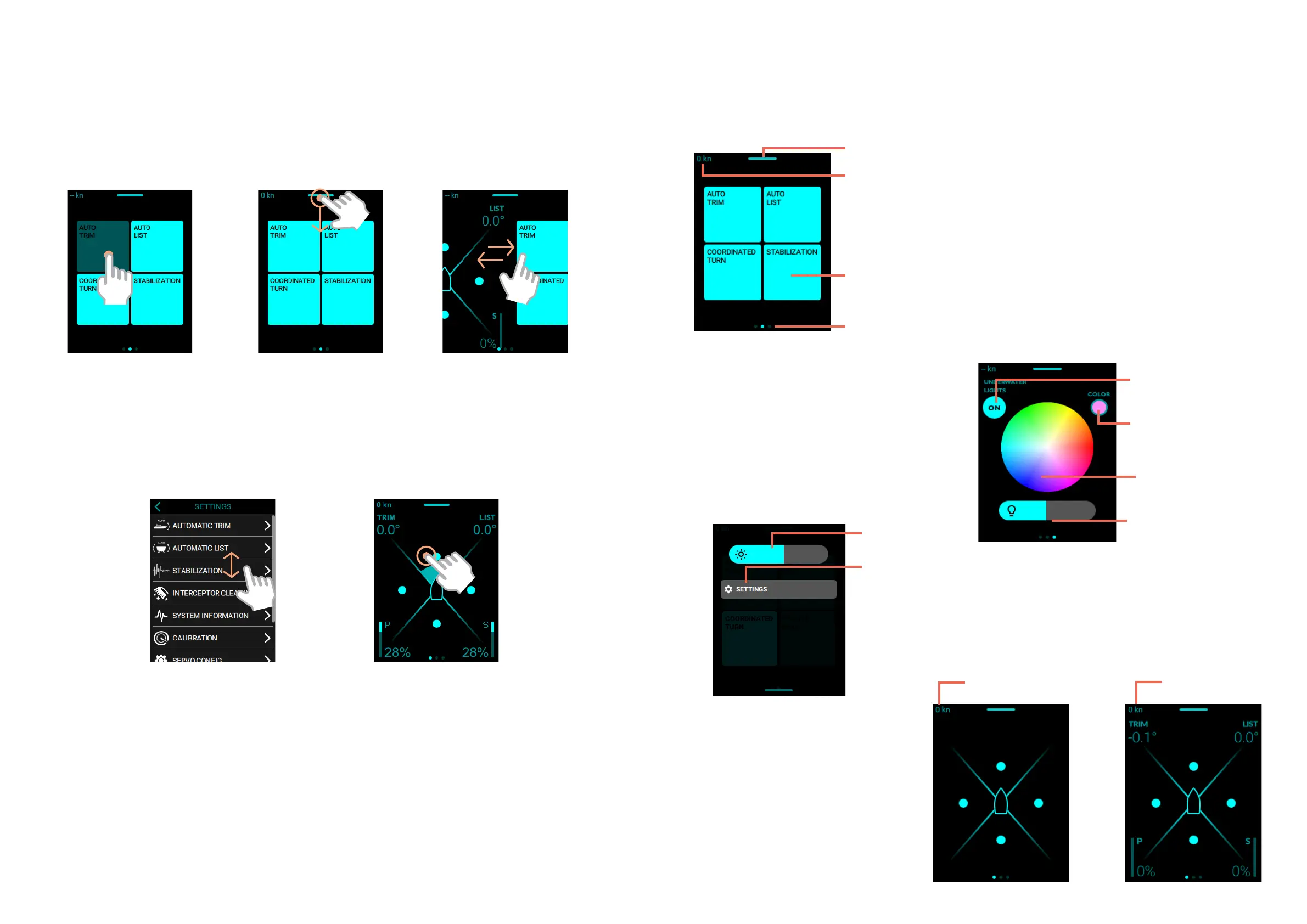
5.1 TOUCH SCREEN GESTURES
Tap. Tap one
finger lightly
on the screen.
Swipe. Move one
finger across the
screen quickly.
Tap and drag. Tap
and drag with one
finger.
Scroll. Move one finger
across the screen
without lifting.
Tap and hold. Tap and hold
to increase the eect of a
function faster.
5. CONTROL PANEL
MAIN SCREEN
DROP DOWN
UNDERWATER LIGHTS
GPS speed
Drop down menu
Auto functions
ON/OFF
Page indicator
Brightness
Settings menu
Lights intensity
Underwater lights
ON/OFF
Select color
Selected color
5.2 DISPLAY FEATURES
or
When the speed exceeds 5 kn,
the control view is automatically
showing.
Detailed view
AUTOMATIC FUNCTION
Overview

Other manuals for Humphree Lightning

Related product manuals