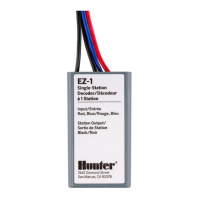
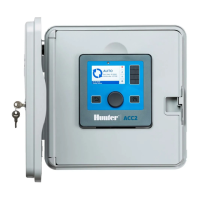
Use ONLY with Hunter model EZ-DM (for ICC2 and HCC controllers)
and PC-DM (for Pro-C
®
controllers) decoder output modules.
ENGLISH
TO PROGRAM A STATION DECODER
Insert EZ-1 red and blue wires in the port
on the EZ-DM or PC-DM output module.
DEUTSCH
PROGRAMMIEREN EINES STATIONEN-DECODERS
Stecken Sie das rote und blaue Kabel des EZ-1 Decoders
in den Port am EZ-DM- oder PC-DM-Ausgangsmodul.
ESPAÑOL
PARA PROGRAMAR UN DECODIFICADOR DE ESTACIÓN
Inserte los cables rojo y azul del EZ-1 en el puerto del
módulo de salida EZ-DM o PC-DM.
FRANÇAIS
POUR PROGRAMMER UN DÉCODEUR DE STATION
Insérez les ls rouge et bleu de l’EZ-1 dans le port du
module de sortie de l’EZ-DM ou du PC-DM.
ITALIANO
PER PROGRAMMARE UN DECODER DI STAZIONI
Inserire i cavi rosso e blu del decoder EZ-1 nella porta
situata sul modulo di uscita EZ-DM o PC-DM.
PORTUGUÊS
PARA PROGRAMAR UM DECODIFICADOR DE SETOR
Insira os cabos vermelho e azul do EZ-1 na porta do módulo
de saída do EZ-DM ou PC-DM.
РУССКИЙ
ПРОГРАММИРОВАНИЕ СТАНЦИОННОГО ДЕКОДЕРА
Вставьте красный и синий провода EZ-1 в разъемы на
модуле вывода EZ-DM или PC-DM.
TÜRKÇE
İSTASYON DEKODERINI PROGRAMLAMA
EZ-1 dekoderin kırmızı ve mavi kablolarını EZ-DM veya PC-
DM çıkış modülündeki yuvaya takın.
START THE STATION NUMBER
Use controller face panel (or remote control,
if so equipped) to start the station number you
want to program into the decoder.
STATIONSNUMMER STARTEN
Verwenden Sie die Frontplatte des Steuergeräts (oder falls
vorhanden, die Fernsteuerung), um die Stationsnummer
zu starten, die Sie dem Decoder zuordnen möchten.
INICIE EL NÚMERO DE ESTACIÓN
Use la carátula del programador (o control remoto si está
equipado con él) para arrancar el número de estación que
desea programar en el decodicador.
ACTIVER LE NUMÉRO DE STATION
Utilisez le panneau avant du programmateur (ou la
télécommande, le cas échéant) pour activer le numéro de
station que vous voulez programmer dans le décodeur.
AVVIO DEL NUMERO DI UNA STAZIONE
Utilizzare il pannello frontale del programmatore (o il
comando remoto, se disponibile) per avviare la stazione a
cui si vuole abbinare il decoder.
INICIE O SETOR
Utilize o painel frontal do controlador (ou o controle
remoto, se houver) para iniciar o setor que você deseja
programar no decodicador.
ЗАПУСК СТАНЦИИ С ОПРЕДЕЛЕННЫМ НОМЕРОМ
С помощью лицевой панели контроллера или пульта
дистанционного управления (при его наличии)
запустите станцию с номером, который вы хотите
запрограммировать в декодере.
İSTASYON NUMARASINI BAŞLATMA
Dekoderde programlamak istediğiniz
istasyon numarasını başlatmak için kontrol ünitesinin
arayüzünü (veya varsa uzaktan kumandayı) kullanın.
PROGRAM THE DECODER
When station is running, press the PRG button.
When LED ashes on decoder, decoder is programmed.
Write station number on the decoder label with
permanent marker.
DECODER PROGRAMMIEREN
Drücken Sie bei laufender Station die PRG Taste.
Wenn die LED am Decoder blinken, ist der Decoder der
gewählten Station zugeordnet.
Schreiben Sie die Stationsnummer mit einem
wasserfesten Sti auf den Decoder.
PROGRAME EL DECODIFICADOR
Mientras la estación esté funcionando, presione el botón
“PRG”. Cuando el LED parpadee en el decodicador, éste
ya está programado.
Escriba el número de la estación en la etiqueta del
decodicador con un rotulador permanente.
PROGRAMMER LE DÉCODEUR
Après avoir activé la station, appuyez sur le bouton PRG.
Lorsque la diode clignote sur le décodeur, cela signie que
le décodeur est programmé.
À l’aide d’un marqueur permanent, notez le numéro de
station sur l’étiquette du décodeur.
PROGRAMMAZIONE DEL DECODER
Mentre una stazione è attiva sul display, premere il
pulsante PRG. Quando il LED sul decoder lampeggia, il
decoder è programmato col numero della stazione.
Scrivere il numero di stazione sull’etichetta del decoder
con un pennarello indelebile.
PROGRAME O DECODIFICADOR
Quando um setor estiver irrigando, pressione o botão PRG.
Quando o LED piscar no decodicador, isso quer dizer que
ele está programado.
Escreva o número do setor na etiqueta do decodicador
com uma caneta permanente.
ПРОГРАММИРОВАНИЕ ДЕКОДЕРА
Включив станцию, нажмите кнопку «PRG».
Мигающий светодиодный индикатор на декодере
свидетельствует об успешном программировании
устройства.
Запишите номер станции на этикетке декодера
несмываемым маркером.
DEKODERI PROGRAMLAMA
İstasyon çalışırken, PRG düğmesine basın. Dekoderdeki
LED yandığında dekoder programlanmış olur.
İstasyon numarasını kalıcı bir kalem ile dekoder etiketine
yazın.
Date/TimeSystem O
Start Times
Run Times
Water Days
Solar Sync
®
Manual
Seasonal Adjust
HCC Wi-Fi
hunterindustries.com RC101IG A 3/20
http://hunter.direct/ezds
EZ-1
INSTALLATION GUIDE
COMPLIANCE DATA
This device complies with part 15 of the FCC Rules. Operation is subject to the following two conditions: (1) This device may not cause harmful
interference. (2) This device must accept any interference received, including interference that may cause undesired operation.
This device complies with Industry Canada license-exempt RSS standard(s). Operation is subject to the following two conditions: (1) This
device may not cause interference, and (2) This device must accept any interference, including interference that may cause undesired
operation of the device.
Le présent appareil est conforme aux CNR d’Industrie Canada applicables aux appareils radio exempts de licence. L’exploitation est autorisée
aux deux conditions suivantes: (1) L’appareil ne doit pas produire de brouillage, et (2) L’utilisateur de l’appareil doit accepter tout brouillage
radioélectrique subi, même si le brouillage est susceptible d’en compromettre le fonctionnement.
Hunter Industries hereby declares that this product is in compliance with the essential requirements and other relevant provisions of
Directives 2014/35/EU (low voltage) and 2014/30/EU (electromagnetic compatibility).


 To Next Page
 Need help?
 General