13 43007-01
Air Purier Maintenance
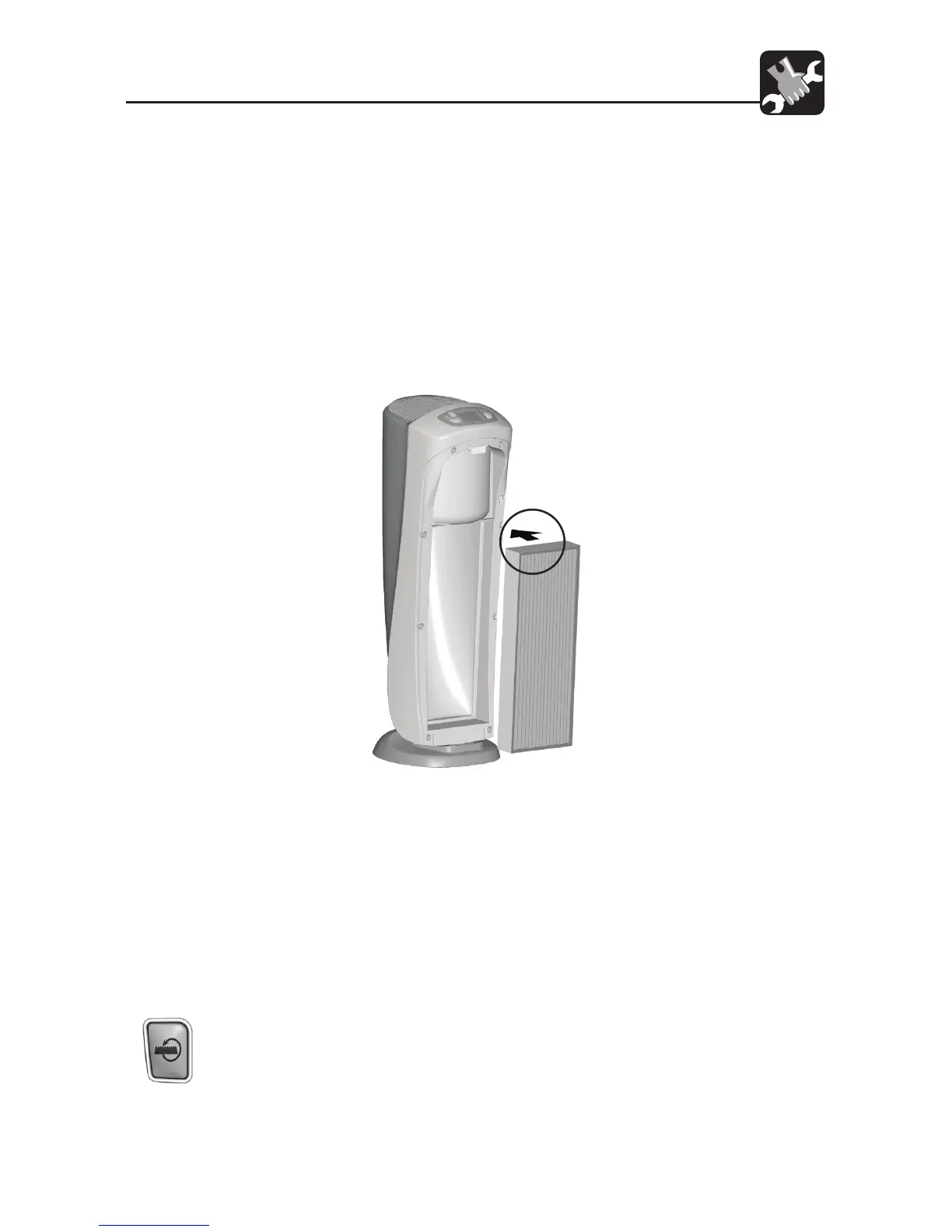
the top of the lter. The lter will be reinstalled with the same orientation. Refer
to Fig. 12.
4. To install a new lter, position the lter with its rim facing the unit. Refer to Fig
12.
5. Place the bottom of the lter rim behind the ridges on each side of the bottom
of the unit. Refer to Fig. 11.
6. Lift the Filter Tab and press the top of the lter into the Air Purier. To avoid
damaging the lter, you should press only on the lter’s frame. When the new
lter is in place, release the Filter Tab.
7. Place the front grill back onto the unit. Refer to Figs. 6 and 7, pg. 7. NOTE: This
unit will not operate unless the grill is in the correct position.
8. Plug in the unit.
9. To reset the Filter Life Counter to zero hours and turn o the indicator, press and
hold the HEPAtech
®
Filter Reset Key for three seconds, then release it.
10. To rest the counter to zero before it expires, press and hold the HEPAtech
®
Filter
Reset Key for three seconds. When the Indicator begins ashing, release the
Key. Then, once again, press and hold the HEPAtech
®
Filter Reset Key for three
seconds. The Indicator will turn o. The Counter is now reset to zero.
Fig. 12



 To Next Page