Please contact 1-888-HD-HUSKY for further assistance. Please contact 1-888-HD-HUSKY for further assistance.
5 HUSKYTOOLS.COM
6 7 HUSKYTOOLS.COM
□ Clean the device regularly with a non-abrasive cleaner.
When the device is not in use, we recommend that the battery is charged at least
every 3 months.
□ Allow the work light to cool down completely before storing.
□ Store in a safe place, out of the reach of children.
WARNING:
Always make sure that the worklight is cooled down
before attempting to clean it.
Using as a charger
It can be used to charge small electronics devices with USB socket (Type A
port) for charging.
The charging current the device requires can not exceed 2A. Carefully read
the instructions for use of the device you wish to charge.
Pre-Operation (continued)
Charging the product
NOTES:
Remove all packaging materials from the product.
Before use, you need to recharge the rechargeable battery before use. The
charging process takes about 6 hours. The rechargeable battery is firmly
integrated into the base of the product.
Charge the battery if it becomes empty (only 1 LED of the charging indicator [B]
is flashing).
Open the protective cap [E].
Connect the USB plug of the USB cable [I] to the USB input socket (Type C) [F]
on the product. The USB cable is for charging only,not for other use.
Fully charge the rechargeable battery prior to first use.
NOTES:
The battery charging status is shown by the charging indicator [B]:
Under input current 2A, the charging time is approximately 6 hours when the
battery was drained.
Using as a LED light
Fully charge the product as described in the section “Charging the product”.
Select these by repeatedly The product can be operated in 4 different modes.
pressing the ON/OFF switch [C].
ON/OFF switch
Mode
Work light 100 % brightness
Work light 50 % brightness
Work light 25 % brightness
Flash
Switch off the light
Press 1x
Press 2x
Press 3x
Press 4x
Press 5x
Press after 30s
Switch off the light
Adjusting the light direction
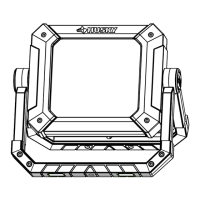
□ To adjust the light direction, rotate stand (A) and work light body (B) to suitable
position.
□ Stand (A) can be rotated 270 degrees and work light body (B) can be
rotated 360 degrees.
A
B
The product is equipped with 4 magnets [D] at the bottom of stand. With all
these magnets, the product can be attached to magnetisable surfaces


 To Previous Page
 Loading...