EasyManua.ls Logo

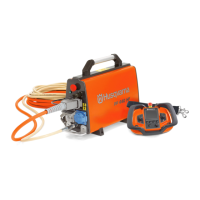
Husqvarna PP 440 HF - User Manual

Husqvarna PP 440 HF
60 pages
Print Icon
To Next Page IconTo Next Page
Loading...
UU
UU
SS
SS
CC
CC
AA
AA
EE
EE
SS
SS
PP 440 HF
Operator’s manual
Manuel d’utilisation
Manual de instrucciones
Please read the operator’s manual carefully and make sure you understand the instructions before using the machine.
Lire attentivement et bien assimiler le manuel d’utilisation avant d’utiliser la machine.
Lea detenidamente el manual de instrucciones y asegúrese de entender su contenido antes de utilizar la máquina.

Table of Contents

Question and Answer IconNeed help?

Do you have a question about the Husqvarna PP 440 HF and is the answer not in the manual?

Summary

Key to Symbols

Symbols on the Machine

Explains symbols shown on the machine.

Explanation of Warning Levels

Details the three warning levels used in the manual.

Product Presentation

Key Product Features

Highlights key features of the product.

Power Pack Specifications

Details the specifications and features of the power pack.

Wireless Remote Control

Describes the functionality and features of the wireless remote.

Power Pack Component Identification

What is what on the power pack?

Identifies components of the power pack.

Machine Safety Equipment

General Safety Equipment

General safety equipment information and checks.

Start Button Operation

Explains the function and checking of the start button.

Emergency Stop and Stop Button

Details the emergency stop and stop button functionality.

Main Switch Function

Explains the main switch for electricity supply.

Ground Fault Circuit Interrupter

Describes the ground fault circuit interrupter for protection.

Assembling and Adjustments

Connect Power Source

Instructions for connecting the power source to the machine.

Connect Water Cooling

Steps to connect the water cooling hose.

Battery Management

Information about the Li-ion battery, usage and disposal.

Charging the Battery

Instructions for charging the battery using a charger.

Software Settings

Pair Remote Control

Steps to pair the remote control with the power unit for safety.

Other Software Settings

Additional software settings like language and units.

Operating: General Safety and PPE

General Operating Precautions

General operating precautions and advice.

Personal Protective Equipment

Mandatory personal protective equipment (PPE) for safe operation.

Additional Protective Gear

Additional protective equipment like fire fighting gear.

General Safety Precautions

Essential safety rules and guidelines for operating the machine.

Operating: Work and Electrical Safety

Common Sense Operation

Emphasizes the importance of using common sense during operation.

Work Area Safety

Maintaining a clean, well-lit, and safe work environment.

Electrical Safety

Critical safety guidelines regarding electrical connections and usage.

Personal Safety Measures

Personal safety measures for the operator.

Machine Use and Care

Guidelines for proper usage, care, and handling of the machine.

Menu System: Basic Operations

Basic Working Techniques

Explains how to operate using remote control levers.

Transport and Storage

Instructions for safe transport and storage of the equipment.

Menu System: Navigation and Overview

Remote Control Menu System

How to access and navigate the remote control menu system.

Menu Overview

Visual guide to the main menu options and submenus.

Menu System: Settings and Choices

Drive Choices Settings

Settings related to drive mode, rotation direction, and fuse.

General Settings

General settings like run time, date, language, and units.

Starting and Stopping Procedures

Before Starting Checks

Pre-operation checks and safety instructions.

Starting Procedure

Step-by-step guide to starting the machine.

Stopping Procedure

Procedures for safely stopping the machine.

Maintenance

General Maintenance Guidelines

General guidelines for maintenance and service.

Daily Maintenance Tasks

Routine checks and cleaning tasks performed daily.

Servicing Information

Information regarding scheduled servicing and professional repairs.

Maintenance: Troubleshooting

Error Message Troubleshooting

Troubleshooting guide for error codes displayed by the machine.

Technical Data

PP 440 HF Specifications

Specifications and technical data for the PP 440 HF model.

Machine Dimensions

Physical dimensions of the power pack and remote control.

Technical Data: Blade Recommendations

Recommended Blade Speed

Recommended blade speeds for different concrete types and blade sizes.

US Warranty Statement

Warranty Policy Details

Details the warranty terms, conditions, and claim process.

Equipment Warranty Periods

Specific warranty periods for different equipment components and wear items.

Summary

Key to Symbols

Symbols on the Machine

Explains symbols shown on the machine.

Explanation of Warning Levels

Details the three warning levels used in the manual.

Product Presentation

Key Product Features

Highlights key features of the product.

Power Pack Specifications

Details the specifications and features of the power pack.

Wireless Remote Control

Describes the functionality and features of the wireless remote.

Power Pack Component Identification

What is what on the power pack?

Identifies components of the power pack.

Machine Safety Equipment

General Safety Equipment

General safety equipment information and checks.

Start Button Operation

Explains the function and checking of the start button.

Emergency Stop and Stop Button

Details the emergency stop and stop button functionality.

Main Switch Function

Explains the main switch for electricity supply.

Ground Fault Circuit Interrupter

Describes the ground fault circuit interrupter for protection.

Assembling and Adjustments

Connect Power Source

Instructions for connecting the power source to the machine.

Connect Water Cooling

Steps to connect the water cooling hose.

Battery Management

Information about the Li-ion battery, usage and disposal.

Charging the Battery

Instructions for charging the battery using a charger.

Software Settings

Pair Remote Control

Steps to pair the remote control with the power unit for safety.

Other Software Settings

Additional software settings like language and units.

Operating: General Safety and PPE

General Operating Precautions

General operating precautions and advice.

Personal Protective Equipment

Mandatory personal protective equipment (PPE) for safe operation.

Additional Protective Gear

Additional protective equipment like fire fighting gear.

General Safety Precautions

Essential safety rules and guidelines for operating the machine.

Operating: Work and Electrical Safety

Common Sense Operation

Emphasizes the importance of using common sense during operation.

Work Area Safety

Maintaining a clean, well-lit, and safe work environment.

Electrical Safety

Critical safety guidelines regarding electrical connections and usage.

Personal Safety Measures

Personal safety measures for the operator.

Machine Use and Care

Guidelines for proper usage, care, and handling of the machine.

Menu System: Basic Operations

Basic Working Techniques

Explains how to operate using remote control levers.

Transport and Storage

Instructions for safe transport and storage of the equipment.

Menu System: Navigation and Overview

Remote Control Menu System

How to access and navigate the remote control menu system.

Menu Overview

Visual guide to the main menu options and submenus.

Menu System: Settings and Choices

Drive Choices Settings

Settings related to drive mode, rotation direction, and fuse.

General Settings

General settings like run time, date, language, and units.

Starting and Stopping Procedures

Before Starting Checks

Pre-operation checks and safety instructions.

Starting Procedure

Step-by-step guide to starting the machine.

Stopping Procedure

Procedures for safely stopping the machine.

Maintenance

General Maintenance Guidelines

General guidelines for maintenance and service.

Daily Maintenance Tasks

Routine checks and cleaning tasks performed daily.

Servicing Information

Information regarding scheduled servicing and professional repairs.

Maintenance: Troubleshooting

Error Message Troubleshooting

Troubleshooting guide for error codes displayed by the machine.

Technical Data

PP 440 HF Specifications

Specifications and technical data for the PP 440 HF model.

Machine Dimensions

Physical dimensions of the power pack and remote control.

Technical Data: Blade Recommendations

Recommended Blade Speed

Recommended blade speeds for different concrete types and blade sizes.

US Warranty Statement

Warranty Policy Details

Details the warranty terms, conditions, and claim process.

Equipment Warranty Periods

Specific warranty periods for different equipment components and wear items.

Husqvarna PP 440 HF Specifications

General IconGeneral
Phases1
Voltage230 V
Frequency50 Hz
Power sourceGasoline
Max Power Output4.4 kVA
Rated Power Output4.0 kVA
Noise Level at 7 m72 dB
Starting SystemRecoil start
Outlet Types2 x 230 V 16 A outlets

Related product manuals