Product Description
DOCUMENT HQI-J-FC1-001
ES_DATE 2019-07-19
Fundus camera
HFC-1
RE_DATE 2020-06-08
REV R-3 PAGE 14 / 36
Q-I-300-02(R1):2018/06/04 Huvitz Co.,Ltd
-. △
3
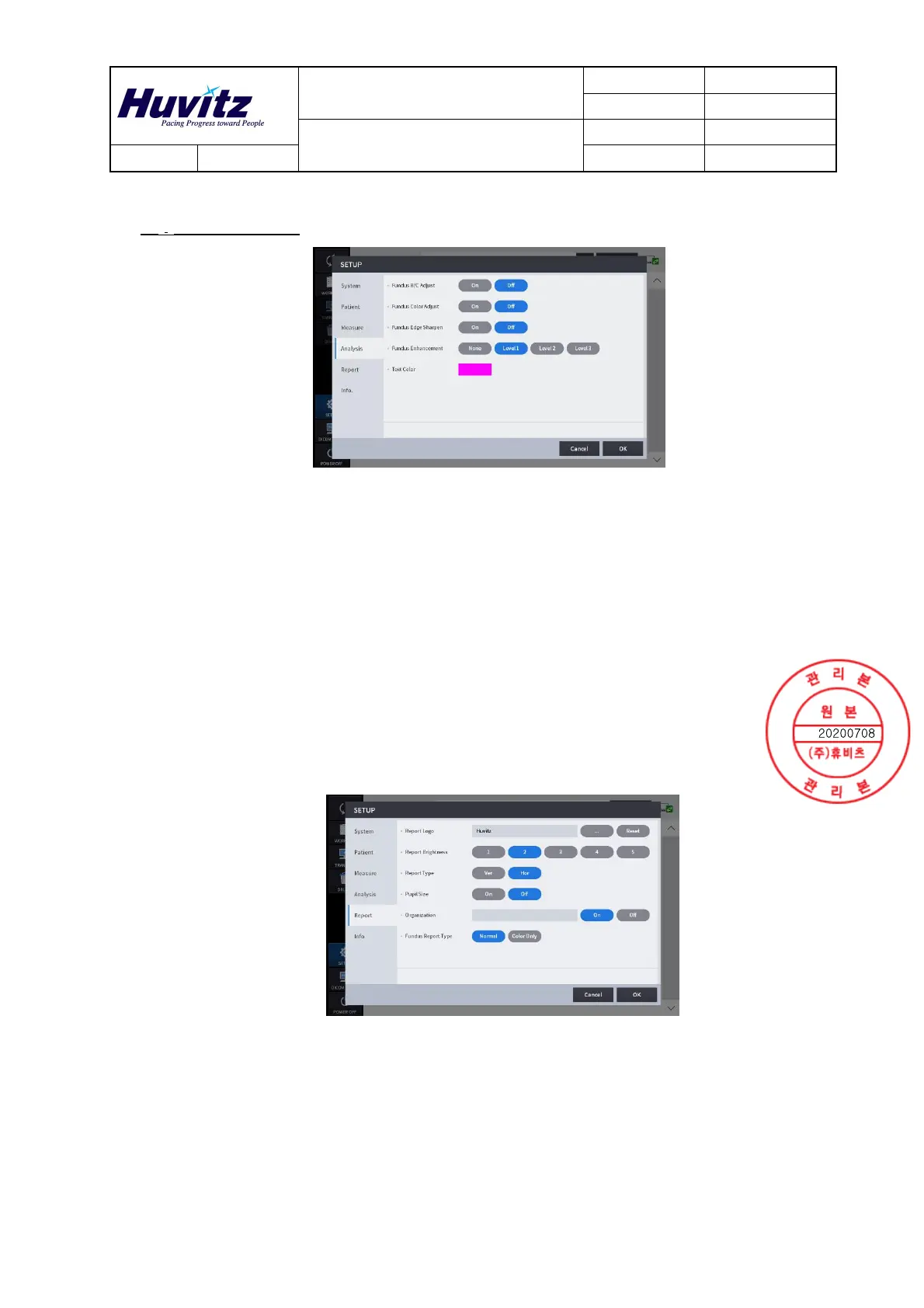
Analysis Settings
Fundus B/C Adjust
Apply the standard values of brightness and
contrast to the measured fundus image
automatically.
Fundus Color Adjust
Apply the standard values of UB and VR to the
measured fundus image automatically.
Fundus Edge Sharpen
Apply edge sharpening function to the measured
fundus image automatically.
Fundus Enhancement Set the enhancement level of Fundus image
Set the measurement value text(ruler value) color.
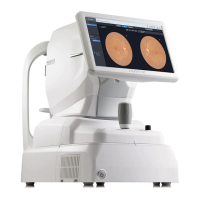
-. Report Settings
Report Logo
Set the report logo image.
Report Brightness Set the report print brightness.
Report Type Set the orientation of report print.
Pupil Size Set the pupil size information.
Organization Assign the organization.
Fundus Report Type Decide the type of fundus image.


 To Next Page