53
Note: The channels may be pre-configured by the factory prior to shipment, but the
installer is responsible for confirming the settings are correctly configured to
suit the installation site.
Ensure the channel settings are stored when finished.
External Pressure Transducers – Entering Calibration coefficients
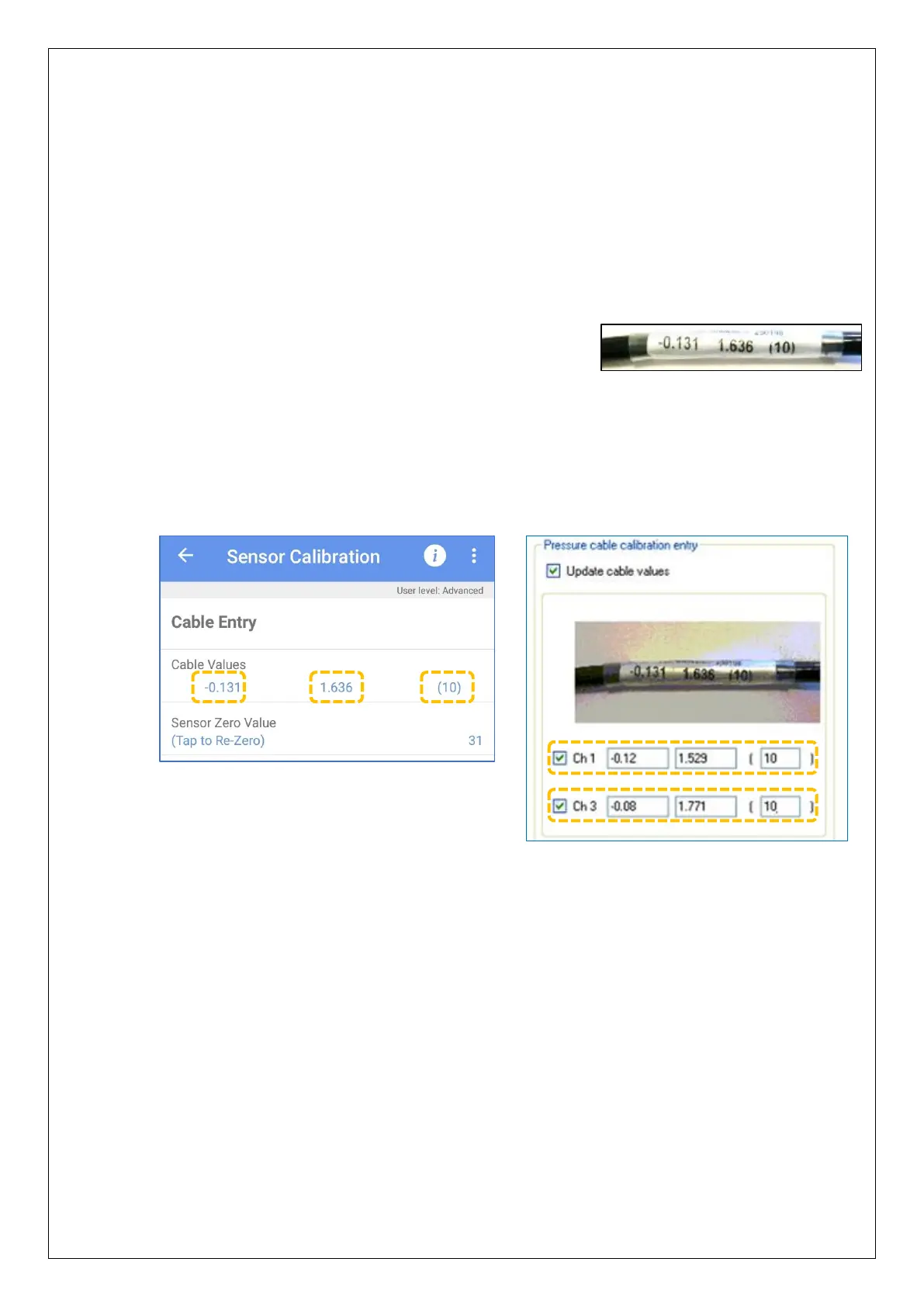
External pressure transducers from HWM have calibration
coefficients (usually located on the cable).
Note: The final number represents the maximum pressure range of the transducer,
in bar.
The coefficients must be entered into IDT in order for Pegasus2 to use the pressure
transducers correctly and obtain accurate measurements.
Enter the values, as per the examples shown below (including any negative symbols).
(Refer to the IDT user-guide for the required steps to do this).
At this stage, it is important that the channel settings stored in the PC memory should
be written into the Pegasus2, and the device restarted. (Use the ‘Setup Device’ button in
IDT (PC version); the IDT app will automatically save and restart at the appropriate time).
(The unit will now operate with the channels as set earlier).
4.5 RE-ZERO PRESSURE TRANSDUCERS
The transducers (internal or external) must now both be re-zeroed whilst in
atmospheric pressure. (Refer to the IDT user-guide for the required steps to do this).
Note: During this operation, the sensors must be electrically connected, but must not
be connected to water pressure.


 To Next Page
 Loading...
