6
1 2
3
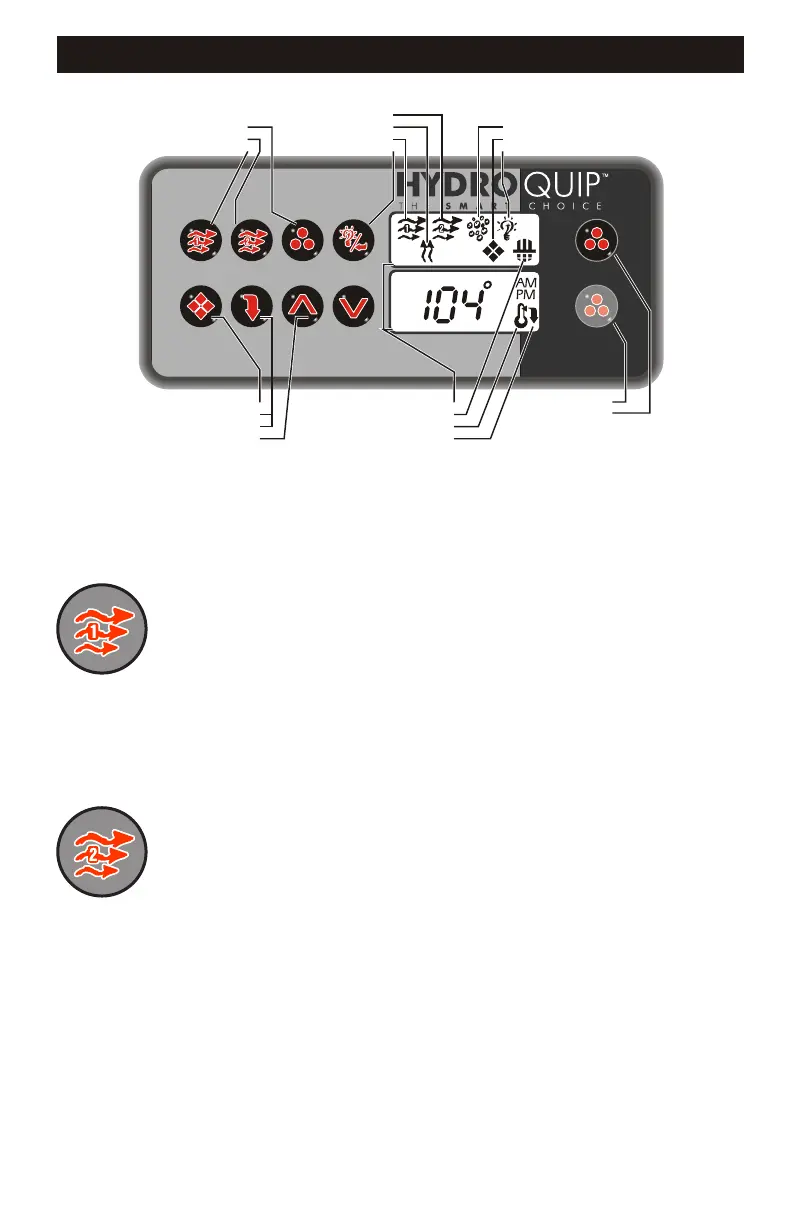
YOUR SPASIDE CONTROL
PUMP 2 ICON
HEATER ON ICON
PUMP 1 ICON
LIGHT/ENTER KEY
PROGRAM KEY
ECONOMY/NORMAL
MODE KEY
UP/DOWN ARROWS
LCD WINDOWS
FILTERING ICON
TEMPERATURE SET ICON
ECONOMY MODE ICON
BLOWER/LIST KEY
PUMP 2 KEY
PUMP 1 KEY
AIR BLOWER ICON
PROGRAM MODE ICON
LIGHT ON ICON
Default System Operation: When power is applied, or there is a temporary loss of
power, the system will initiate its default programming. The filter cycle will begin 24-
hours after the system has been powered up. The filtration cycle will be active for 1-
hour and will repeat every 24-hours. The temperature will be maintained at 95BF.
Pump 1 Key:
Pump 2 Key:
Press this key once to turn Pump 1 on. A second press will
turn it off. For dual speed pump operation; Press this key once to turn Pump 1 onto
Low speed, press this key a second time to turn Pump 1 onto High speed, a third
Press will turn the pump off. A built-in timer will shut the pump off after 20 minutes of
operation unless done so manually. The Pump 1 Icon will appear on the LCD while
the pump is running in High speed and flash while it is in Low speed. If the filter icon
appears, a filtration cycle has begun and you will not be able to turn the pump off.
Press this key once to turn Pump 2 on. A second press will
turn it off. For dual speed pump operation; Press this key once to turn Pump 2 onto
Low speed, press this key a second time to turn Pump 2 onto High speed, a third
Press will turn the pump off. A built-in timer will shut the pump off after 20 minutes of
operation unless done so manually. The Pump 2 Icon will appear while the pump is
running in High speed and flash while it is in Low speed.
AUXILIARY 2 KEY
AUXILIARY 3 KEY


 To Next Page