1.
3.
2.
DEEP CLEANING OF
CARPETED FLOORS
with Electro Brush
Deep Cleaning of Carpeted Floors 3130 Electro Nozzle Set
VENTUS
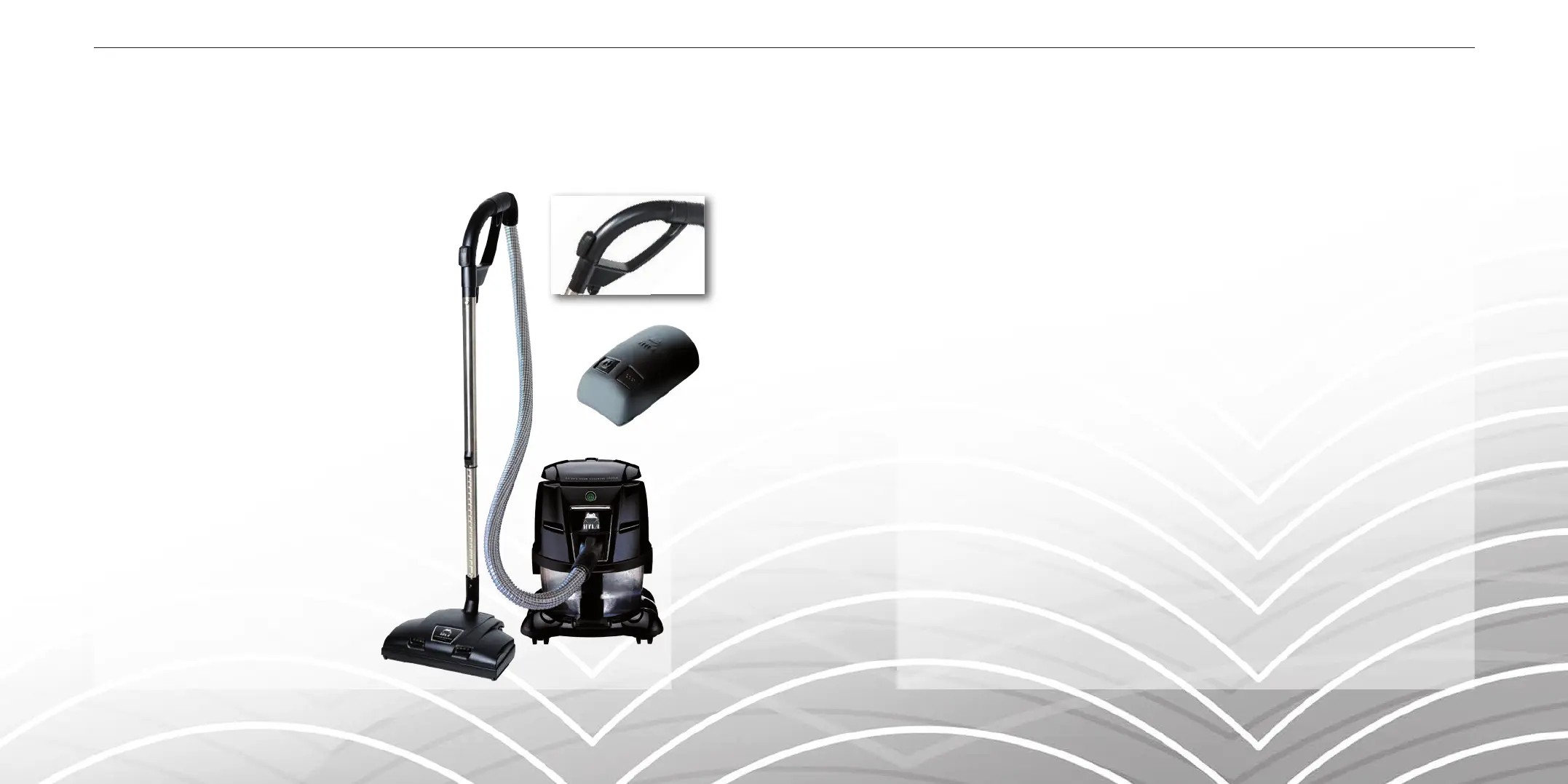
ELECTRO BRUSH SET
1. VENTUS Electro Brush
2. Flexible Electro Hose
3. Telescopic Wand with Cord Canal
4. Remote Control Unit
Set-up for the Electro Brush Set
Always turn off the main switch of the HYLA System
before connecting or disconnecting the Electro Brush!
Before assembly, rst ensure the Electro Brush is set rmly
on a at surface and the swivel neck is locked in an
upright position. Facing the Electro Brush, align the fully
extended Telescopic Wand, and gently insert
spring-button into position. Insert the
handle of the Flexible Electro Hose into
the Telescopic Wand. Align the handle with cord canal. Hold the electro cord plug while sliding
the electro cord upward into the cord canal, and gently insert spring-button into position. Open
outlet cover and insert plug. Clip excess cord to the lower portion of the Telescopic Wand. Take
loose end of Flexible Electro Hose and connect into the HYLA Motor Unit Assembly.
Using the Electro Brush
Turn on the main switch on the HYLA. To activate Electro Brush, release it from the parked up-
right locked position by pressing the button located to the left of the swivel neck. You will notice
a green light indicating operation. Now you are ready to clean! In order to turn off the Electro
Brush, put back in parked upright locked position. Then turn off the main switch on the HYLA. You
can also use the Remote Control Unit to switch on/off the Electro Brush and the HYLA.
Troubleshooting the Electro Brush
The Electro Brush is equipped with an electronic circuit board for safety purposes. The red light
located on the right of the Electro Brush is an indication the motor has been shut off to avoid
overload. Place in parked upright locked position, turn off HYLA and disconnect power.
After clearing any objects, you may reconnect the power and restart by turning on the main
switch on the HYLA.
Maintenance of the Electro Brush
Disconnect power from the Electro Brush.
Textile bers can be removed from the brush by cutting them and vacuuming.
4.


 To Next Page