4.
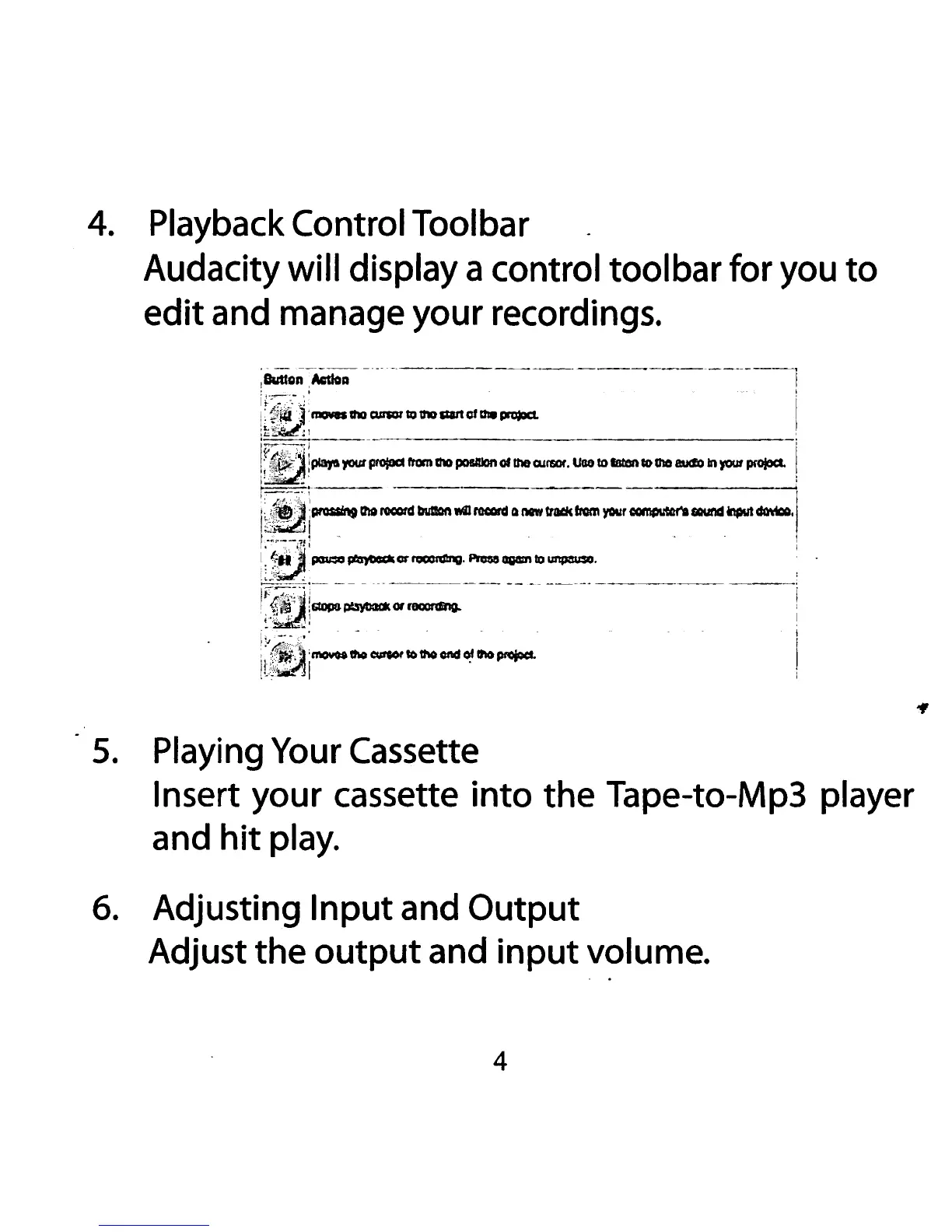
Playback Control Tool bar
Audacity
will display a control tool bar for you
to
edit and manage your recordings.
'~~~:rJ!OIIadlllcur101'101ho&llttofat.~
;r:.:
··------
------:
!~;play!t.yoo.rprojOCI
rtomthOposmDnoflh&OJrsct.
UG81DIIItonCOih08I.ICioh)'OUfprofoa.
!
~~~-.,.~...:-~-·---yo.·~---·1
0:l:~~~-~·-~-~~-~~-------
'
~~~:QOpS~Of~
:;_\~~
..
~I:
mo.....~
0#001'
~thO
end~
lfl&pr$d.
•·c't...~
5.
Playing Your Cassette
Insert your cassette
into
the Tape-to-Mp3 player
and
hit
play.
6.
Adjusting Input and Output
Adjust the
output
and
input
volume.
4


 To Next Page