Need help?
Do you have a question about the Hyper Tough AQ85000G and is the answer not in the manual?
Explains safety symbols like DANGER, WARNING, CAUTION, and NOTICE used in the manual.
Read all instructions and warnings to prevent electric shock, fire, or serious injury.
Keep work area clear, avoid grounding services, and do not expose to wet conditions.
Stay alert, avoid drugs/alcohol, use protective equipment.
Ensure the power switch is off before plugging in or connecting the battery.
Maintain footing, dress properly, avoid dust hazards, and do not use damaged tools.
Secure workpiece, use correct tools, don't force, maintain tools, use recommended accessories.
Maintenance and repairs must be done by qualified personnel using identical parts.
Wear ear protection, safety glasses, dust mask; use auxiliary handles; keep clear of vents.
Watch what you do, don't operate when tired, and avoid prolonged dust contact.
Device compliance with FCC rules regarding interference and operation.
Explains common symbols found on the tool label, such as voltage, current, speed.
Use as intended, use recommended accessories, check accessory speed and size.
Wear face shield, goggles, dust mask, gloves for protection against debris.
Keep bystanders away, hold tool by insulated surfaces, stop accessory before laying down.
Clean air vents, avoid flammable materials, use appropriate coolant.
Use recommended wheels, correct flanges, and dress appropriately.
Be aware of thrown bristles and reduce vibration injury risk.
Consult doctor, avoid smoking, wear gloves, take breaks to reduce vibration effects.
Read instructions, use Hyper Tough charger, protect from elements, never open battery.
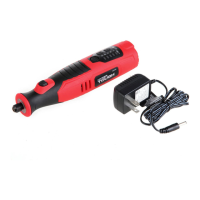
Use 120V AC charger; charge between 41-95°F; avoid over-discharge.
Battery charging light turns Red ON during charge and Green ON when complete.
Hold tool away from face, ensure accessories are securely clamped.
Insert accessory into collet, tighten collet nut securely; use correct collet size.
Press button to turn on/off; use speed control buttons to adjust RPM.
Approximate RPMs for different tasks; use slow speeds for plastics, delicate materials.
Use wire brushes at max 15,000 RPM; higher speeds for carving, cutting, shaping.
Use shaft lock, loosen collet nut, insert accessory, tighten collet nut.
Lists collets, screwdriver/wrench, and wire brushes included in the kit.
Details felt wheels, grinding stones, cut-off wheels, sanding accessories, diamond points, whetstone.
Used for polishing and sharpening/grinding various tools and metal parts.
Discs for cutting/slicing; sanding discs for various finishing jobs.
Use mandrel with set screw for wheels/discs at higher speeds.
Replace bands by loosening screw, sliding off old band, and sliding on new band.
Ensure accessory is clamped, hold tool firmly, adjust speed, and keep clean.
Keep tool clean, protect from moisture, charge battery periodically.
Maintenance, repairs, or adjustments must be done by authorized centers.
Details on recycling lithium-ion batteries via local centers or 1-877-2-RECYCLE.
Product contains lead, a chemical known to cause cancer and reproductive harm.
Product warranted for 2 years against defects in materials and workmanship.
Provides contact details for American Customer Service for questions and support.
Lists voltage, speed, collet capacity, charge time, power supply, and battery type.
Lists the quantity and type of accessories included with the rotary tool.
 Power
Power| voltage rating | 8V MAX |
|---|---|
| power supply rating | 120V AC in, 500mA DC Out |
 Battery
| battery type | Lithium-ion |
|---|---|
| charge time | 3-4 hours |
 Performance
| no load speed | 5, 000 – 25, 000 RPM |
|---|---|
| collet capacity | 1/8”, 3/32” |

 To Next Page