HYPERCOM Client Services – February 2007
PAGE 3 of 3
D I A L D O W N L O A D
ACTION REQUIRED TERMINAL DISPLAY
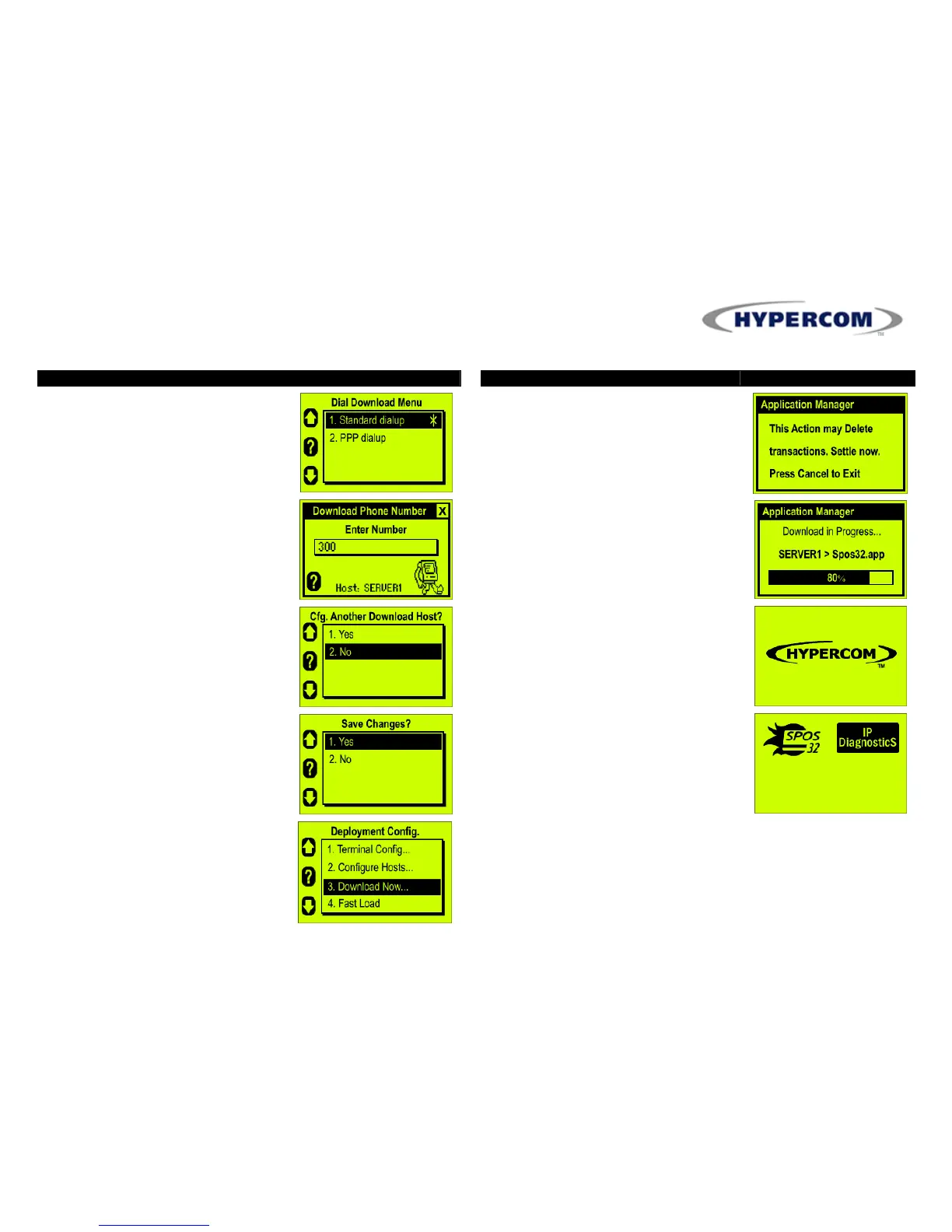
19. Dial Download Menu screen
displays if “1.Dial” is previously
selected in Download Connection
Type screen
20. Select “1.Standard Dialup”
21. Key in download host phone
number and press
ENTER
22. Select “1.No” when prompted to
Configure Another Host
23. Select “1.Yes” to save recently
made changes
ACTION REQUIRED TERMINAL DISPLAY
24. Select “3.Download Now”
25. Press
ENTER
to bypass warning
message and begin download
26. Terminal connects to host and
initiates application download and
profile configuration
27. Terminal boots up upon completion
The applications loaded in the terminal
will display on the desktop screen
Press hot key next to icon to launch
applications
Press
HOME
key to return to desktop
screen


 To Previous Page
 Loading...

