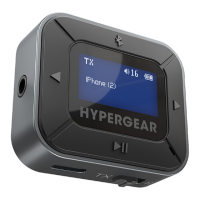
INSTRUCTIONS – TX Mode (cont.)
Pairing a Second Audio Device
1. Activate the Bluetooth
®
pairing mode
on your second audio device. See your
device’s user manual for instructions.
2. On your IntelliCast Flight, press the
button. It will begin searching for available
devices.
3. If multiple devices appear on screen, use
the and buttons to navigate the list.
Press the button to select and pair
your device.
Your IntelliCast Flight can pair with up to 2
audio devices at once. If you wish to pair a
different audio device:
Hold the button for 5 seconds to clear the
connection memory. You may then follow
the pairing instructions to pair both of your
audio devices as usual.


 To Next Page
 Loading...