24
Using your Charger Charging Modes
Scheduled Charging
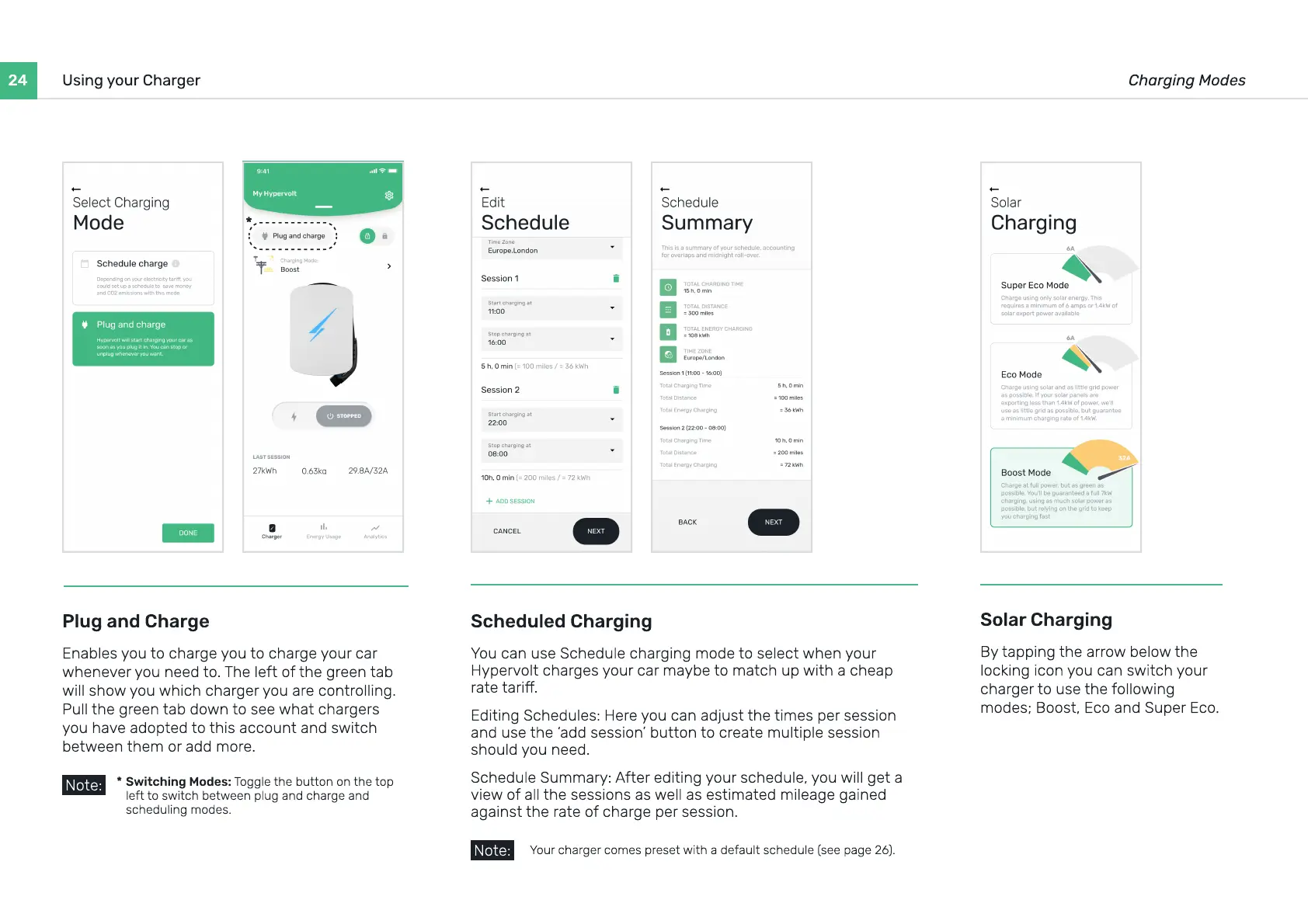
You can use Schedule charging mode to select when your
Hypervolt charges your car maybe to match up with a cheap
rate tari
Editing Schedules: Here you can adjust the times per session
and use the ‘add session’ button to create multiple session
should you need
Schedule Summary: After editing your schedule, you will get a
view of all the sessions as well as estimated mileage gained
against the rate of charge per session.
Your charger comes preset with a default schedule (see page 26).
Note:
Plug and Charge
Enables you to charge you to charge your car
whenever you need to. The left of the green tab
will show you which charger you are controlling.
Pull the green tab down to see what chargers
you have adopted to this account and switch
between them or add more.
Solar Charging
By tapping the arrow below the
locking icon you can switch your
charger to use the following
modes; Boost, Eco and Super Eco.
Switching Modes: Toggle the button on the top
left to switch between plug and charge and
scheduling modes.
*
Note:
*


 To Next Page