EasyManua.ls Logo

HyperX Alloy Origins - Page 13

HyperX Alloy Origins
19 pages
Print Icon
To Next Page IconTo Next Page
To Previous Page IconTo Previous Page
Loading...
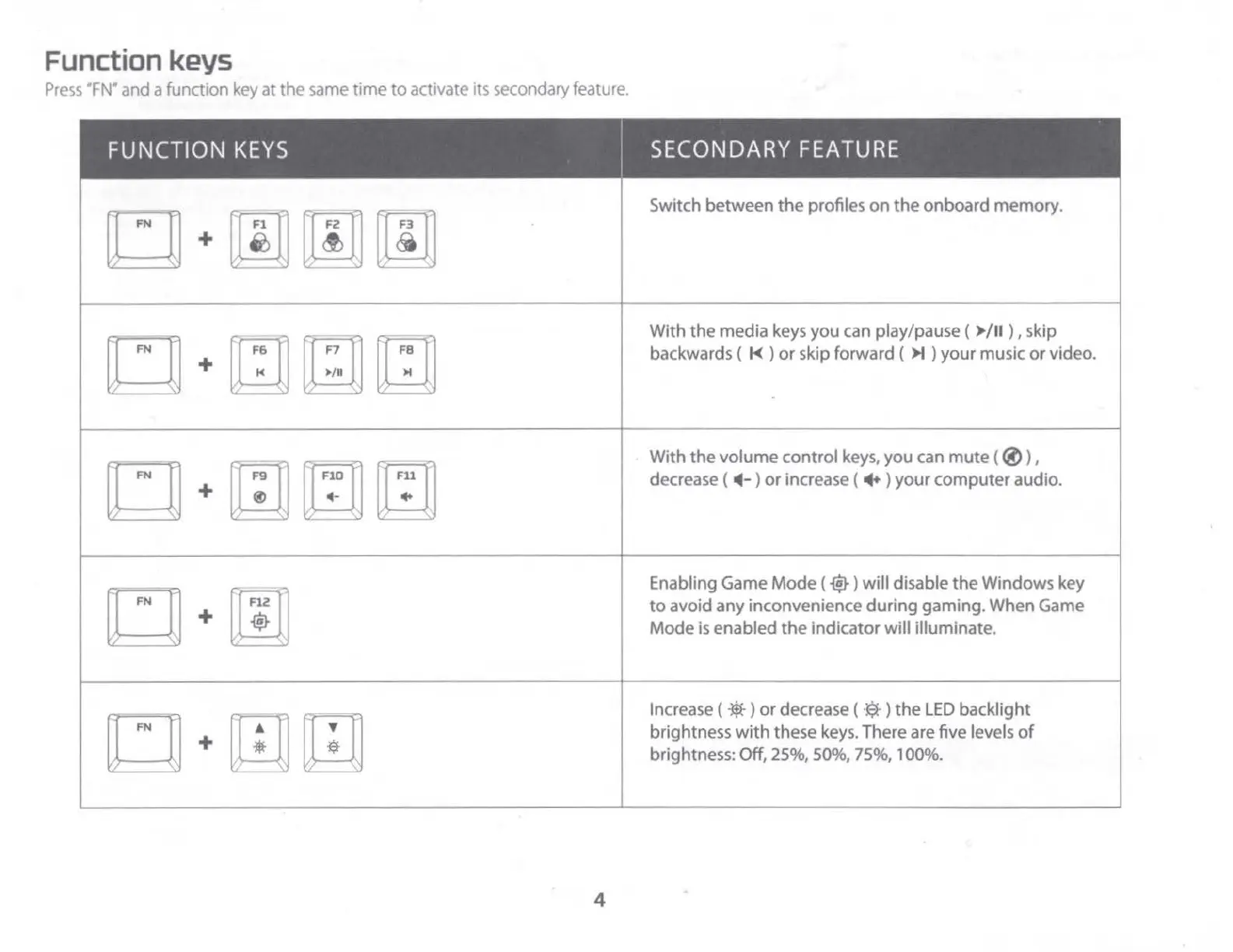
Function keys
Press
•Fw
and a function key at the same
time
to
activate its secondary feature.
I
I
I
FUNCTION
KEYS
I
SECONDARY
FEATURE
mmm
Switch between
the
profiles
on
the
onboard memory.
+
□~□
With
the
media keys
you
can play/pause (
/
II
) , skip
+
/
II
I
backwards (
t<
)
or
skip forward (
I
)
your
music
or
video.
m~~
With
the
volume
control
keys,
you
can
mute
(
®)
,
+
-
+
decrease (
-4
-)
or
increase ( + )
your
computer
audio.
m
Enabling Game
Mode
(
~)
will
disable
the
Windows key
+
to
avoid
any
inconvenience
during
gaming. When Game
a
Mode
is
enabled
the
indicator
will
illuminate.
mm
Increase (
*)
or
decrease ( ·$·)
the
LED
backlight
+
brightness
with
these keys. There are five levels
of
brightness: Off, 25%, 50%, 75%, 100%.
4

Other manuals for HyperX Alloy Origins

Related product manuals