This document describes the Hysnox Shark 02 Helmet Intercom Headset, a Bluetooth-enabled communication device designed for motorcycle riders. It integrates multiple functions to enhance the riding experience, offering clear, safe, and comfortable communication and entertainment on the go.
Function Description:
The Hysnox Shark 02 is a helmet-mounted Bluetooth intercom system that combines several functionalities:
- Intercom: Allows communication between riders.
- Telephone: Supports making and receiving phone calls.
- Music Playback: Enables listening to music from a connected device.
- FM Radio: Provides access to FM radio stations.
- GPS Navigation Voice Prompts: Relays voice directions from a GPS device.
The device is designed with a focus on stable system operation, dual intelligent noise reduction for clear audio, and low power consumption for extended use. It features a strong pickup effect for the microphone and supports multiple device connections, ensuring strong compatibility with various Bluetooth-enabled devices. Its compact, energy-saving, and environmentally friendly design, coupled with humanized features, makes it a practical accessory for riders.
Usage Features:
The Shark 02 offers a range of user-friendly features and controls:
Power On/Off:
- Power On: Press and hold the [on/off] key for 2 seconds. A power-on tone will be heard, and red and blue lights will flash alternately. If connected to Bluetooth, blue lights will flash slowly.
- Power Off: Press and hold the [on/off] key for 4 seconds. A shutdown tone will be heard, and the red light will be on for 1 second, indicating shutdown completion.
Restore Factory Settings:
- Press and hold the [on/off] + [multi-function] keys for 2 seconds. Both red and blue lights will be on simultaneously, and a shutdown beep will be heard, indicating entry into factory reset mode.
Phone Controls:
- Answer Call: Short press the [multi-function] key when there is an incoming call.
- Automatic Answer: If an incoming call rings for 8 seconds without any operation, the intercom will automatically answer.
- Reject Call: Press and hold the [multi-function] key for 2 seconds when an incoming call rings.
- End Call: During a call, short press the [multi-function] key.
- Redial Last Number: In standby mode, quickly double-click the [on/off] key to redial the last dialed number.
- Cancel Auto-Answer: Long press the [multi-function] key + [FM] key to toggle the auto-answer function on or off. Flashing blue light three times indicates auto-answer is open; flashing red light three times indicates auto-answer is closed.
Music Control:
- Play/Pause: In Bluetooth connection mode, press the [multi-function] key once.
- Forward: Press the volume up button once for the next song.
- Reverse: Press the volume down button once for the previous music.
Volume Adjustment:
- Increase Volume: Long press the volume up key without releasing.
- Decrease Volume: Long press the volume reduction key without releasing.
- An alarm tone will prompt when the highest volume is reached.
FM Radio Control:
- Turn On Radio: In standby mode, long press the [FM] key for 2 seconds.
- Tune Station: After turning on the FM radio, press the volume up or decrease key to select a station. (Note: Long pressing volume keys enters volume adjustment mode).
- Turn Off Radio: Press and hold the [FM] key for 2 seconds. The headset will switch back to its previous state.
- Radio Behavior with Calls: In radio mode, an incoming call will automatically disconnect the radio and connect to the mobile phone. The radio status will automatically restore when the call ends.
Language Tone Switching:
- The device supports multi-language prompt tones. In the power-on state, press and hold the [on/off] + [volume up/down] keys to switch the language. Each operation cycles to the next language.
Pairing:
- Mobile Phone Pairing (Method 1):
- In the off state, long press [on/off] for 2 seconds until red and blue lights flash alternately, entering Bluetooth waiting connection state. If other devices were connected, it will enter blue light slow flash; reset and turn on the phone again if needed.
- Open phone Bluetooth settings, search for "Shark," and connect. A "Bluetooth is connected" beep confirms successful pairing.
- Note: If a pairing record exists, the device will automatically connect to the phone when Bluetooth is open.
- Mobile Phone Pairing (Method 2):
- After power on, in standby state (blue light blinking), press and hold [on/off] + [FM] for 2 seconds until red and blue lights alternately blink, entering Bluetooth waiting pairing state. Search for "Shark" on the phone and connect. This method is practical for 120 seconds without Bluetooth pairing operation.
- Intercom Pairing (Two Bluetooth Intercoms):
- Turn on both intercoms (A, B) simultaneously, ensuring both enter Bluetooth waiting pairing state (red and blue lights flashing alternately).
- Short press the A intercom [on/off] key. A will flash blue rapidly, entering intercom search mode. Successful connection will result in both A and B flashing blue slowly and a beep.
- Note: If an intercom is already connected to other Bluetooth devices (slow flashing blue light), long press [on/off] + [FM key] for 2 seconds until red and blue lights flash alternately to enter pairing state for a new operation.
- Third-Party Bluetooth Headset Pairing:
- This function supports pairing between two different brand models within 1 meter.
- Power On: Long press Shark 02 intercom [on/off] for 2 seconds (power-on tone, red and blue lights flashing alternately), entering Bluetooth search mode.
- Pairing: The other headset also enters pairing mode (red and blue lights flashing alternately). Short press Shark 02 [on/off] (blue lights flashing, tone pairing search) and wait for connection.
Multi-mode Intelligent Mixed Use:
- Intercom to Music/FM: When in two-person intercom, long press [multi-function] for 2 seconds to disconnect intercom. Then, short press [multi-function] for phone music playback (if connected to phone Bluetooth) or long press [FM key] for 2 seconds to open FM radio.
- Music/FM to Intercom: When in music mode/FM radio mode, long press [multi-function] for 2 seconds to resume intercom.
- Call Priority: If a call comes in during intercom (and connected to phone), the intercom will automatically disconnect, switch to answer the call, and automatically resume intercom after the call ends (approx. 2 seconds switch time).
Work Priority Order:
- Phone
- Intercom
- Music
- FM
Installation Procedure:
Two options are provided for installation:
Quick Removal:
- Unplug headset cable. Press the middle of the back clip fixed snap (towards helmet side) to disengage snap hook and intercom. Push up the intercom to slide it out of the back clip.
Maintenance Features:
- Battery and Charging:
- Use the original charging cable. Connect the small TYPE-C connector to the intercom's USB charging port and the large USB to a power source (computer USB, mobile power supply DC 5V, or USB power adapter DC 5V).
- During charging, the red LED is always on. When fully charged, the red light slowly goes out. Full charge from low battery takes about 2 hours.
- Cautions:
- If not connected to any device, the intercom automatically shuts down after 30 minutes.
- For long-term storage (month or more), charge the headset once every two months to protect the lithium battery.
- Store the product between -20°C and 50°C. Avoid extreme temperatures to prevent damage.
- Do not expose to open flame.
- Do not open the Bluetooth intercom to avoid short-circuiting the motherboard or battery damage.
- USB Emergency Shutdown: Directly inserting the USB charging cable during operation will cause an emergency shutdown, and recorded data will not be saved. Avoid this in non-emergency situations.
Important Technical Specifications:
- Working Frequency: 2402-2480MHz
- Bluetooth Protocol Support: A2DP and AVRCP
- Operating Range: Up to 10 meters for phones
- Battery Type: 900mAh rechargeable lithium polymer
- Standby Time: Up to 500 hours
- Talk Time: Up to 28 hours (cell phone calls/intercom)
- Music Listening Time: Up to 33 hours
- Charging Time: About 2 hours
- Power Adapter: DC 5V 1A (optional)
- Charging Interface: TYPE-C interface
- Operating Temperature: 41°F-104°F (5°C-40°C)
- Storage Temperature: -4°F-122°F (-20°C-50°C)
- Waterproof Level: IP65
- Audio Processing: Intelligent DSP audio processing, CVC 12th generation noise reduction, 16K voice bandwidth transmission rate
- Speaker: 40mm tuning speaker diaphragm for shocking music
- Voice Communication Speed: Supports up to 120 km/h
- Simultaneous Device Connection: 2 other devices (phone, MP3, GPS)
- Intercom Pairing: Supports pairing with third-party Bluetooth intercoms.
Applicable People:
- Motorcycle and bicycle riders
- Skiers
- Take-away riders
- Electric vehicle users
- Construction and mining workers
- Firefighters and traffic police, etc.

 Need help?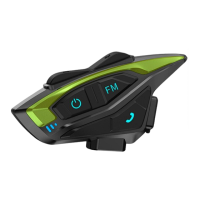

 To Next Page
 General