This document describes a wireless earpiece and a wireless audio adapter, designed for use with Hytera portable radios.
Function Description
The wireless earpiece is an exquisite, easy-wearing, and low-powered device that allows for hands-free communication. It connects to a Hytera portable radio via a wireless audio adapter, enabling convenient and safe communication within a distance of 10 meters from the radio. The earpiece supports Push-to-Talk (PTT) functionality and multi-functional key operations. The wireless audio adapter facilitates the connection between the earpiece and the radio, supporting PTT functionality and featuring a waterproof ring and charging piece.
Important Technical Specifications
Talk Time: >4 hours
Dust/Water Protection Class: IP54
Operation Temperature:
- Wireless Earpiece: -20°C to +60°C
- Wireless Audio Adapter: -25°C to +65°C
Storage Temperature:
- Wireless Earpiece: -40°C to +75°C
- Wireless Audio Adapter: -40°C to +75°C
The device is designed to communicate regardless of whether the radio supports BT feature or not.
Usage Features
Items in the Package:
The package includes:
- Wireless Earpiece: 1
- Earhook: 1
- Rubber Ear Cushion: 3
- Wireless Audio Adapter: 1
- Owner's Manual: 1
Wireless Earpiece Components:
- Earhook: Secures the earpiece to the ear.
- Rubber Ear Cushion: Provides comfort and comes in three different sizes.
- LED Indicator: Shows device status.
- PTT (Push-to-talk)/Multi-functional Key: For communication and other functions.
- Charging Piece: For charging the earpiece.
- MIC: Microphone for voice input.
- Groove: A physical feature of the earpiece.
Wireless Audio Adapter Components:
- LED Indicator: Shows adapter status.
- PTT (Push-to-talk) Key: For communication.
- Waterproof Ring: Ensures water resistance.
- Charging Piece: For charging the adapter.
- Fixing Screw of the Adapter: Secures the adapter.
- POGO Pin (10 pce.): For connection and charging.
Charging the Wireless Earpiece:
To charge the wireless earpiece, connect it to the adapter on the radio. It is recommended to use the high-capacity battery specified by the Company to ensure optimal operation.
- The wireless earpiece can only be charged when the radio is powered on. Ensure both the radio (with battery attached) and the wireless earpiece are powered on during charging.
- The LED indicator glows red during charging and glows blue when fully charged.
- Charging the wireless earpiece will not affect radio operation.
- If the earpiece is idle for a long time, charge it at least once within three months.
- If the LED indicator does not glow red while the earpiece is being charged, charge the earpiece for 10 to 20 minutes to recover to normal status.
Pairing with and Connecting to the Adapter:
- Initial Connection:
- Disconnect the wireless earpiece from other devices.
- Connect the wireless earpiece with the radio.
- Turn on the radio, and the wireless earpiece will be powered up.
- The wireless earpiece will be paired with and connected to the adapter automatically.
- Pairing mode: The LED indicator of the wireless earpiece/adapter flashes red and blue alternatively.
- Connection status: The LED indicator flashes blue rapidly after the connection is completed.
- Subsequent Connections: The wireless earpiece can connect to the adapter without pairing after the initial connection.
Wearing the Wireless Earpiece:
There are three rubber ear cushions with different sizes provided. Choose the most comfortable one. Adjust the rubber ear cushion to position it into your ear canal, and adjust the earhook to secure the earpiece.
Transmitting:
After detaching the wireless earpiece from the adapter, you can hold down the PTT key on the wireless earpiece or the PTT key on the adapter to make a call.
Powering On/Off:
- Powering On:
- Automatic power-on: When attached to the radio via the adapter, the wireless earpiece will be powered on automatically when the radio is turned on.
- Manual power-on: When the wireless earpiece is not attached to the adapter, you can power on the wireless earpiece by long pressing the PTT key on it. The adapter can be powered on by turning on the radio only.
- Powering Off:
- To power off the adapter, turn off the radio.
- To power off the wireless earpiece, long press the PTT key after the BT connection is disconnected (the LED indicator flashes blue slowly). The LED indicator goes out when the wireless earpiece is powered off.
LED Indication:
The LED indicator flashes after the wireless earpiece is powered on.
- Pairing: LED indicator flashes red and blue alternatively.
- Transmitting: LED indicator glows red.
- Low battery power (wireless earpiece only): LED indicator flashes red.
- Connected with no voice: LED indicator flashes blue twice rapidly.
- Connected with voice: LED indicator flashes blue once rapidly.
- Paired but not connected: LED indicator flashes blue slowly.
Maintenance Features
Troubleshooting:
- LED indicator does not glow red while the wireless earpiece is being charged: The battery power of the wireless earpiece may run out completely. Solution: Charge the wireless earpiece for 10 to 20 minutes.
- Wireless earpiece cannot pair with the adapter: The wireless earpiece or the adapter may pair with other BT devices. Solution: Move away from other BT devices and restart the radio to pair the wireless earpiece with the adapter.
FCC Statement:
The device complies with part 15 of FCC Rules. Operation is subject to two conditions:
- This device may not cause harmful interference.
- This device must accept any interference received, including interference that may cause undesired operation.
This equipment has been tested and found to comply with the limits for a Class B digital device, pursuant to part 15 of the FCC Rules. These limits are designed to provide reasonable protection against harmful interference in a residential installation.
To reduce potential radio interference, the antenna type and its gain should be chosen so that the equivalent isotropically radiated power (e.i.r.p.) is not more than that necessary for successful communication.
IC Statement:
This device complies with Industry Canada licence-exempt RSS standard(s). Operation is subject to two conditions:
- This device may not cause interference.
- This device must accept any interference, including interference that may cause undesired operation of the Device.
The device has been tested and compliance with SAR limits, users can obtain Canadian information on RF exposure and compliance.
Under Industry Canada regulations, this radio transmitter may only operate using an antenna of a type and maximum (or lesser) gain approved for the transmitter by Industry Canada. To reduce potential radio interference to other users, the antenna type and its gain should be so chosen that the equivalent isotropically radiated power (e.i.r.p.) is not more than that necessary for successful communication.

 Need help?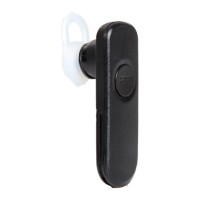

 To Next Page
 General