Pairing with and Connecting
to the Adapter
Before initial connection, the wireless
earpiece needs to be paired with the adapter
rst. Afterwards, the wireless earpiece can
connect to the adapter without pairing.
1. Disconnect the wireless earpiece from
other devices.
2. Connect the wireless earpiece with
the radio. (See Charging the Wireless
Earpiece for details)
3. Turn on the radio, and the wireless
earpiece will be powered up.
4. The wireless earpiece will be paired
with and connected to the adapter
automatically.
● Pairing mode: The LED indicator of the
wireless earpiece/adapter flashes red
and blue alternatively.
● Connection status: The LED indicator
ashes blue rapidly after the connection
is completed.
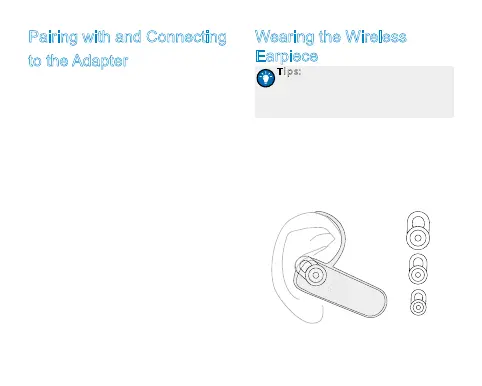
Wearing the Wireless
Earpiece
Tips: There are three rubber ear
cushions with different sizes provided
with the wireless earpiece for your
comfortable wearing.
Wear the wireless earpiece after the
connection is completed. Adjust the rubber
ear cushion to position it into your ear
canal, and adjust the earhook to secure the
earpiece.


 To Next Page