-8-
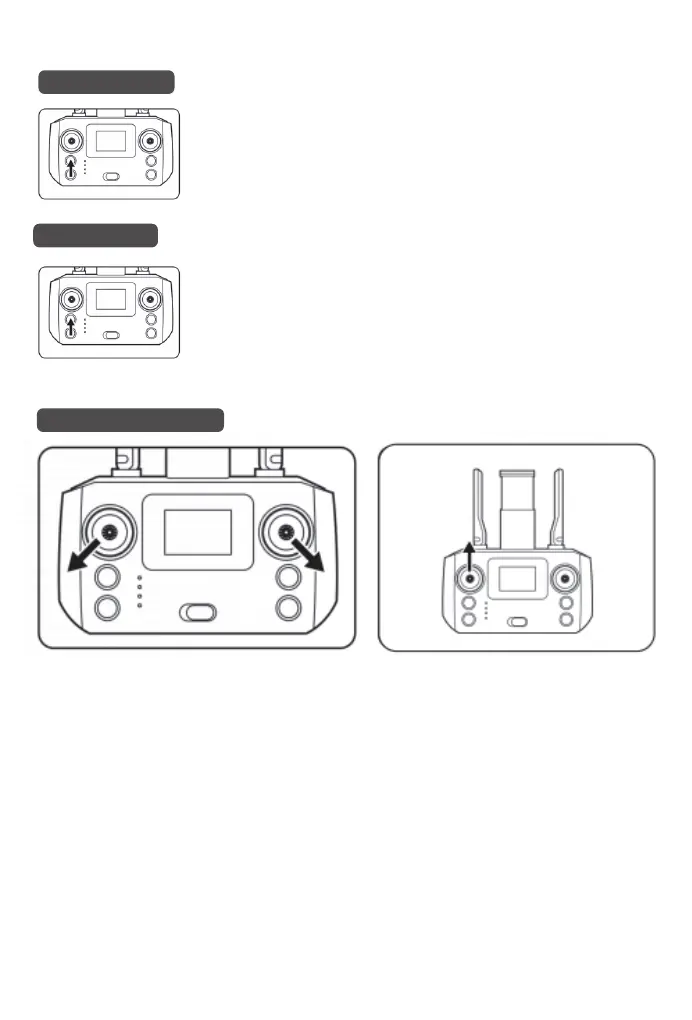
(1) Outdoor takeoff
(2) Indoor takeoff
(3) Unlocking for takeoff
After completing the above operations, the drone will automatically search
for GPS signal, and the rear light will be always on. When the number of
GPS satellites reaches 10 or more, it means the search signal is
completed.
(If the front and rear lights of the drone flash, it means that the current
location is subject to signal interference and needs to change the place. It
is recommended to play on the roof of the building, square, riverside,
seaside and other open space.)
After completing the above operations, long press the ""GPS switch""
button on the remote control to turn off the GPS function. The ""0FF"" will
be shown under the GPS on the display, which means it enters the indoor
mode.
(Note: When flying indoor, please make sure to switch to indoor mode.)
1. Push the right joystick to the lower right and the left joystick to the lower left at the same time. The
drone's blades will start to rotate and the drone will be unlocked successfully.
2. After unlocking, push up the left throttle joystick and the drone will take off. Push down and the
drone will land.
Step 4:


 To Next Page