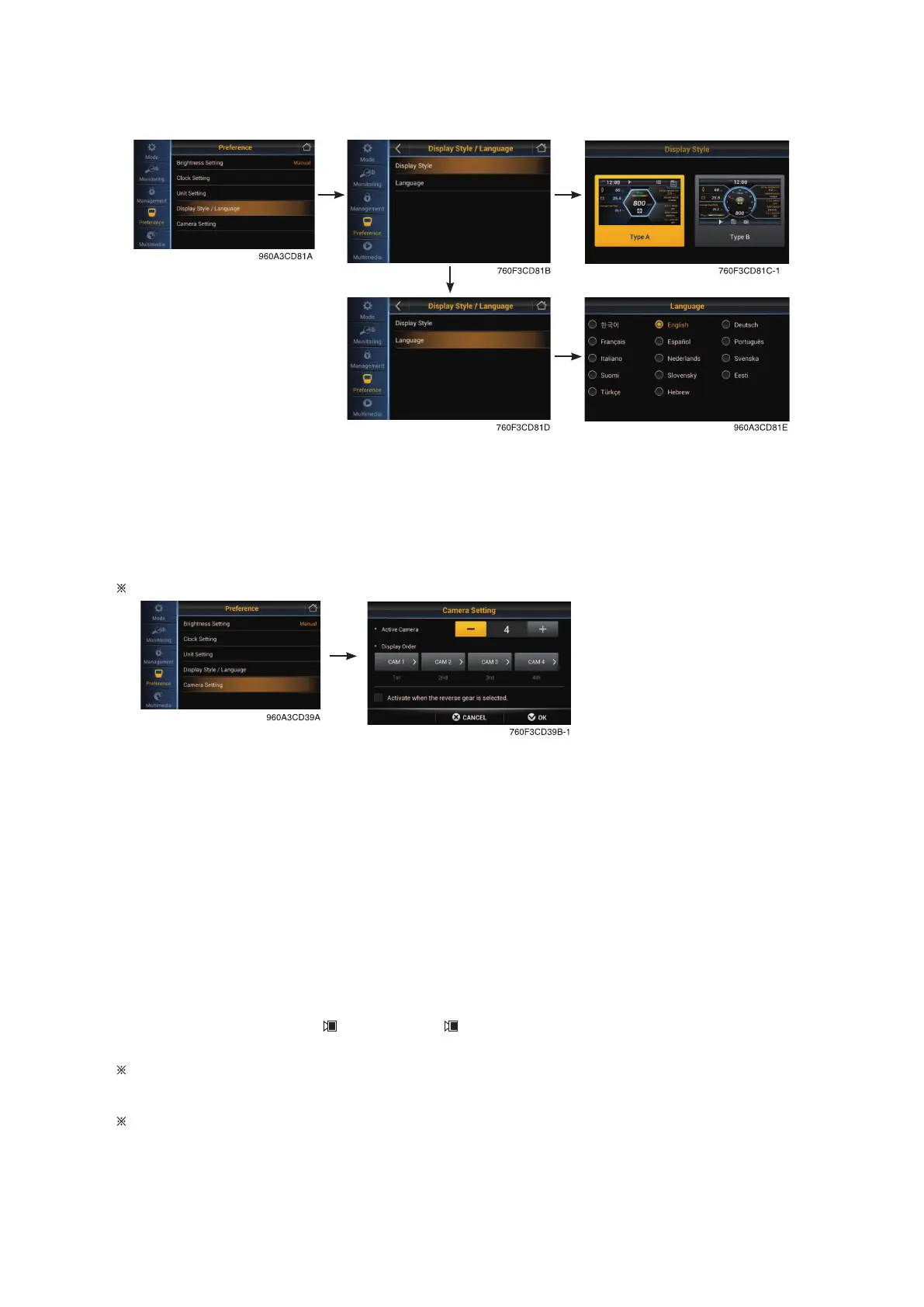
Display style/ Language
• Set the display type A or B.
• User can select preferable language and all display are changed the selected language.
• 14 multiple language available.
Camera setting
If the camera monitor is equipped, camera will showing on camera monitor only.
• Active camera
- Four cameras can be installed on the machine.
• Display order
- Set the channel sequence of each camera.
• Active when the reverse gear is selected
- If transmission engages the reverse gear (R1~R3), the camera mode is displayed automati-
cally in the main display.
• If the camera is not equipped, this menu is not useful.
• If the camera monitor is equipped, camera will showing on camera monitor only. This menu is not
useful. See the page 3-89.
• In the main display, if the is touched (or switch is pushed), the first ordered display camera
will be viewed.
If AAVM is equipped, this menu will be changed to AAVM setting.
AAVM (Advanced Around View Monitoring, option)
If the camera monitor is equipped, AAVM will showing on camera monitor only.
• The AAVM switchs of the cluster consist of Camera, ESC and Buzzer stop.
3-39


 To Next Page