
 Need help?
Do you have a question about the Hyundai IONIQ ELECTRIC 2021 and is the answer not in the manual?
Steps for programming HomeLink and using two-way communication openers.
Explanation of gauges, LCD display, and EV system indicators.
Detailed guide to dual climate control modes, defrosting, and auto heating.
Requirements and steps for using Android Auto with the vehicle.
Steps for setting cruise control speed, vehicle distance, and cancelling the function.
How to configure FCA safety functions like Active Assist or Warning Only.
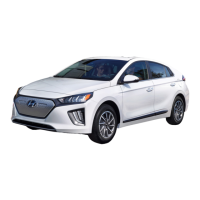
This document is a Quick Reference Guide for the Hyundai Ioniq Electric, providing an overview of its features, controls, and maintenance.
The guide details various aspects of the vehicle's interior and exterior controls. The instrument cluster (page 10) provides essential driving information, including a power/charge gauge, speedometer/eco guide, warning and indicator lights, an LCD display (including trip computer), and a battery SOC (State of Charge) gauge. Warning lights include Ready indicator, Service warning light, Power down warning light, Charging indicator, Seat belt warning light, Anti-lock Brake System (ABS) warning light, Charging system warning light (for 12-volt battery), Lane Keep Assist System (LKAS) indicator, Master warning light, Adaptive Front Lighting System (AFLS) warning light, High beam indicator light, High voltage battery low level warning light, Parking brake & brake fluid warning light, Electronic Brake force Distribution (EBD) warning light, TPMS Malfunction / Low tire pressure warning light, Rear Cross-Traffic Collision Warning, LED headlamp warning light, Electronic Stability Control (ESC) Indicator Light, Immobilizer indicator, Light ON indicator light, Electronic Stability Control (ESC) OFF indicator light, Turn signal indicator light, Cruise SET indicator, SPORT mode indicator, Forward Collision Avoidance Assist, and ECO mode indicator.
The driver's main controls (page 03) include buttons for folding/unfolding outer side view mirrors, adjusting outer side view mirrors, a power window lock button, door lock/unlock, and individual window switches. The liftgate can be opened by pressing a button on the smart key (within range) or by pressing and holding to unlock the tailgate.
The charging door (page 04) is opened by pressing a dedicated button. After recharging, the bottom inlet cover should be installed first, followed by the upper inlet cover, and then the charging door should be securely latched. In case of an emergency, the charging door can be opened by pulling the emergency cable located in the tailgate. The guide also mentions a "Plug unlock when fully charged" button to enable unlocking the plug when fully charged, and a "Charge timer activation" button to turn off the scheduled charge timer. The charge indicator on the dash provides visual feedback: Green Light ON for charging in progress, Green Light OFF for complete charge, Green Light Blinking for scheduled charge time programmed but not charging, and Red Light Blinking for charging malfunction.
Headlights (page 05) include a headlight delay feature (stays on for 15 seconds after exiting/locking, can be turned off by double-pressing the lock button on the smart key). LED headlights are equipped with a special beam pattern for optimal road illumination while protecting oncoming drivers. Turn signals and lane change signals are also covered. The Smart High Beam Function (page 06) can be activated by selecting "auto" position and pushing the lever forward, and disengaged by pushing it forward again. Windshield wipers and washer (page 06) offer MIST (single wipe), OFF, INT (intermittent wipe with adjustable speed), LO (low wiper speed), and HI (high wiper speed). Washer fluid can be sprayed by pulling the lever.
Key hole access (driver door) (page 07) describes how to manually unlock the door by removing the lock access cover with the FOB key. The HomeLink Wireless Control System (page 08) allows programming garage door openers. The process involves pressing and releasing a button (1, 2, or 3), holding the desired button for 15-25 seconds, holding the original transmitter near the HomeLink Mirror, and pressing the original transmitter button until the indicator flashes. Rolling Code Programming is also detailed, which may require a ladder and a second person. Two-Way Communication functionality is mentioned, with a link to homelink.com for more information.
The Dual Automatic Temperature Control system (page 17) includes a temperature control button, fan speed control button, mode selection button, HEAT button, AUTO (automatic control) button, OFF button, front windshield defrost button, rear window defrost button, air conditioning button, air intake control button, driver only button, EV button, climate information screen, and air intake control button. Defogging/defrosting (page 17) involves pressing the front windshield defrost button, setting the temperature to warmest, and fan speed to highest. The system OFF mode turns off the blower, selects outside air, and vents air at the last set temperature. Mode selection allows changing the direction of airflow. The EV mode button enters the EV menu on the AVN screen. Air intake control allows selecting recirculated or outside air. The HEAT button manually turns on the heater. The rear window defroster activates/deactivates the rear window defroster. The DRIVER ONLY button directs cold air primarily to the driver's seat.
The infotainment system covers Bluetooth® Phone Pairing (page 19), Steering Wheel Audio Control (page 21), Voice Recognition Tips (page 22), Blue Link Connected Car System (page 23), Wireless Cellular Phone Charging System (page 26), AUX and USB Port (page 26), Radio Mode (page 27), Navigation (page 29), Android Auto™ (page 31), Android Auto™ Wireless (page 33), Apple CarPlay™ (page 35), and Apple CarPlay™ Wireless (page 39).
Bluetooth® pairing can be done via Display Audio or Navigation. Steering wheel audio controls include volume, seek/preset, mode, and mute. Phone call operational tips are provided, along with making calls using voice recognition. Blue Link offers services like Service Link, Roadside Assistance, Blue Link Account Services, and Help, accessible via voice commands or buttons. Remote Climate Control is available for push-start vehicles with automatic transmission and fully automatic temperature control. The wireless charging system supports Qi-enabled phones. The AUX and USB port allow connecting external audio devices. Radio mode covers tuning, preset memory, and sound control. Navigation features include map display, destination search, and route options. Android Auto™ and Apple CarPlay™ require specific phone OS versions, USB cables, and data plans. Wireless versions of Android Auto™ and Apple CarPlay™ are also available with specific requirements.
Driving features include Automatic with Push Button Drive Selector (page 41), Regenerative Brake Level Control Paddles (page 41), Smart Cruise Control (page 42), Electronic Parking Brake (EPB) (page 43), Highway Driving Assist (HDA) (if equipped) (page 43), Lane Keeping Assist System (LKA) (page 44), Forward Collision-Avoidance Assist (FCA) (page 44), Virtual Engine Sound System (VESS) (page 45), Blind-Spot Collision Warning (BCW) (page 45), and Tire Pressure Monitoring System (TPMS) (page 46).
The push button drive selector allows selecting gear positions (P, R, N, D). Regenerative brake paddles adjust braking rate from 0 to 3. Smart Cruise Control maintains vehicle-to-vehicle distance and allows adjusting cruising speed. EPB can be applied by pulling the switch and released by pressing it while depressing the brake pedal. HDA helps keep the vehicle between lanes, maintains distance, and adjusts speed based on limits. LKA detects lane markers and assists steering. FCA helps detect and monitor vehicles ahead, warning of collisions and applying emergency braking if necessary. VESS generates engine sound for pedestrians at low speeds and when in reverse. BCW uses radar sensors to monitor blind spots and warn of approaching vehicles. TPMS illuminates an indicator if tires are under-inflated and a malfunction indicator if there's a system issue.
The guide includes a maintenance schedule (page 01) with normal and severe usage intervals. Normal Usage:
Severe Usage:
The guide also provides contact information for Roadside Assistance (1-800-243-7766), Consumer Affairs (1-800-633-5151), Sirius XM Radio (1-800-967-2346), and Blue Link (1-855-2BLUELINK / 1-855-225-8354). A Hyundai Vehicle Owner Privacy Policy is included, detailing how vehicle data is collected and used, with a link to the full policy online and contact information for a hard copy.
 General
| Brand | Hyundai |
|---|---|
| Model | IONIQ ELECTRIC 2021 |
| Category | Automobile |
| Language | English |








 To Next Page