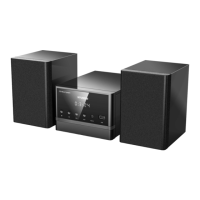
This document describes the Hyundai MS 132 DU3BL CD Micro System, a versatile audio device offering multiple playback options and features.
Function Description
The Hyundai MS 132 DU3BL is a CD micro system designed for audio playback from various sources. It supports CD, MP3, CD-R, and CD-RW disc formats, making it compatible with a wide range of audio discs. Additionally, it features a USB slot for playing back digital audio files from USB drives. The system also includes an FM stereo radio tuner for listening to broadcast radio stations. For external audio sources, a LINE IN terminal is provided, allowing connection of devices such as VCD, CD, VCR, or MP3 players. Bluetooth connectivity is also integrated, enabling wireless audio streaming from smartphones or tablets. The system is operated via controls on the front panel and a full-function remote control.
Important Technical Specifications
- Power Supply: AC ~ 100-240 V, 50/60 Hz
- Power Consumption: 20 W
- Power Consumption in Standby Mode: <0.5 W
- Working Environment Temperature: -10 ~ +35 °C
- Working Environment Relative Humidity: 5% ~ 90%
- Disc Output Frequency Range: 20 Hz - 20 kHz
- Disc Output S/N (A weight): >70 dB (1 kHz)
- Disc Output THD + NOISE: ≤-60 dB (1 kHz)
- Disc Output WOW FLUTTER: Below the limit of apparatus measure
- Tuner FM Band Range: 87.5 MHz ~ 108 MHz
- Power Output (Max): 2 × 5 W
- Frequency Response: ±3 dB (20 Hz ~ 20 kHz)
- Speaker Output: Connects to speaker terminals (white for +, black -).
- USB Slot: 5V, 500mA output.
Usage Features
The MS 132 DU3BL offers a user-friendly experience with its various playback modes and control options.
General Operation:
- STANDBY: Press to switch the unit on or put it in standby mode.
- SOURCE: Repeatedly press to select between CD, USB, BLUETOOTH, LINE IN, and FM modes.
- VOLUME +/-: Adjusts the master volume.
- MUTE: Temporarily mutes or unmutes the sound.
- SLEEP: Sets a sleep timer, after which the unit automatically enters standby mode. Select S-00 to disable.
- EQ: Switches between equalizer modes.
CD/USB Playback:
- PLAY/PAUSE (►II): Starts, pauses, or resumes playback.
- STOP (■): Stops playback.
- PREVIOUS (◄◄)/NEXT (►►): Skips to the previous or next track. Hold down for fast rewind or fast forward playback.
- INTRO: Plays the first 10 seconds of each track on a disc.
- RANDOM: Switches to random play mode.
- REPEAT: Switches between repeat modes (e.g., repeat one, repeat all).
- PROGRAM: In stop mode, allows users to program a sequence of tracks for playback.
- ALBUM +/-: (MP3 discs only) Skips between different albums.
- Digit Keys (0-9, 10+): Used to directly select track numbers.
FM Tuner Operation:
- FM: Selects FM tuner mode.
- TUN +/-: Fine-tunes the frequency up or down. Hold down for continuous tuning.
- AUTO/STOP: Holds down to automatically scan and save broadcasting radio channels. Press again to stop scanning.
- MEMORY: After tuning to a new frequency, press to select a preset station number using the digit keys, then press MEMORY again to save it.
- PREVIOUS (◄◄)/NEXT (►►): Skips to the previous or next preset station.
- Digit Keys (0-9, 10+): Used to directly select preset station numbers.
Bluetooth Connection:
- Select "BT" as the source.
- Search for "MS132DU3BL" on your smartphone/tablet and enter password "0000".
- "CONNECT" will appear on the display, indicating a successful connection.
- Once paired, the device will automatically reconnect in the future.
- In Bluetooth mode, PLAY/PAUSE, MUTE, NEXT, and PREVIOUS buttons are active.
Remote Control:
The full-function remote control allows convenient operation from a distance of up to 8 meters and within a 30-degree angle from the sensor. It requires two AAA/1.5V batteries, inserted with correct polarity.
Maintenance Features
- Cleaning: The exterior of the unit should be cleaned with a soft, clean rag. Avoid using chemicals or detergents.
- Battery Replacement: For the remote control, replace batteries with new AAA/1.5V batteries of the same or equivalent type when they are depleted. Remove batteries if the remote is not used for a long time to prevent leakage.
- Troubleshooting: A dedicated troubleshooting section in the manual helps users diagnose and resolve common issues such as no power, no sound, disc playback problems, USB drive issues, or remote control malfunction.
- Service: The cabinet of the unit should not be opened by users. All servicing should be referred to qualified personnel to prevent electric shock or damage.
- Environmental Protection: The product packaging materials (cardboard, paper pulp, polyethylene) are designed for easy separation and recycling. Users are advised to dispose of the product, batteries, and packaging according to local regulations at designated collection points.
- Laser Product: This device is a Class 1 laser product. Avoid direct contact with the laser beam.
Important Safety Notes
- Do not expose the unit to heat sources, direct sunlight, moisture, or rain.
- Do not place liquid-filled objects (e.g., vases) on the unit.
- Ensure proper ventilation by installing the unit on a horizontal, flat, and firm surface, without blocking vents.
- Always switch off and disconnect the unit from the AC power supply when not in use for extended periods.
- The mains plug serves as the disconnect device and should remain readily operable.
- Batteries should not be exposed to excessive heat (sunshine, fire, etc.).
- Do not mix new and used batteries or different types of batteries.
- The lightning flash symbol warns of dangerous uninsulated voltage inside the product.
- The exclamation mark symbol indicates important operating instructions.

 Need help?
 General

 To Next Page