EasyManua.ls Logo

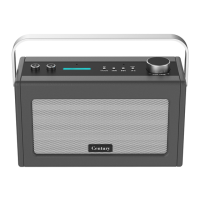
i-box Century - User Manual

i-box Century
16 pages
Print Icon
To Next Page IconTo Next Page
Loading...
Classic Smart Speaker
with Amazon Alexa
Question and Answer IconNeed help?

Do you have a question about the i-box Century and is the answer not in the manual?

Summary

Introduction

Safety Information

General Safety Precautions

Covers precautions for power, environment, liquids, ventilation, cleaning, and disposal.

Understanding Your Speaker

Controls and Features Overview

Identifies physical buttons, ports, and controls on the speaker unit.

Button Functions and LED Indicators

Details control button actions and LED status behavior for different modes.

Getting Started

App Installation and Wi-Fi Connection

Download required apps and connect the speaker to your Wi-Fi network.

Wi-Fi Setup Methods

Covers standard Wi-Fi network selection and alternative WPS setup.

Speaker Naming and Alexa Account Linking

Assign a name to your speaker and link your Amazon account for Alexa.

Operating Your Speaker

Alexa Configuration and Commands

Set location, learn Alexa commands, and control smart home devices.

Audio Connection Options

Connect via AUX-In or pair wirelessly using Bluetooth.

Advanced App Features

Learn to group speakers and manage radio presets using the i-box app.

Speaker Reset and Troubleshooting

How to restore factory settings and resolve common operational issues.

Product Information

Key Functions and Specifications

Summary of control functions, technical specifications, and regulatory compliance.

Support and Disclaimer

Information on technical support, updates, disclaimers, and waste disposal.
Summary

Introduction

Safety Information

General Safety Precautions

Covers precautions for power, environment, liquids, ventilation, cleaning, and disposal.

Understanding Your Speaker

Controls and Features Overview

Identifies physical buttons, ports, and controls on the speaker unit.

Button Functions and LED Indicators

Details control button actions and LED status behavior for different modes.

Getting Started

App Installation and Wi-Fi Connection

Download required apps and connect the speaker to your Wi-Fi network.

Wi-Fi Setup Methods

Covers standard Wi-Fi network selection and alternative WPS setup.

Speaker Naming and Alexa Account Linking

Assign a name to your speaker and link your Amazon account for Alexa.

Operating Your Speaker

Alexa Configuration and Commands

Set location, learn Alexa commands, and control smart home devices.

Audio Connection Options

Connect via AUX-In or pair wirelessly using Bluetooth.

Advanced App Features

Learn to group speakers and manage radio presets using the i-box app.

Speaker Reset and Troubleshooting

How to restore factory settings and resolve common operational issues.

Product Information

Key Functions and Specifications

Summary of control functions, technical specifications, and regulatory compliance.

Support and Disclaimer

Information on technical support, updates, disclaimers, and waste disposal.

i-box Century Specifications

General IconGeneral
Brandi-box
ModelCentury
CategorySpeakers
LanguageEnglish

Related product manuals