User’s Manual
OSD Diagram OSD Description
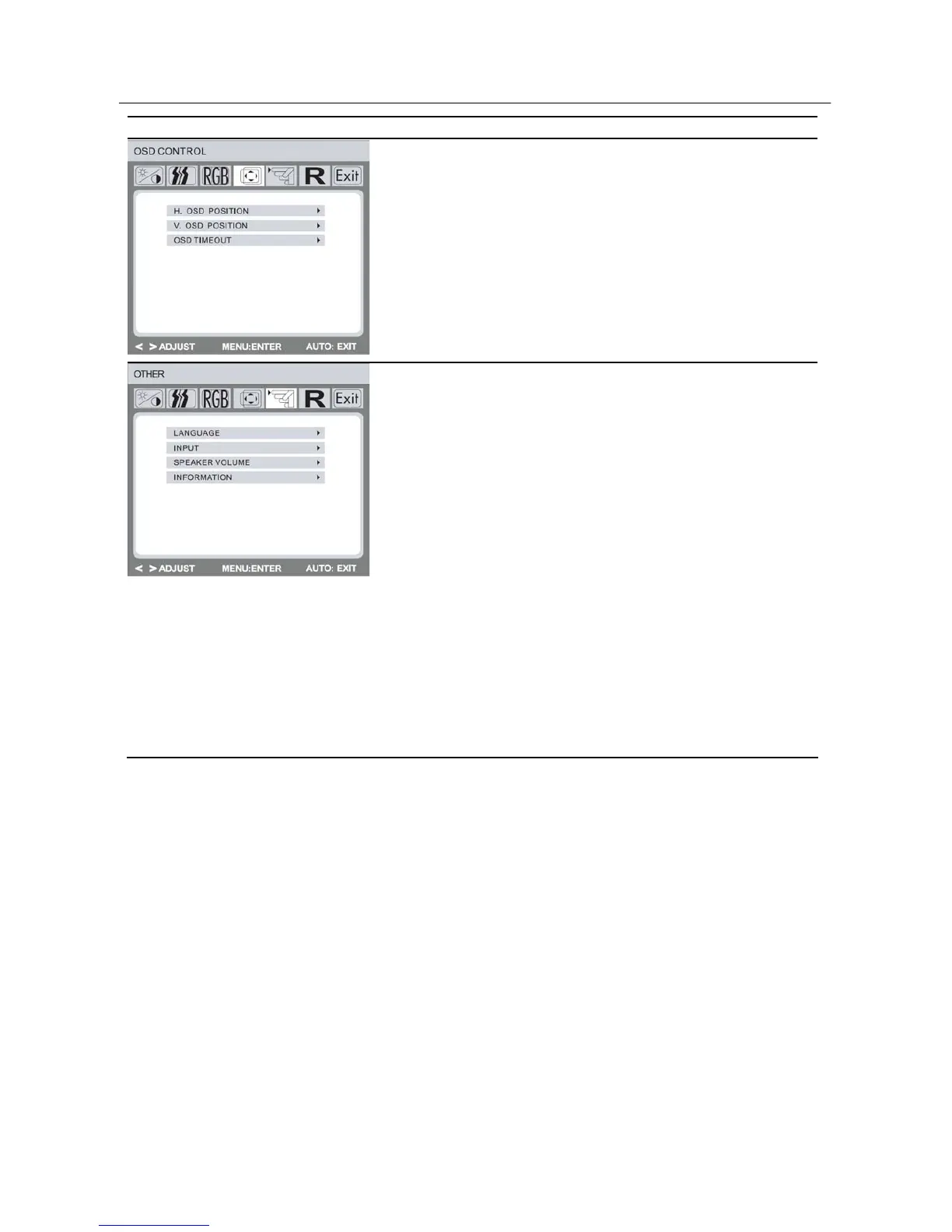
OSD Control:
H. OSD Position: Controls the OSD
menu’s horizontal position.
V. OSD Position: Controls the OSD
menu’s vertical position.
OSD Timeout: Determines how long (in
seconds) the OSD menu waits before
closing automatically after no action has
been performed.
Other:
Language: English. French. German.
Italian. Spanish. Japanese. Portuguese.
Nederlands. Korea. Simplify Chinese.
Traditional Chinese.
Input: Controls the selection of the input
signal. The monitor allows you to make
the following connections: analog graphics
card via the 15-pin mini D-Sub interface,
digital graphics card via the 24-pin DVI-D
interface.
Speaker Volume: Adjusts the monitor
loudspeaker output volume.
Information: There is an optional OSD
window (on/off) that displays the newly
adjusted screen resolution settings.
15


 To Next Page
 Loading...