EasyManua.ls Logo

i-tec USB3HDMI - User Manual

i-tec USB3HDMI
28 pages
Print Icon
To Next Page IconTo Next Page
Loading...
P/N: USB3HDMI
User guide • Gebrauchsanweisung • Mode d’emploi
Manual de instrucciones • Manuale • Uživatelská příručka
Instrukcje obsługi • Užívateľská príručka • Vartotojo vadovas
Handleiding
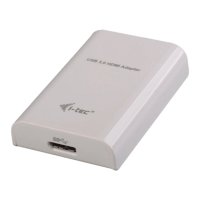
I-TEC USB 3.0 HDMI
ADAPTER FULL HD
Question and Answer IconNeed help?

Do you have a question about the i-tec USB3HDMI and is the answer not in the manual?

Summary

Introduction and Overview

Introduction

Provides a brief welcome and overview of the USB 3.0 HDMI Adapter's capabilities and resolution support.

Package Contents

Lists the items included in the product package, such as the adapter and USB cable.

Specifications

Details the technical specifications of the adapter, including interface, output, power, resolution, and dimensions.

Description

Identifies the physical connectors of the USB 3.0 HDMI Adapter.

System Requirements

Outlines the operating systems and versions compatible with the adapter.

Installation and Safety

Driver Installation for Windows

Instructions for installing drivers on Windows 7, 8, 8.1, and 10, including download sources and process.

Hardware Installation (PC;Notebook)

Step-by-step guide for connecting the adapter to a PC or notebook via USB.

Driver Installation for macOS

Guidance for installing drivers on macOS, including necessary software enablement.

Hardware Installation (MacBook;PC)

Steps for physically connecting the adapter to a MacBook or PC.

Safety Instructions

Provides essential safety precautions for using and handling the device.

FAQ

Directs users to the product's FAQ section on the website for common questions.

Compliance and Disposal Information

WEEE Compliance

Information regarding the proper disposal of the equipment at the end of its life according to EU WEEE Directive.

EU Declaration of Conformity

Formal declaration that the product conforms to relevant EU directives and standards.

FCC Compliance Statement

Statement confirming the product's compliance with FCC rules for digital devices.

Summary

Introduction and Overview

Introduction

Provides a brief welcome and overview of the USB 3.0 HDMI Adapter's capabilities and resolution support.

Package Contents

Lists the items included in the product package, such as the adapter and USB cable.

Specifications

Details the technical specifications of the adapter, including interface, output, power, resolution, and dimensions.

Description

Identifies the physical connectors of the USB 3.0 HDMI Adapter.

System Requirements

Outlines the operating systems and versions compatible with the adapter.

Installation and Safety

Driver Installation for Windows

Instructions for installing drivers on Windows 7, 8, 8.1, and 10, including download sources and process.

Hardware Installation (PC;Notebook)

Step-by-step guide for connecting the adapter to a PC or notebook via USB.

Driver Installation for macOS

Guidance for installing drivers on macOS, including necessary software enablement.

Hardware Installation (MacBook;PC)

Steps for physically connecting the adapter to a MacBook or PC.

Safety Instructions

Provides essential safety precautions for using and handling the device.

FAQ

Directs users to the product's FAQ section on the website for common questions.

Compliance and Disposal Information

WEEE Compliance

Information regarding the proper disposal of the equipment at the end of its life according to EU WEEE Directive.

EU Declaration of Conformity

Formal declaration that the product conforms to relevant EU directives and standards.

FCC Compliance Statement

Statement confirming the product's compliance with FCC rules for digital devices.

i-tec USB3HDMI Specifications

General IconGeneral
TypeUSB to HDMI Adapter
USB StandardUSB 3.0
Plug and PlayYes
Video OutputHDMI
Operating System CompatibilityWindows, macOS
Power SupplyPowered via USB

Related product manuals