Need help?
Do you have a question about the i3 International VEO 16 and is the answer not in the manual?
Installation and serving should be performed by qualified technicians, avoiding specific environmental conditions.
Lists and describes the components included in the Veo16 DVR packing box.
Details the ports and connectors on the rear panel of the Veo16 DVR.
Illustrates the basic connections of peripheral devices to the Veo16 DVR.
Step-by-step guide for connecting peripheral devices and powering up the Veo16 DVR.
Explains how to connect the Veo16 DVR to a PC via a Local Area Network (LAN).
Details connecting the Veo16 DVR to a PC via a Wide Area Network (WAN).
Instructions for connecting and operating PTZ cameras using the RS-485 interface.
Guides on connecting alarm input (sensors) and alarm output (relay) devices to the DVR.
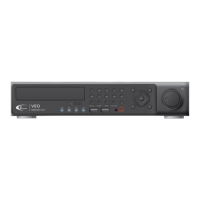
Identifies and describes the buttons and ports on the front panel of the Veo16 DVR.
Instructions for logging into the Veo16 DVR system using the default or custom credentials.
Procedure to safely log out of the Veo16 DVR system to prevent unauthorized access.
Steps to properly shut down the Veo16 DVR to prevent data corruption or drive damage.
Overview of the Live screen interface, including Live View, Quick Menu, Timeline, and Status Bar.
How to view live video feeds from connected cameras and switch to full-screen mode.
Explains the timeline feature for navigating and previewing recorded video footage.
Details the icons and functions available on the Status Bar for quick access to DVR features.
How to access and view the event log, which records system events and detected occurrences.
Describes the quick menu options for accessing playback, zoom, and snapshot functions.
Instructions on how to use the digital zoom feature for closer inspection of live video.
Guide to saving a *.jpg snapshot of the live video to a USB storage device.
How to select different PTZ camera channels within the PTZ Mode interface.
Setting up and recalling pre-defined camera positions (presets) for PTZ cameras.
Detailed instructions on operating PTZ camera functions like pan, tilt, zoom, and iris.
Procedure for recalling previously saved preset positions for PTZ cameras.
Steps to create and save new preset positions for PTZ camera control.
Configuring the PTZ camera to automatically scan between selected preset positions.
Setting up the PTZ camera for continuous touring between multiple preset locations.
Overview of the search window for accessing recorded footage using calendar and timeline.
How to review recorded video footage and navigate playback using control panel.
Accessing the archiving mode for exporting recorded video clips.
Instructions for playing back exported AVI video clips on a PC.
Guide to using the Veo16 Backup Player software for playback of exported video.
Instructions for playing back exported AVI video using Windows Media Player after codec installation.
Interface for configuring recording modes, schedules, and settings for the DVR.
Setting up recording for all cameras simultaneously with a single recording type.
Configuring resolution, frame rate, and quality for motion, alarm, and mixed recording modes.
Setup for configuring motion detection activation, area, and sensitivity levels.
Adjusting daytime and nighttime sensitivity levels for motion detection accuracy.
Defining specific areas on the screen for motion detection to reduce false alarms.
Specifies the minimum OS, browser, CPU, memory, and display requirements for Web Viewer.
How to locate the Veo16's IP address and Web Service Port for network connectivity.
Step-by-step guide to connecting to the Veo16 DVR using a web browser.
How to search recorded video and save clips remotely using the web viewer.
Configuring the folder on the local PC where exported video clips will be saved.
Procedure to export recorded video events as AVI files to local storage.
Instructions for downloading and playing back exported AVI video files.
Troubleshooting steps when the DVR fails to power on or its front panel LEDs are off.
Diagnosing and resolving issues causing the Veo16 DVR unit to reboot continuously.
Details the physical and hardware specifications of the Veo16 DVR unit.
 General
| Model | VEO16 |
|---|---|
| Category | DVR |
| Video Channels | 16 |
| Hard Drive Support | 1 SATA HDD |
| Power Supply | 12VDC |
| Mobile App Support | Yes |
| Remote Viewing | Yes |
| Operating System | Embedded Linux |
| Video Output | HDMI, VGA |
| Compression Format | H.264 |
| Network Interface | RJ45 10/100 Mbps |
| Compression | H.264 |
| Hard Drive | 1 SATA HDD |
| Video Input | 16-channel |
| Audio Input/Output | 1 Channel Audio Input, 1 Channel Audio Output |

 To Next Page