8
9
.
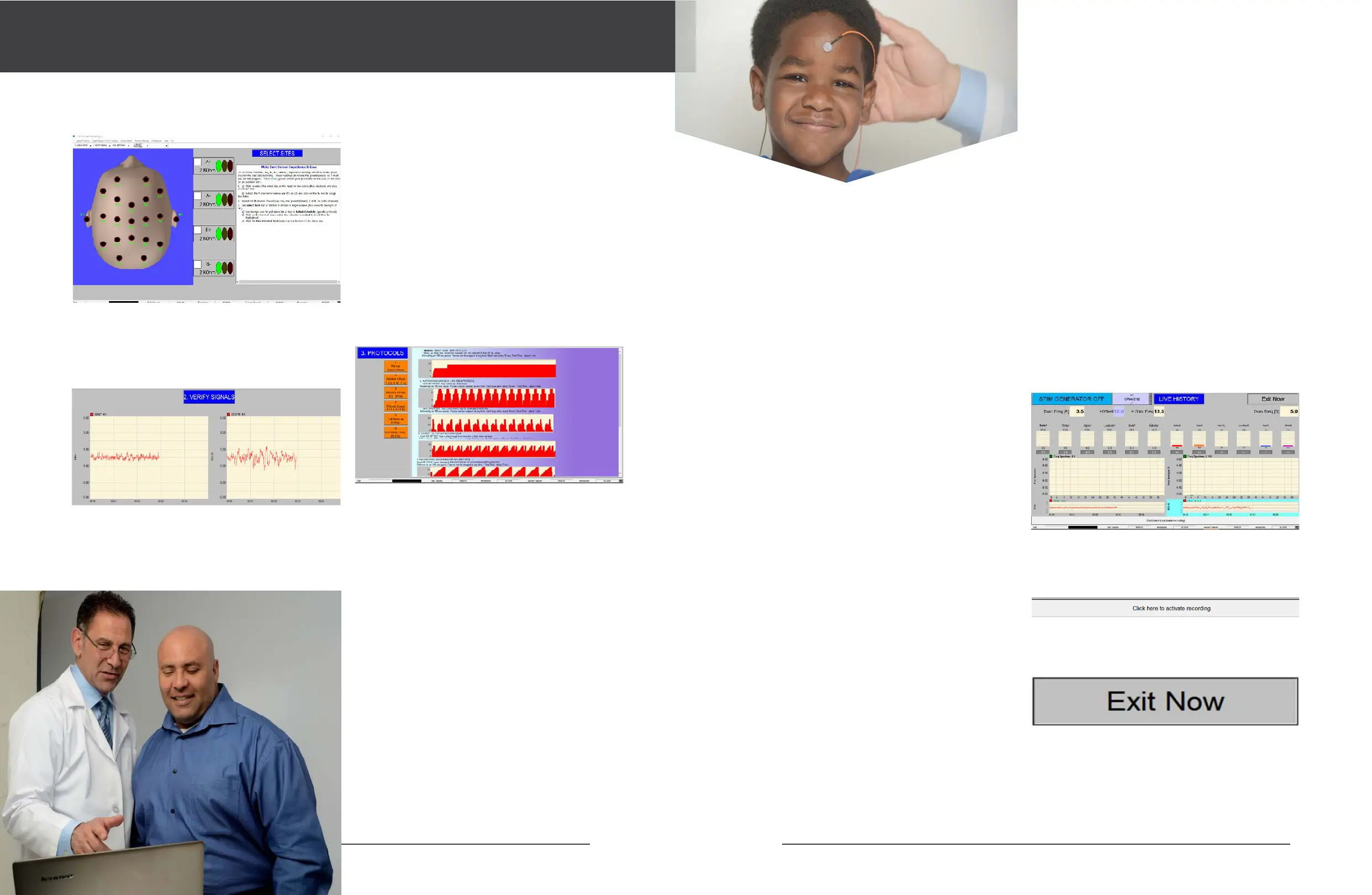
Click to select the 10-20 site for the active
electrode(+)and click VERIFY SIGNALS to go to the next
screen on the A+ box. (FIGURE 5)
or at least Yellow in all four bar charts (green is best).
Re-prep with 91% alcohol, skinPure and Elefix paste as
necessary for low impedance.
. Confirm that the Battery Level voltage indicator
at the bottom of the screen is green, as shown below.
Yellow means Replace Soon. Red means Replace Now.
There is little or no useful battery life remaining at the
red level.
Verify that the two EEG signals are correct, and go to the
next screen, SETTINGS:
You have the option of changing these settings at any
time.
The next screen allows you to SELECT PROTOCOLS.
(FIGURE 6)
. (Optional) Repeat above for the B channel.
. Make sure impedance is Green (10 KOhm or less),
FeedbackProtocols
Applicability
These protocols are intended for the express purpose
of training the brain. They have not completed peer-
review clinical trials to as certain and/or compare their
ecacy for any specific intended purpose. Please
interpret any possible suggestions within this document
with these facts in mind. Likewise, any “observation”
or “suggestion” offered here is purely subjective, and
not backed by formal study. Therefore, no claims are
being made, nor should any be implied or construed,
regarding the ecacy of these protocols for any specific
health purpose.
I-1.
Manual Offsets
This protocol schedule produces 30 seconds of active
resonant signal with minimal background (like 5 out
of 6 of these protocol schedules, feedback is enabled
100% of the time, including lead change), which tends
to result in very low reactivity. Clinician chooses offset,
which defaults to10 Hz.
Suggestions: An excellent starting protocol for new
clients or for clients known or suspected to be reactive.
Note: Habituation can be evident in the 3-6 second
(FIG. 4)
(FIG. 5)
(FIG. 6)
range following a change in offset (by clinician,
manually, via FB Offset Hz, up -or down- arrow). This is
likely to be the very gentlest schedule.
I-2.
Genesis: Random Offsets 1
This is also a very good, gentle starting point for
individuals, as well as a good general-purpose protocol
schedule. Beginning with 14 Hz, it produces 5 second
intervals of 3.3, 6.6, 10, and 7 Hz offsets. Feedback signal
tracks 100% of the time.
I-3.
Balanced Energy: Random Offsets 2
This calming, yet energizing schedule provides 13
varied offset frequencies that change at 2-second
intervals. Active feedback is provided continuously,
including during the hookup time. This schedule may
be useful for a broad range of client, including those
with inflammation. 11Hz lead-change offset. Feedback
signal tracks 100% of the time.
I-4.
Activation: Ups and Downs
Activation Ramp Up is intended to be a relatively
aggressive, “pull-out-the-stops” protocol schedule. It
produces 22 seconds of changing active EEG dominant
tracking signal, starting with several seconds each of
medium offsets, followed by stepping 5-14 Hz. It may
be useful for attention issues. It can be both activating
and mood lifting. It has a 7 Hz lead-change offset.
Feedback signal tracks 100% of the time.
I-5.
Activation Plus: Full Ramp Up
This schedule is a ramp variation, producing 20 seconds
(only) of increasing offset active EEG dominant tracking
signal. It maybe even more activating than I-4, above.
The offset changes every second. This is intended to
be a relatively aggressive protocol, useful especially in
situations in which the other schedules have resulted
in insucient activation. It is the only protocol that
does not provide brain wave tracking signal during
lead change, which may be quite activating for certain
clients.
I-6.
NEUROBLAST: Full Ramp Down
Neuro Blast tends to be a more activating variation of
I-5. It produces 20 seconds of decreasing offset, active
EEG dominant tracking, signal, against a background
of 7 Hz offset during lead change. The offset is
automatically “ramped” (stepped) down every second,
from 20 to 1 Hz. Suggestions: For clients insuciently
responsive to I-5. This is intended to be avery aggressive,
“pull-out-the-stops” protocol. This also may be useful
for activation and mood lifting. Feedback signal tracks
100% of the time.
Pulse Width %
Occasionally, one may want to try increasing Pulse
Width % from the default value (10), to enable a high
repetition rate signal source. Some clients may notice
a difference.
Choose a protocol.
Click on one of the orange buttons on the left side of the
screen to begin a protocol.
This starts a protocol. A protocol includes pauses to give
you the opportunity to CHANGE electrode sites, or EXIT
or to make other adjustments in SETTINGS.
Protocols are divided into LOOPS of frequency offsets.
Each loop has a fixed number of frequency offsets, and
each loop ends in a post-loop PAUSE, where you can
CHANGE sites or EXIT or modify SETTINGS.
The first protocol screen is the LIVE HISTORY screen. It
looks like this (FIGURE 7):
Remember that the protocol is now set up to run. If it is
not yet running, click on the bottom horizontal button,
‘Click here to activate recording’. (FIGURE 8)
If you want to abort at any time, press the red EXIT
button, then press EXIT on the top menu. (FIGURE 9)
(FIG. 7)
(FIG. 8)
(FIG. 9)
Some protocols start immediately, while others PAUSE.
For those that pause, activate the horizontal ‘Click here
to activate recording’ button.
Note that the STIMULUS GENERATOR is OFF in
the beginning.


 To Next Page
 Loading...