EasyManua.ls Logo

IASUS EAR3H - User Manual

IASUS EAR3H
15 pages
Print Icon
To Next Page IconTo Next Page
Loading...
IASUS_EAR3H_OPERATINGINSTRUCTIONS_v1_2020
1
H E L M E T A M P
MODEL NUMBER: IA-E3H-AMP
Thank you for choosing the IASUS EAR3H Helmet Amp, the newest evolution in a long line
of IASUS portable audio ampliers. The EAR3H boosts any audio track, giving it a fuller and
more robust sound from a micro and compact form factor, with the signature IASUS quality
and performance many have come to trust.
In addition to boosting volume, the EAR3H also features the embedded Transparent Mic
to introduce transparency into your music by blending in surrounding ambient sounds.
This keeps you safe in no matter what environment you wish to experience premium in-ear
audio.
The EAR3H is based on the EAR3 Micro Amp, but with a special attachement designed for
helmet users - an IASUS proprietary quick release mounting system. Just snap it on and go.
In this manual are instructions and tips to operating the EAR3H Helmet Amp. Should you
have any questions and require assistance with setup and usage, please feel free to visit our
website or contact us directly at : info@iasus-concepts.com
You must register your product to be eligible for warranty service. To register online, please visit the IASUS Concepts website.
To receive warranty service, you will need to provide a copy of your dated sales receipt to confirm warranty status. Please
retain the original copy for your records.
w w w . i a s u s - c o n c e p t s . c o m
Question and Answer IconNeed help?

Do you have a question about the IASUS EAR3H and is the answer not in the manual?

Summary

Warnings

Parts & Controls Reference

Charging The EAR3 H

Controls

Power On;Off

Instructions on how to turn the EAR3H Amp on and off using the volume knob.

Volume +;-

Guide to adjusting audio volume levels using the EAR3H Amp's volume knob.

Connecting The EAR3 H

Audio Source

Explains how to connect audio sources like smartphones or music players to the EAR3H Amp.

Audio Out

Details how to connect helmet speakers or earphones to the EAR3H Amp's output.

Mounting The EAR3 H Onto A Helmet

Transparency Mode

Turning Transparency Mode Off

1-Year Limited Warranty

Overview

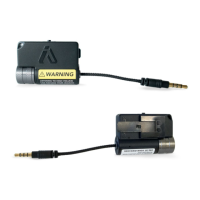
The IASUS EAR3H Helmet Amp is a portable audio amplifier designed to enhance the audio experience for helmet users. It boosts audio tracks, providing a fuller and more robust sound from a compact form factor. A key feature is the embedded Transparent Mic, which blends surrounding ambient sounds with music, enhancing safety by maintaining awareness of the environment. The EAR3H is based on the EAR3 Micro Amp but includes a proprietary quick-release mounting system specifically for helmets.

Function Description

The primary function of the EAR3H Helmet Amp is to amplify audio signals from a source, delivering higher and more sufficient volume levels to helmet speakers or earphones. This amplification results in a richer and fuller sound. Additionally, it helps conserve the battery power of the audio source (e.g., smartphone, music player) by allowing users to lower the source volume and increase the EAR3H's volume to achieve the desired listening level.

The Transparent Mode is a unique feature that allows ambient sounds to be mixed with the audio source. This is activated by a switch on the side of the unit. When enabled, users can hear their surroundings while enjoying amplified audio, which is crucial for safety in various environments. When ambient sounds are not needed, disabling the Transparent Mic allows the EAR3H to solely amplify the audio source, providing a cleaner and more solid sound with potentially higher volume output compared to a direct connection to the audio source.

Important Technical Specifications

  • Dimensions: 51mm x 37mm x 20mm (2" x 1-3/8" x 3/4")
  • Weight: 30g (1oz)
  • Battery: Internal, non-removable lithium-ion battery.
    • Operation Time: Up to 20 hours per charge (depending on output volume and ambient temperature).
    • Charging Time: Approximately 3 hours for a full charge using a computer's USB port (0.5A output).
    • Battery Capacity: 150mAh
  • Audio Output: 55mW/channel x2 @ 16Ω
  • Signal-to-Noise Ratio (S/N Ratio): 100dB@32Ω, 20mW
  • Frequency Response: 10Hz to 100Hz +0/-0.1dB
  • Boost: 10Hz to 100Hz +0/-0.1dB
  • Input/Output: 3.5mm jack cable for audio input and a 3.5mm jack plug for audio output.

Usage Features

Power On/Off and Volume Control: The EAR3H features an IASUS signature CNC-machined and knurled aluminum volume knob, designed for enhanced grip, even with gloves.

  • To power on and increase volume: Turn the volume knob clockwise until a click is heard and felt.
  • To power off and decrease volume: Turn the volume knob counter-clockwise until a click is heard and felt.
  • The volume knob adjusts the overall volume of both music and ambient sounds when Transparency Mode is active.

Connecting the EAR3H: The EAR3H connects to an audio source (e.g., helmet communication system, smartphone, music player) via its 3.5mm input jack cable. Audio output is delivered to helmet speakers or earphones through its 3.5mm output jack plug.

  • Audio Source Connection: The input 3.5mm jack cable (3) connects to the audio source. For larger helmets, an included long extension cable with a right-angled plug can be used.
  • Audio Out Connection: Helmet speakers or earphones connect directly to the output 3.5mm jack plug (4). A short extension cable is included for tidier installations, allowing cables to be tucked behind helmet padding.
  • Microphone Compatibility: While the EAR3H Output Jack supports headsets and earbuds with an inline mic, any mic input will not pass through the EAR3 to the audio source.

Transparency Mode:

  • Turning On: Slide the Transparency Mode switch (1) on the side of the EAR3H to the ON position. This activates the Mic for Transparency Mode (2), blending ambient sounds with your audio.
  • Adjusting Transparency: Once the helmet is on, the EAR3H volume knob can be slowly turned to adjust the level of ambient sounds. The audio source volume control can then be used to fine-tune the desired balance between music and ambient sounds. For louder ambient sounds, increase EAR3H volume and decrease audio source volume. For louder audio source, decrease EAR3H volume and increase audio source volume.
  • Turning Off: Slide the Transparency Mode switch (1) to the OFF position. This disables the Transparent Mic, allowing the EAR3H to solely amplify the audio source for a cleaner sound and potentially higher volume.

Mounting: The EAR3H uses an IASUS proprietary quick-release mounting system.

  1. Clean the helmet's mounting surface.
  2. Secure the EAR3H onto the Quick Release Mount (G).
  3. Peel the backing paper from the 3M Adhesive (H) and position it on the Quick Release Mount (G).
  4. Peel the second backing paper from the 3M Adhesive, position it on the helmet, and press firmly.
  5. To remove the EAR3H from the mount, push the clip away from the amp and slide the unit until it is fully released.

Maintenance Features

Charging:

  • The EAR3H is pre-charged for immediate use out of the box.
  • To charge, connect the included 3.5mm to USB-A Charging Cable (D) to the input jack at the bottom of the unit and the other end to a computer USB port.
  • The Charging Indicator LED (7) will be red during charging and turn off when charging is complete.
  • A full charge takes approximately 3 hours.
  • Important: Only use the included IASUS charging cable. Using other charging cables may cause permanent damage.
  • Battery Longevity: To prolong battery life, avoid using high-output USB chargers (e.g., 1.0A, 2.1A).
  • Storage: If the EAR3H will not be used for an extended period, fully charge the unit before storing to prevent permanent battery damage.

Warranty:

  • The EAR3H Helmet Amp comes with a 1-year limited warranty covering defects in materials and workmanship under normal use.
  • Registration: Product registration is required for warranty service. This can be done online at the IASUS Concepts website.
  • Service: To obtain warranty service, contact IASUS customer service via their website. A dated sales receipt and a fully completed Return Materials Authorization (RMA) form are required. Shipping costs (freight, duties, insurance) must be prepaid by the customer.
  • Exclusions: The warranty does not cover damage from improper operation, misuse, neglect (e.g., dropping, exposure to humidity/heat), acts of nature, unauthorized repairs/alterations, stretched/burnt/torn/cut cords, purchases older than 12 months, or lack of valid proof of purchase.

Safety Warnings:

  • Hearing Damage: Listening at high volumes can damage hearing. Discontinue use immediately if ringing in the ears occurs.
  • Equipment Damage: Do not turn the volume up too high on the EAR3H. It can damage helmet speakers, earphones, or headphones if they are not rated for higher audio input. Increase volume slowly and with caution to avoid over-boosting equipment and permanently damaging hearing.

IASUS EAR3H Specifications

General IconGeneral
BrandIASUS
ModelEAR3H
CategoryAmplifier
LanguageEnglish

Related product manuals