Need help?
Do you have a question about the iBasso Audio DX320 MAX and is the answer not in the manual?
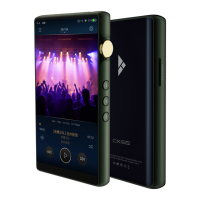
The main digital audio player device.
Protective leather case for the DX320MAX.
Cable for connecting to external DACs via coaxial output.
Cable for conditioning the device's electronic components.
Power adapter for charging the analog section.
Protective film for the device's screen.
Provides initial setup and basic operation instructions.
Document for warranty claims and service.
Cable for charging and data transfer via USB-C.
Technical output specifications for balanced phone out.
Technical output specifications for single-ended phone out.
Technical output specifications for balanced line out.
Technical output specifications for single-ended line out.
Details on charging duration for analog and digital sections.
Physical dimensions and weight of the device.
Instructions for powering on/off and switching operating systems.
Description and usage scenarios of the USB-C port.
How to operate the volume adjustment feature.
Usage details for the coaxial audio output port.
Usage details for the balanced line out port.
Usage details for the single-ended audio output port.
Usage details for the balanced headphone output port.
Instructions for using the Micro SD card slot.
Step-by-step guide for turning the device on and off.
How to turn the device's screen on or off.
Procedure to reset the device when unresponsive.
Connecting the device to a computer as a USB DAC.
Procedure for charging the analog component of the device.
Procedure for charging the digital component of the device.
Steps to establish a connection to a WiFi network.
Steps to pair and connect to Bluetooth devices.
Instructions for installing third-party applications.
Steps to remove installed applications from the device.
How to connect the device to a computer via USB.
Configuration options for audio playback and processing.
Adjusting digital filter parameters for audio output.
Configuring the cut-off frequency for DSD filters.
Enabling an enhanced audio processing mode utilizing all DAC channels.
Matching volume levels between PCM and DSD audio formats.
Procedure for updating the device's firmware over WiFi.
Procedure for updating the device's firmware from local storage.
Detailed layout and components of the playback screen.
Displays current song details and playlist information.
Shows detailed metadata for the currently playing music track.
How to navigate and view the music library and files.
How to search for music tracks, albums, or artists.
Customizing the navigation bar and music screen layout.
Actions available by long-pressing a song in the library.
Browsing the music library organized by albums.
Browsing the music library organized by artists.
Managing and viewing user-created music playlists.
Enabling gapless playback to eliminate pauses between tracks.
Configuring the music player's enhanced audio processing mode.
Selecting the desired playback mode (e.g., Loop, Folder Play).
Adjusting the balance between left and right audio channels.
Selecting and applying digital filters within the music player.
Accessing further configuration options for the music player.
Adjusting sound frequencies using a graphic equalizer interface.
Fine-tuning sound frequencies with a parametric equalizer.
Navigating through different filter settings for equalization.
Managing and customizing up to six parametric filters.
Enabling/disabling filters and selecting from eight filter types.
Adjusting central frequency, gain, and quality factor for filters.
Explanation of how low pass filters affect audio frequencies.
Explanation of how high pass filters affect audio frequencies.
Explanation of how all pass filters affect audio frequencies.
Explanation of how band filters affect audio frequencies.
Explanation of how peak filters affect audio frequencies.
Explanation of how notch filters affect audio frequencies.
Explanation of how high shelf filters affect audio frequencies.
Explanation of how low shelf filters affect audio frequencies.
Setting the various DSD filter options.
Adjusting volume consistency between DSD and PCM formats.
Enabling the device to function as a USB Digital-to-Analog Converter.
Enabling the device to function as a Bluetooth Digital-to-Analog Converter.
Customizing the screen's background and display elements.
Setting a timer to automatically power off the device.
Viewing device model, software version, and storage details.
Overview of the Mango OS interface components and navigation.
 General
| Operating System | Android 11 |
|---|---|
| SoC | Snapdragon 660 |
| RAM | 4GB |
| Internal Storage | 128GB |
| USB | USB Type-C |
| THD+N | <0.0005% |
| Frequency Response | 20Hz - 40kHz |
| DAC | Dual ES9038PRO |
| Storage Expansion | microSD up to 2TB |
| Outputs | 4.4mm balanced, 3.5mm single-ended |
| Bluetooth | 5.0 |
| Wi-Fi | 802.11ac |
| Supported Formats | DSD |

 To Next Page