EasyManua.ls Logo

IBM 7316 - TF1 Rack Console - Page 19

IBM 7316 - TF1 Rack Console
54 pages
Print Icon
To Next Page IconTo Next Page
To Previous Page IconTo Previous Page
Loading...
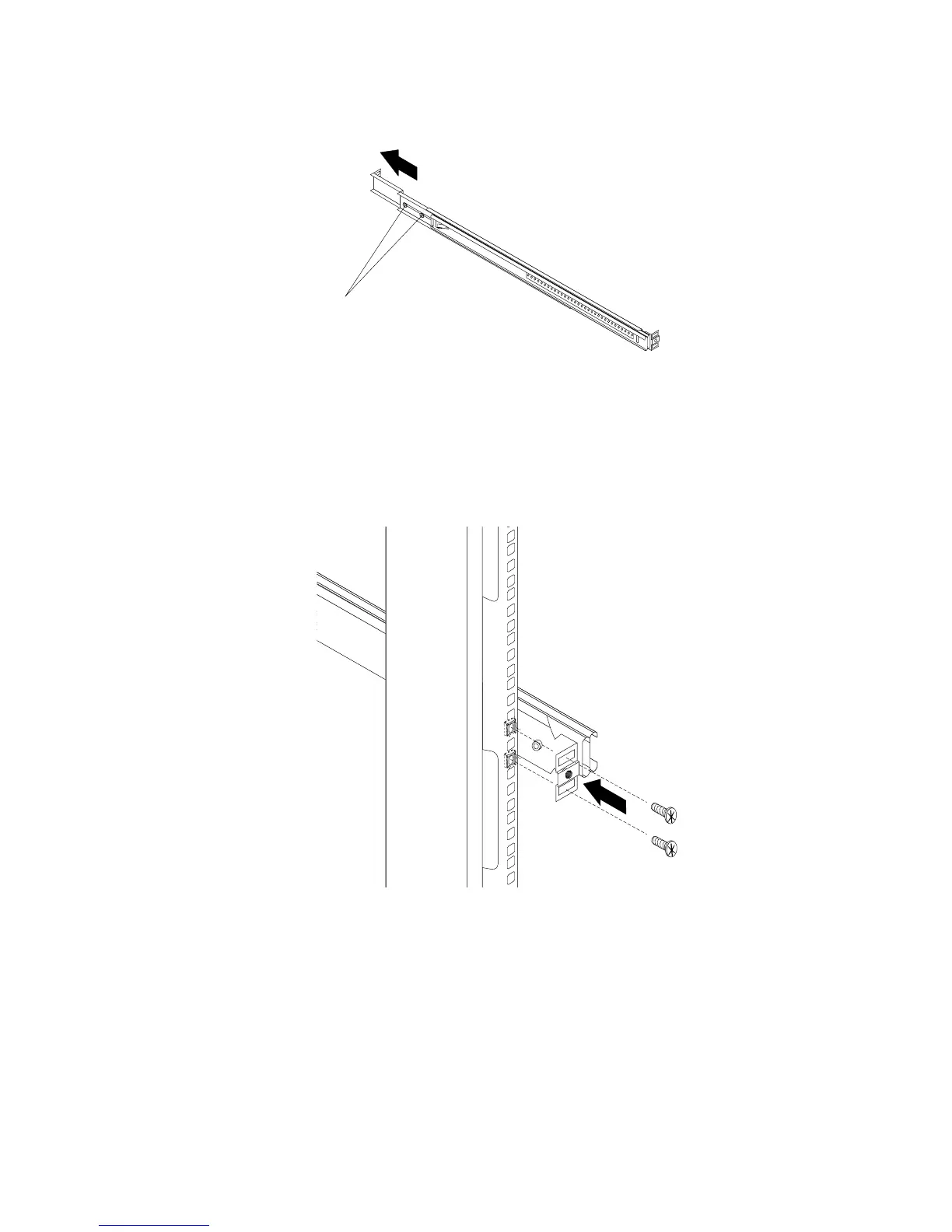
3.
Loosen
the
two
rail-adjustment
screws
on
each
of
the
outer
slide
rails.
Then,
extend
the
rails
to
their
maximum
outward
adjustment.
Rail-adjustment
screws
4.
Adjust
the
outer
slide-rail
brackets
to
fit
the
depth
of
the
rack
cabinet.
Then,
loosely
attach
the
front
of
the
slide-rail
brackets
to
fit
the
depth
of
the
rack
cabinet
using
four
screws
from
the
miscellaneous
hardware
kit.
The
screws
should
be
finger-tight
to
allow
adjustment
of
the
rails.
Note:
Make
sure
that
the
slide-rail
brackets
extend
outside
of
the
rack-cabinet
mounting
flanges.
Do
not
install
screws
in
the
middle
holes
on
the
front
or
rear
of
the
slide-rail
brackets.
These
holes
will
be
used
to
attach
thumbscrews
or
optional
console-switch
mounting
brackets,
respectively,
later
in
this
procedure.
5.
Loosely
attach
(finger-tight)
the
back
of
the
slide-rail
brackets
to
the
rack
cabinet
using
four
screws
from
the
miscellaneous
hardware
kit.
Make
sure
that
the
slide-rail
brackets
extend
outside
of
the
Chapter
2.
Installing
the
7316-TF3
17-Inch
Flat
Panel
Rack-Mounted
Monitor
and
Keyboard
5