EasyManua.ls Logo

IBM 7316 - TF1 Rack Console - Page 20

IBM 7316 - TF1 Rack Console
54 pages
Print Icon
To Next Page IconTo Next Page
To Previous Page IconTo Previous Page
Loading...
rack-cabinet
mounting
flanges.
6.
Tighten
the
two
rail-adjustment
screws
on
each
of
the
outer
rails
that
you
loosened
in
step
3
on
page
5.
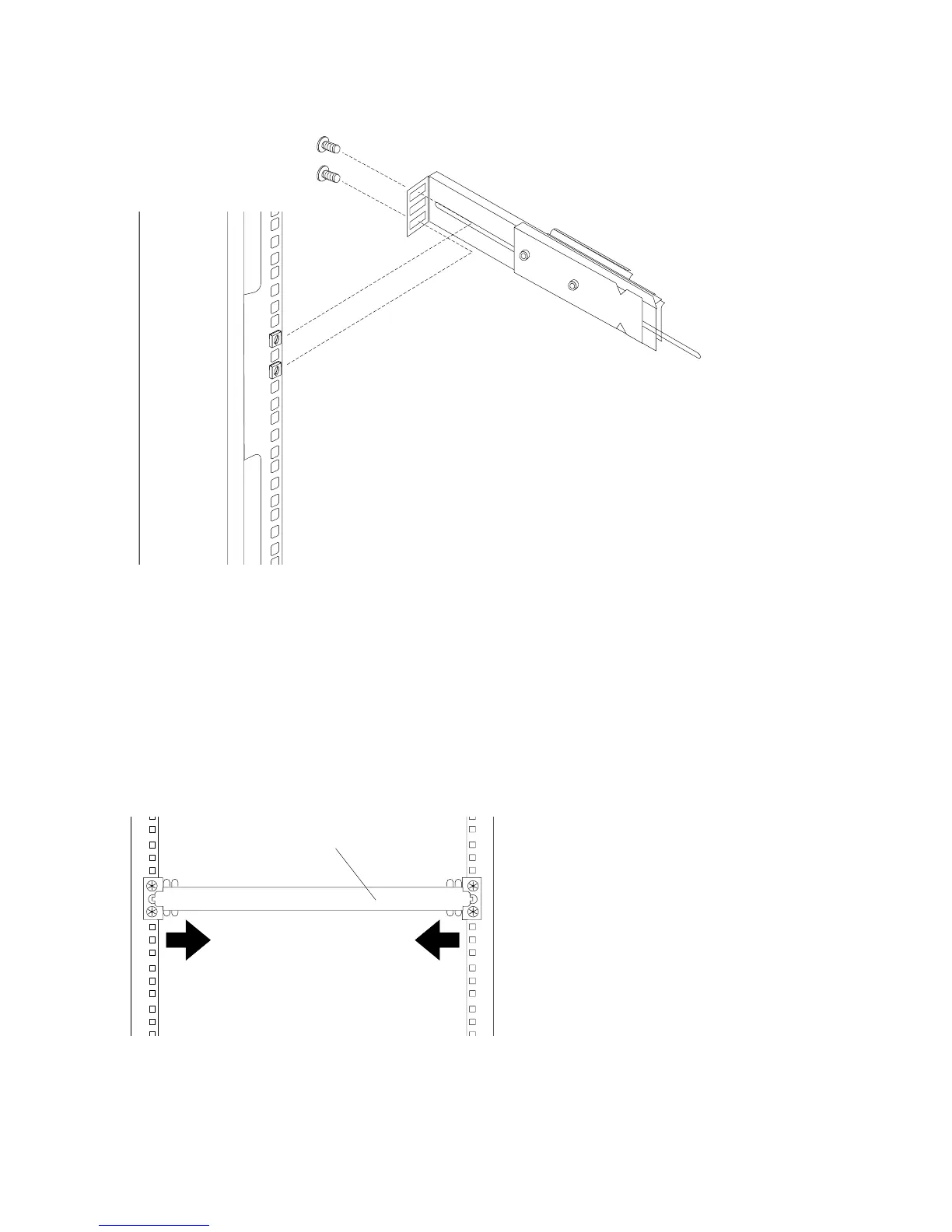
7.
Insert
the
rail-alignment
spacer
into
the
slide-rail
middle
holes.
The
rail-alignment
spacer
must
wrap
around
the
rails
(top
and
bottom
of
the
front
of
the
rail)
to
align
them
correctly.
Tighten
the
front
four
screws;
then,
remove
the
spacer.
Note:
Do
not
tighten
the
four
rear
slide-rail
bracket
screws
yet.
Rail-alignment spacer
8.
Extend
the
inner
part
of
the
rails
mounted
in
the
rack,
then
slide
the
ball-bearing
assemblies
forward
to
the
front
of
the
rails.
6
7316-TF3
17-Inch
Flat
Panel
Rack-Mounted
Monitor
and
Keyboard:
Installation
and
Maintenance
Guide