Routing the Adapter Cables through the Cable Guides
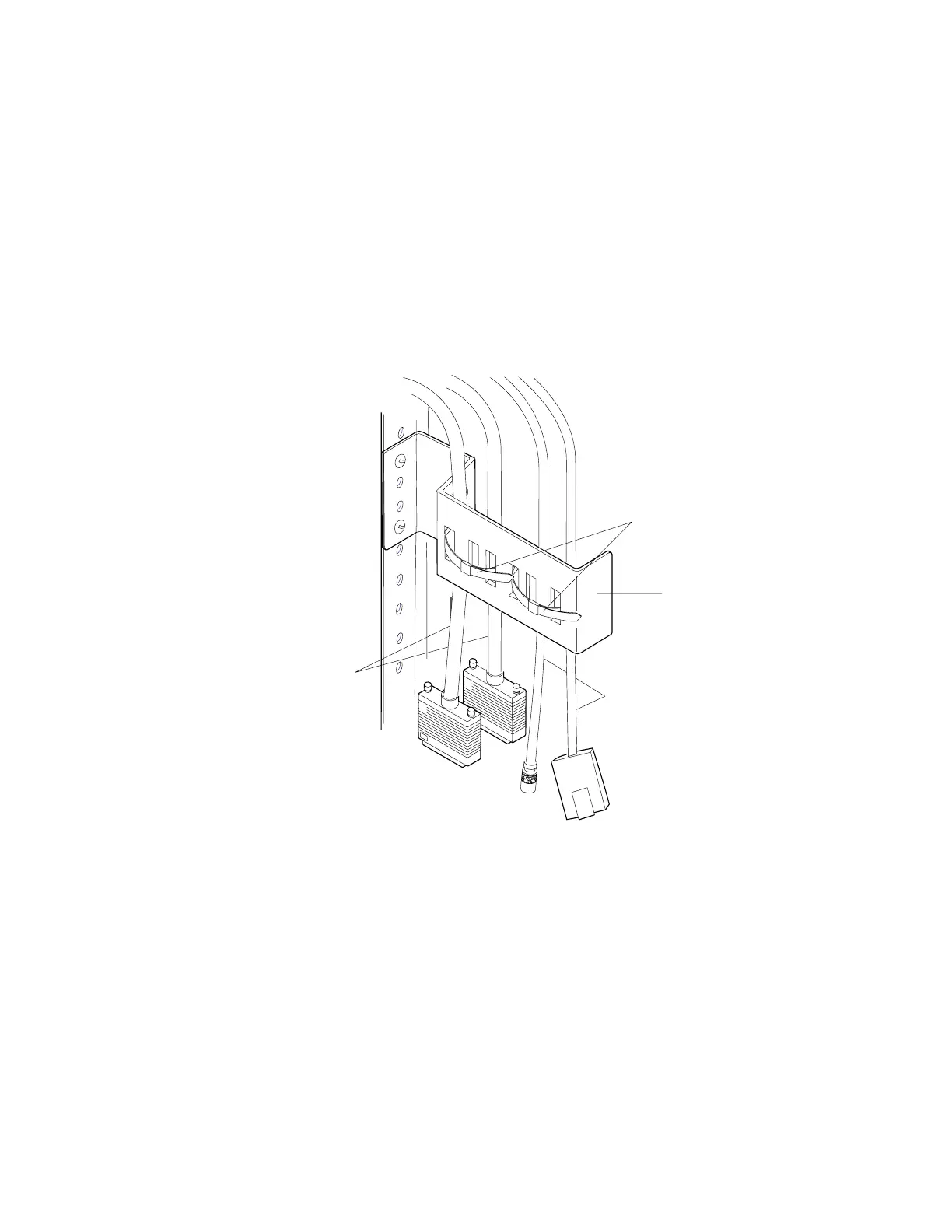
After you have completed all cable connections, secure the cables in the cable
guides by following these Steps for each multiaccess enclosure base unit:
1. Release the existing plastic cable ties that hold the cables in the cable guide
bracket.
Notes:
a. Do not attach any cable ties until you are finished routing all cables.
b. When fastening optical fiber and other cables together using the same
cable tie, be careful not to fasten the tie too tightly. Overtightening the ties
can damage the optical fiber cable. Whenever possible, route optical fiber
cables separately from wire-based cables.
Cable
Guide
Bracket
Cable
Ties
V-cable
Adapter
Cables
2. Remove the plastic cable strap from the cable guide arm.
3. Route all cables, and extender cables through the cable guide arm and bracket,
giving the cables the same amount of slack.
4. Replace the plastic cable strap from the cable guide arm.
5. Retie the plastic cable ties to secure the cables.
You have completed cable routing.
Releasing the Device to Your Customer
On multiaccess enclosure, a quick reference card is located in the slot under the
multiaccess enclosure, enter the information about the adapter type and slot
number for each Parallel Channel Adapter that is installed. Write on the worksheet
the slot number for each Parallel Channel Adapter in the multiaccess enclosure.
Chapter 3. Multiaccess Enclosure Problem Determination 3-47


 To Next Page
 Loading...







