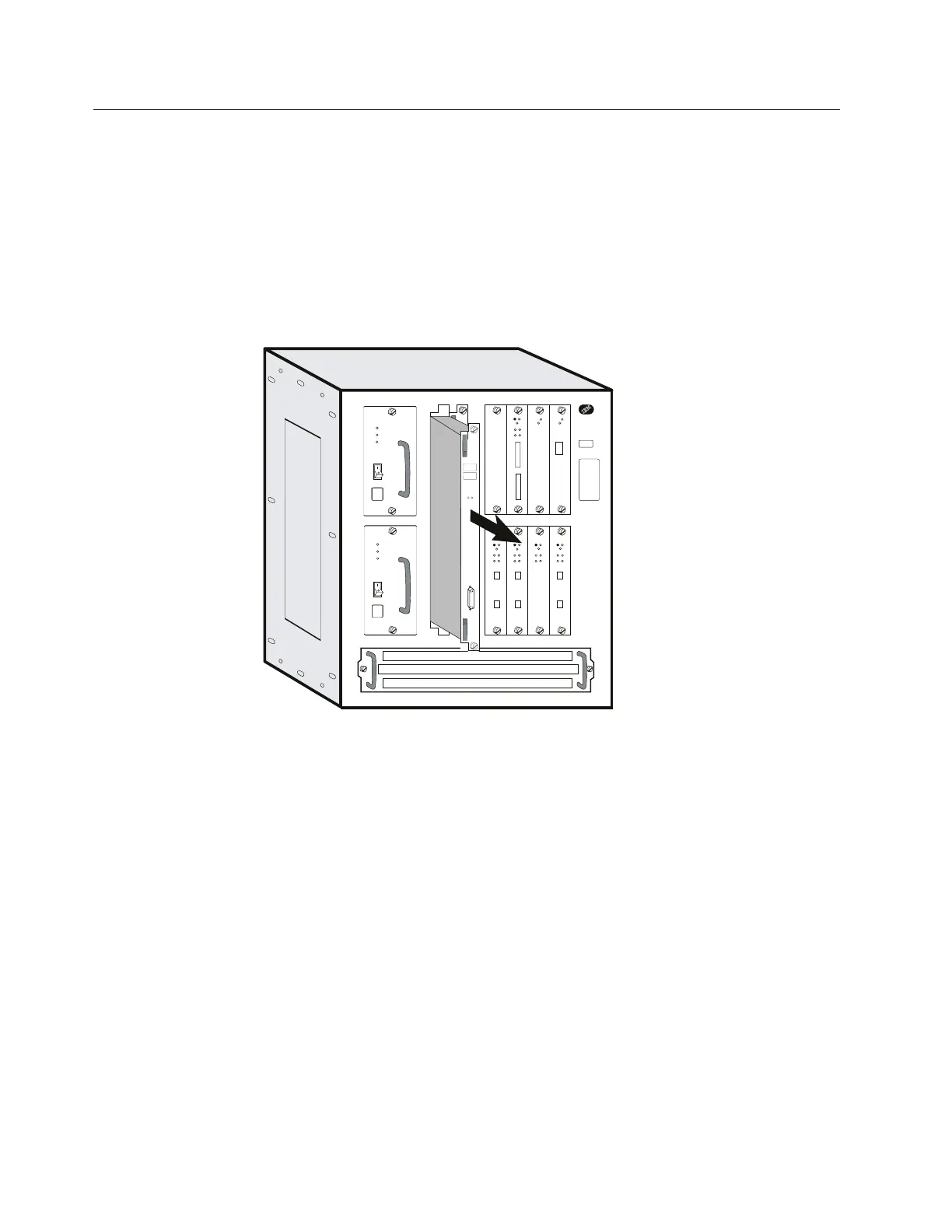
Exchanging the SAC
Attention:
1. Be sure that all the traffic has been stopped on the Multiaccess Enclosure.
2. The SAC is not hot pluggable.
1 Switch OFF each power supply.
2 Label the cable on the SAC. Unplug the cable.
3 Loosen thumbscrews on the SAC.
YY
Y
Y
YY
Y
Y
Y
Y
Y
AB 1
5
2
6
3
7
4
8
4 Remove the defective SAC.
5 Install the new SAC. Make sure the card is aligned with the plastic grooves
and then slide it in until it is flush with the box. Hold the locking latches so
that they are perpendicular to the face of the system card. With the card in
full contact with the rear of the Multiaccess Enclosure, press the locking
latches into the system card.
6 Tighten the thumbscrews on the face of the adapter card clockwise.
7 Plug the SIE/SAC cable to the new SAC.
8 Power ON and verify the LEDs. See “Adapter Card Status” on page 3-3.
9 Notify the network administrator that you are finished repairing the
Multiaccess Enclosure.
10 Go to “CE Leaving Procedure” on page 5-60.
4-24 3746-9X0: MAE Installation and Maintenance


 To Next Page
 Loading...







