EasyManua.ls Logo

IBO DIGIBO 1 - User Manual

IBO DIGIBO 1
2 pages
Print Icon
To Next Page IconTo Next Page
Loading...
USER MANUAL
SMART PRESSURE SWITCH TO PUMP
DIGIBO 1
1. TECHNICAL DATA Table 1. Recommended settings depending on the parameters
Range: 0-10 bar
Power supply: 230V, 50Hz
Protection: IP66
The maximum pump power: 1.5 kW
Maximum temperature: 80 ° C
Warranty: 2 years / 20 million cycles
Upper limit = (H max) / 10 - (0.4 or 0.5)
Installation:
1 If the pump does not have a check valve, pressure switch before you need to install a check valve to prevent
backflow of water that make the switch will not work properly in this case the pump can be switched off
naprzemiennie.2. After unscrewing the tap / valve, if the pump is alternately turned on / off, set a higher value
H.
3. If the pump is still operating despite the closure of the valve, reduce the value H, while if the pump does not
turn, set a higher value L.
2. SETTING THE PARAMETERS
Setting the pressure off - H
Use the buttons (arrow keys) to set a limit, up arrow - to increase, down arrow - to decrease, after setting the
switch to save the settings and automatically switches to the operation mode.
1. to set a relatively high value H, e.g.,. H5,5
2. close all valves and check the value on the display, for example. 4.5
3. open the upper valve, and turn on the pump, the pump draws water smoothly, check the value on the
display, for example. 3,5.
4. This means that the actual value should be 3.5-4.5 H, normally set to a value of 0.3 or 0.4 below the last
proven value in this case is H - 4.1.
5. the maximum operating pressure of the pump is usually (max. Raising / 10) if the pump has a max. 32m
lifting H value should be about - 2.6.
Setting the pressure switch - L
1. Pressure off L1.2 or 1.5 should be adequate in most cases, if the pump starts when you turn on the tap,
without having to change.
2. if the pump does not start when you turn on the tap, increase the value of L to the launch of the pump.
3. When the valve is closed the pump will stop, check the constant display np.2.2, then remove the faucet
and check the displayed value prior to the start of the pump, np.1.2, then set L of 1.2 - 2.2, eg. 1.5
3. INSTALLATION
1. if you are using a circulating pump, install a valve in order to use the switch.

Power
max H
pressure off
pressure switch
128W
25m
H2.0
L1.0
250W
32m
H2.6
L1.5
370W
35m
H3.0
L1.8
550W
40m
H3.3
L1.8
750W
55m
H4.8
L2.2

Questions and Answers

Summary

Technical Data and Settings

Installation Instructions

Guidance on installing the pressure switch, including preventing backflow and adjusting switch values for pump operation.

Setting Pump Parameters

Setting Pressure Off (H)

Instructions for setting the upper pressure limit (H) using arrow keys and checking pump behavior.

Setting Pressure Switch (L)

Guidance on setting the lower pressure limit (L) for pump activation and stop based on tap usage.

Installation Considerations

Function Description and Protection

Pump Operation Delay

How to set a delay for pump switching to prevent frequent on/off cycles.

Dry-Running Protection

Instructions on enabling or disabling the dry-running protection feature.

Troubleshooting Guide

Declaration of Conformity

Overview

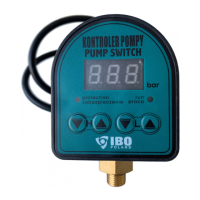
The DIGIBO 1 is a smart pressure switch designed for pumps, manufactured by IBO pompy. This user manual provides detailed information on its technical specifications, setup, operation, and troubleshooting.

Function Description

The DIGIBO 1 acts as a control unit for pumps, managing their operation based on pressure settings. It features a "pressure off" setting (H) which determines the pressure at which the pump stops, and a "pressure switch" setting (L) which dictates the pressure at which the pump starts. The device is designed to prevent frequent on/off cycling of the pump, thereby extending its service life. It also includes dry-running protection, which is enabled by default, to safeguard the pump from damage when there is no water. The unit can be configured to introduce a delay in turning off the pump to further reduce frequent cycling.

Important Technical Specifications

  • Range: 0-10 bar
  • Power Supply: 230V, 50Hz
  • Protection: IP66 (indicating high resistance to dust and water ingress)
  • Maximum Pump Power: 1.5 kW
  • Maximum Temperature: 80 °C
  • Warranty: 2 years / 20 million cycles

The manual provides a table of recommended settings based on pump power and maximum head (H max):

Power max H pressure off (H) pressure switch (L)
128W 25m H2.0 L1.0
250W 32m H2.6 L1.5
370W 35m H3.0 L1.8
550W 40m H3.3 L1.8
750W 55m H4.8 L2.2

The "Upper limit" for the pressure off setting is calculated as (H max) / 10 - (0.4 or 0.5).

Usage Features

Installation:

  1. If the pump lacks a check valve, a check valve must be installed before the pressure switch to prevent backflow and ensure proper operation.
  2. For self-suction centrifugal pumps, a valve must be installed at the pump outlet, and the switch should be placed more than 1 meter above this valve for stable pressure switch operation.
  3. If the water source is above the pump's suction nozzle and the pump is gravity-fed, the pressure switch (L) should be set to less than 2 bars. This is particularly important for pumps with low working pressure to prevent frequent on/off switching.
  4. If using a circulating pump, install a valve to enable the use of the switch.

Setting the Pressure Off (H):

The "H" value is set using arrow keys (up to increase, down to decrease). The device automatically saves settings and switches to operation mode.

  • General Guideline: Set H to a relatively high value initially (e.g., H5.5).
  • Refinement: Close all valves and note the display value (e.g., 4.5). Open the upper valve, turn on the pump, and observe the display value when water flows smoothly (e.g., 3.5). The actual H value should be between 3.5-4.5. The recommended setting is 0.3 or 0.4 below the last proven value (e.g., H - 4.1).
  • Maximum Operating Pressure: Typically, the maximum operating pressure is (max. Raising / 10). For a pump with a max. 32m lifting H, the value should be around 2.6.
  • Troubleshooting H: If the pump turns on/off alternately after opening a tap/valve, set a higher H value. If the pump continues to operate despite closed valves, reduce H. If the pump does not turn on, set a higher L value.

Setting the Pressure Switch (L):

  • Default: L1.2 or 1.5 is usually adequate. If the pump starts when a tap is opened, no change is needed.
  • Adjustment: If the pump does not start when a tap is opened, increase the L value until the pump starts.
  • Verification: When the valve is closed, the pump will stop. Check the constant display (e.g., 2.2). Then, remove the faucet and check the displayed value before the pump starts (e.g., 1.2). Set L between 1.2 - 2.2 (e.g., 1.5).

Delay Off Setting:

To prevent frequent on/off cycling, a delay can be set. Simultaneously press keys 1 and 2 for three seconds. The display will show "n03" (n being the number of seconds, e.g., 3 seconds). Use buttons 2 and 3 to modify the time. If no operation is performed within 3 seconds, the setting is automatically saved.

Dry-Running Protection:

This feature is enabled by default. To disable it, simultaneously press buttons 2 and 4 for 3 seconds. The display will show "F0" (function off) or "F1" (function enabled). If no operation is performed within 3 seconds, the setting is saved, and the unit returns to operating mode.

Maintenance Features

The manual does not explicitly detail maintenance features in a dedicated section. However, proper installation and setting adjustments, as described above, are crucial for the long-term reliability and performance of the device and the pump it controls. Regular checks of the pressure settings and pump behavior, especially if issues arise, serve as a form of operational maintenance.

Troubleshooting:

The manual provides a troubleshooting table for common issues:

Problem Possible Cause Solution
No suction power, water level dropped below 7m. Lower the pump mounting location
The valve was closed and the pump continues to work Switch-off pressure (H) is set too high, pump cannot reach required pressure. Lower pressure means (H) below wilskości shown on the display while the valve is closed.
No valve, water backs up in the pipeline. Install the valve
The suction pressure in the suction pipe is not higher pressure switch (L) Increase the pressure switch (L)

The device also comes with a Declaration of Conformity EC / EU (Module A), affirming its compliance with relevant directives and standards, including LVD Directive no. 2014/35/EU and EMC Directive No. 2014/30/EU, as well as EN standards for safety and electromagnetic compatibility.

IBO DIGIBO 1 Specifications

General IconGeneral
BrandIBO
ModelDIGIBO 1
CategorySwitch
LanguageEnglish