ic audio
EV-5000
EN
19
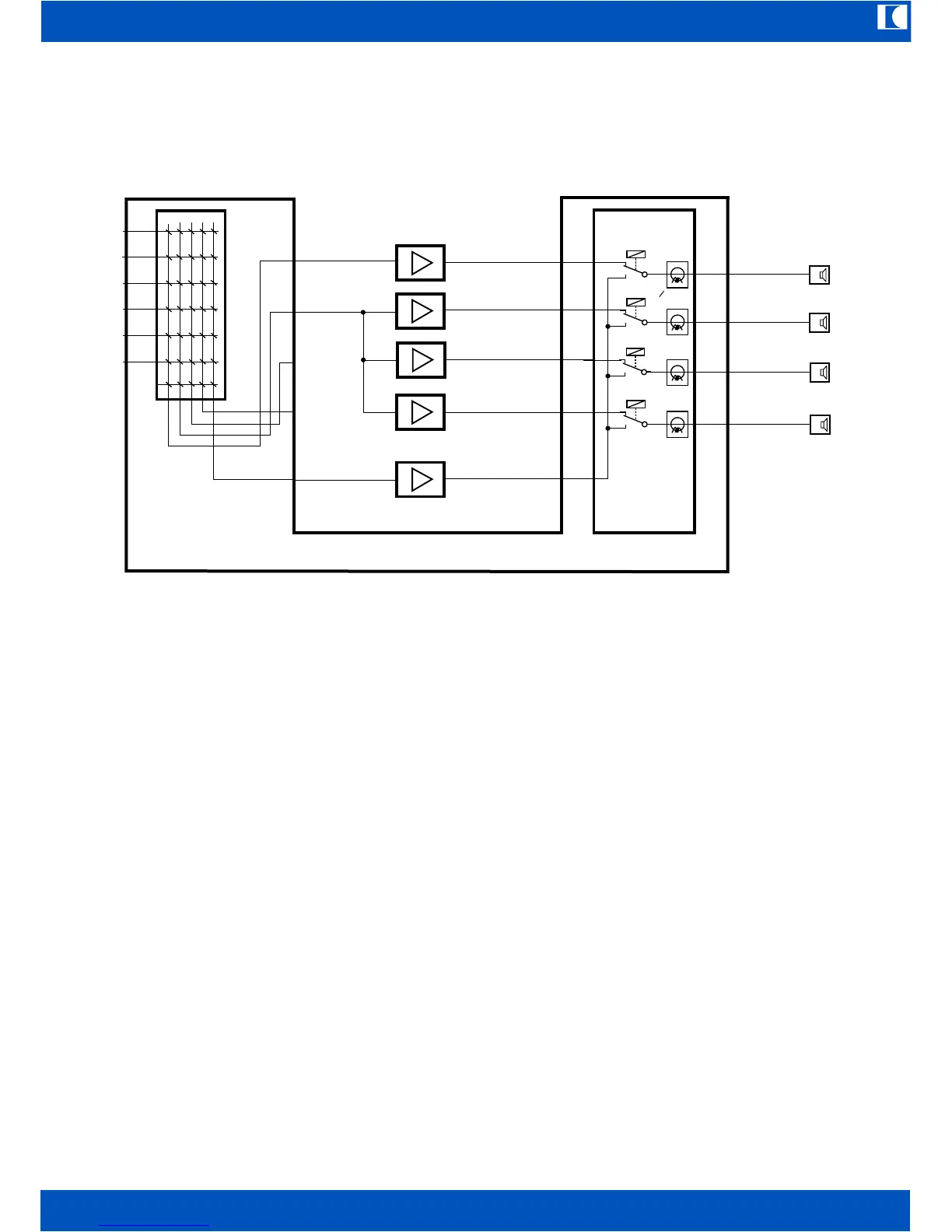
12.2 Sample configuration with several power amplifiers connected to one audio output
In the above sample several amplifiers are connected to one of the audio outputs
(OUT CH1...OUT CH4).
The system will of course detect only one joint amplifier, but the supervising functions will be
maintained. If one of the operational amplifiers fails, it will be replaced automatically by the backup
amplifier.
13. Functions when connecting a Personal Computer
With a PC it is possible to display comfortably all programming and adjustments without checking
all menus and submenus with the exception of item 5 and 7 below. Therefore no special software
is needed, a simple terminal software such as Windows Hyperterminal will do. First a PC COM-
port is to be connected to the RS232 port of the EV-5000 via a null-modem cable (reversed). Start
the terminal software and ajust the following parameters:
©
Bits per second 9600
Data bits 8
Parity none
Stop bits 1
Protocol none
To call for the function menu enter „i“ – without the quotation marks of course. The following screen
appears:
Power Amplifiers
CH1 OUT
CH2 OUT
CH3 OUT
CH4 OUT
SPARE AMP IN
OUT Spare Amp
OUT CH1
OUT CH2
OUT CH3
OUT CH4
AMP IN
AMP IN
AMP IN
AMP IN
Spare Amplifier
Input
Matrix
Line Relays and
Monitoring


 To Next Page
 Loading...