TA03_002_EN_2.2
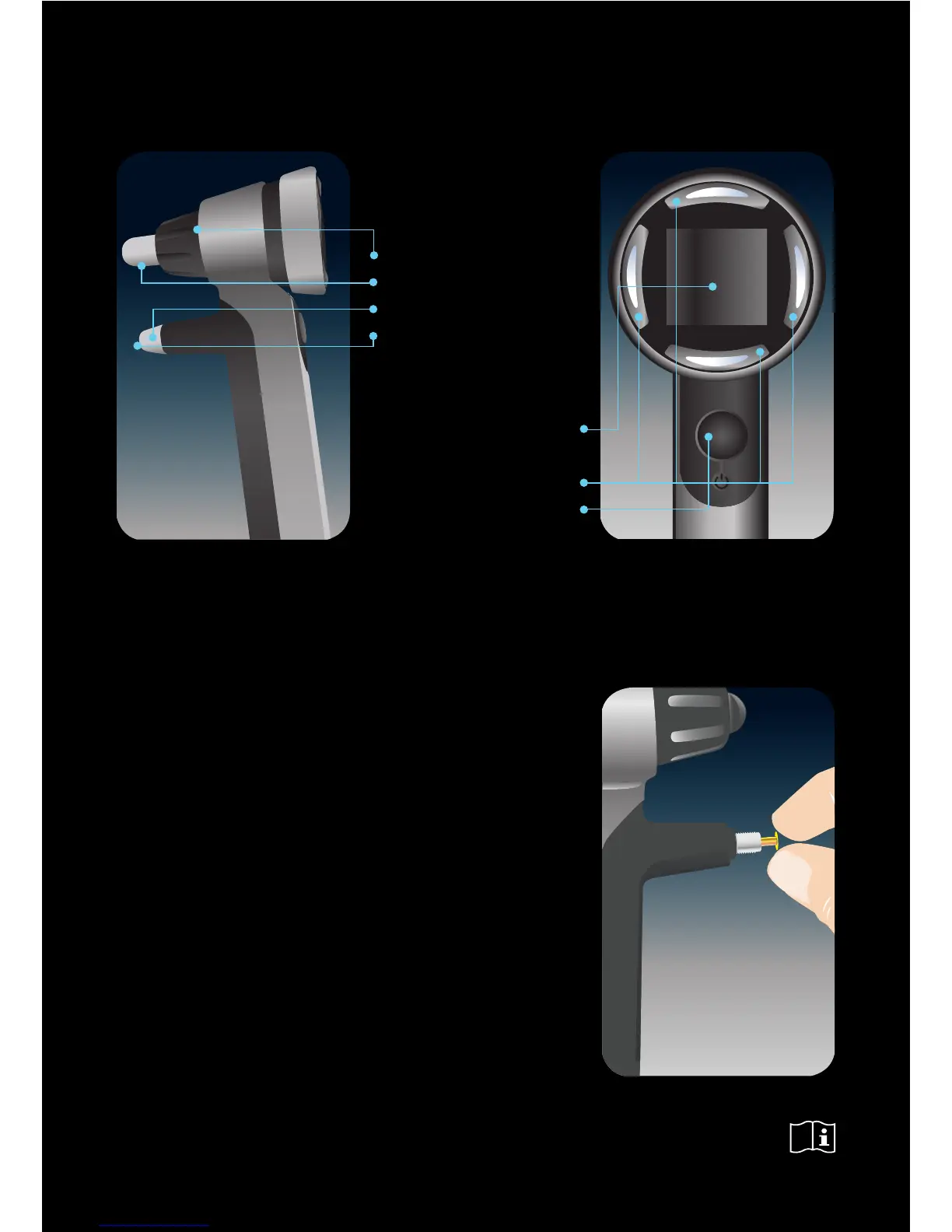
PARTS OF THE TONOMETER
CLEANING THE PROBE BASE
Theprobebasecanbereusedaercarefulcleaning.Makesure
thattheprobebaseiscompletelydrybeforeusingit.
1. Unscrewtheprobebasecollarandcarefullyremovetheprobe
basefromthetonometer.
2.Inverttheprobebaseoveracontainerlledwith70-100%
isopropylalcoholsoluon,allowingtheprobebasetodropinto
thecontainerandletsoakfor5-30minutes.
3.Drytheprobebasebyblowingsomecompressedairintoit.
4.Carefullyreinsertthecompletelydryprobebase,screwthe
collarbackintothetonometer.
Pleaserefertothemanualformoredetailedinstruconsof
changingandcleaningtheprobebase.
CHANGE/CLEAN THE PROBE BASE REGULARLY TO AVOID
UNNECESSARY SERVICE.
www.icaretonometer.com
Display
Navigaonbuons:
Le,Down,Up&Right
Mainbuon
Foreheadsupportadjusngwheel
Foreheadsupport
Collar
Probebase
Pleaserefertothemanual
foraddionalinformaon.


 To Previous Page
 Loading...