Wall Outlet
Wall Outlet
CAT 5e Cable
Router (not provided by ICC)
Patch Cord
DSL/Cable
Modem
INTERNET
Orange/White
Blue
Blue/White
Orange
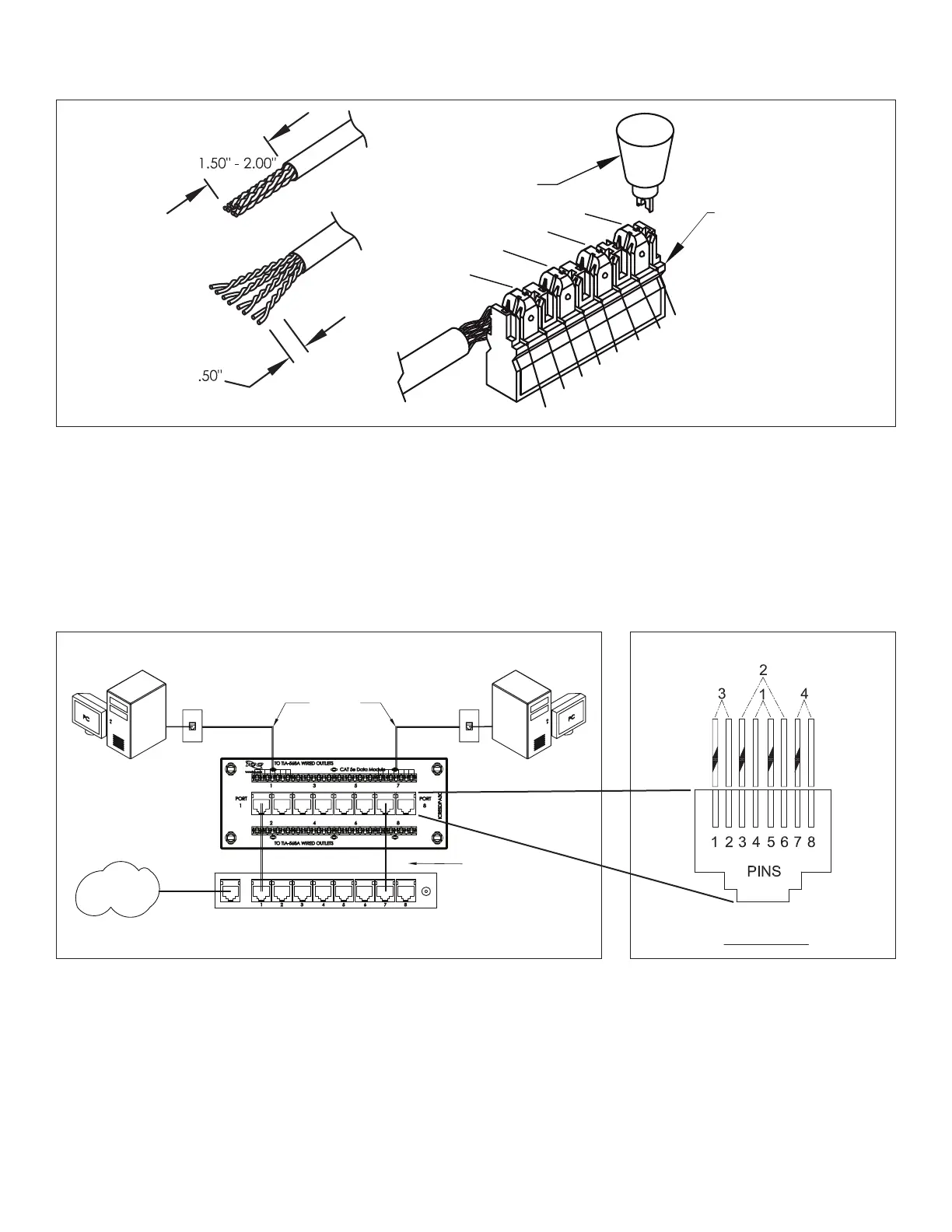
This module supports data connections for 8 locations. Connect one end of a patch cord to a
jack and the other end to the router after identifying the port you want to activate.
It is important to follow TIA-568-A wiring
because it allows pair 1 and 2 to be used for
phone applications, up to 2 lines.
Data Module Setup
Step 3
Punch Down Tool
110 Connector
Blue
Blue
Orange
Orange
Orange/White
Green/White
Brown/White
Brown
Brown
Green
Green
Terminate as indicated. Follow the color-code and only use 110 punch-down tool to terminate the wires. TIA-570 residential wiring standard
species TIA-568-A color code wiring as the standard for residential installations.
Wiring
© Copyright 2020, ICC. ICC and ICC logo are registered trade name and trademark. All rights reserved.
Email us: cs@icc.com • Go online: icc.com
MSR-0432-5 Rev B


 To Previous Page