
EasyManua.ls Logo

ICC OPC-PRT3 - User Manual

ICC OPC-PRT3
115 pages
Print Icon
To Next Page IconTo Next Page
Loading...
January 26, 2022
Part #11162 © 2022 ICC
ICC
INDUSTRIAL CONTROL COMMUNICATIONS, INC.
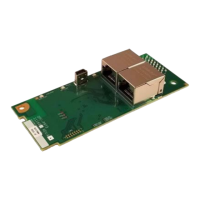
OPC-PRT3
Multiprotocol Ethernet Interface
Thank you for purchasing the OPC-PRT3 Multiprotocol Ethernet Interface.
This product is designed to connect the FRENIC-MEGA, FRENIC-HVAC, FRENIC-HVAC-P,
FRENIC-AQUA, and FRENIC-Ace series of inverters to Ethernet communication networks.
Please read this instruction manual thoroughly in order to become familiar with the proper
interface handling, installation and usage procedures.
Improper handling may inhibit correct operation or cause premature interface failure.
Please deliver this instruction manual to the end user of the interface, and retain it in an
accessible location.
For inverter usage instructions, please refer to the applicable inverter instruction manual.
Instruction Manual

Table of Contents

Questions and Answers

Summary

PRE-OPERATION INSTRUCTIONS

1.1 Product Overview

Introduces the interface card, its purpose, and connection methods.

1.2 Features and Specifications

Details the interface's features and technical specifications across various protocols.

1.4 LED Indicators

Explains the meaning of various LED indicators for status and activity.

INSTALLATION

2.1 Pre-Installation Instructions

Critical safety precautions and prerequisites before installing the interface card.

2.2 Installation Procedure for FRENIC-MEGA, FRENIC-HVAC, FRENIC-HVAC-P, FRENIC-AQUA, non-Ace Inverters

Step-by-step guide for installing the interface card in specific inverter models.

2.3 Installation Procedure for FRENIC-Ace Inverter

Instructions for installing the interface card in FRENIC-Ace inverter models.

INVERTER FUNCTION CODE SETTINGS

3.1 Inverter Control-Related Settings

Configures how the inverter receives commands and parameters over the network.

3.2 Inverter Reaction to Network Timeout Conditions

Defines the inverter's behavior when network communication is lost.

FUNCTION CODE NUMBERING AND BEHAVIOR

4.1 Register Numbers

Explains the mathematical conversion for mapping function codes to Modbus register numbers.

4.3 Commonly Used Function Codes

Provides details on frequently used function codes like Operation Command and Status.

FUJI CONFIGURATION STUDIO

6.1 Overview

Introduces the PC application for device discovery, configuration, and firmware updates.

6.7 Discovery over Ethernet

Explains how the studio discovers devices on local and remote Ethernet networks.

EMBEDDED WEB SERVER

7.1 Overview

Introduces the web server for remote monitoring and control via web browsers.

7.2 Customizing the Embedded Web Server

Guides on modifying the web server content and appearance.

FILE SYSTEM

8.1 Overview

Explains the use of the onboard file system for firmware, configuration, and web server content.

8.2 USB with Windows Explorer

Details how to access the interface card's file system using Windows Explorer via USB.

FIRMWARE

9.1 Overview

Discusses the importance and reasons for updating the interface card's embedded firmware.

9.2 Update Procedure

Step-by-step instructions for successfully updating the firmware.

PROTOCOL-SPECIFIC INFORMATION

10.1 Modbus;TCP

Details the Modbus/TCP protocol implementation, supported functions, and register mapping.

10.2 EtherNet;IP

Covers EtherNet/IP protocol support, messaging, and configuration for PLCs.

10.3 Allen Bradley CSP (PCCC)

Details the CSP (PCCC) protocol for Allen-Bradley PLCs and its configuration.

10.4 BACnet;IP

Covers BACnet/IP protocol support, device profiles, object types, and settings.

10.5 PROFINET IO

Details the PROFINET IO protocol implementation, configuration, and examples.

TROUBLESHOOTING

11.1 Troubleshooting

Provides solutions for common problems like communication failures and configuration issues.

ICC OPC-PRT3 Specifications

General IconGeneral
BrandICC
ModelOPC-PRT3
CategoryRecording Equipment
LanguageEnglish