EasyManua.ls Logo

iCES IMS-100 - Troubleshooting and Specifications; Common Issues and Solutions; Device Specifications

iCES IMS-100
7 pages
Print Icon
To Next Page IconTo Next Page
To Previous Page IconTo Previous Page
Loading...
volume.
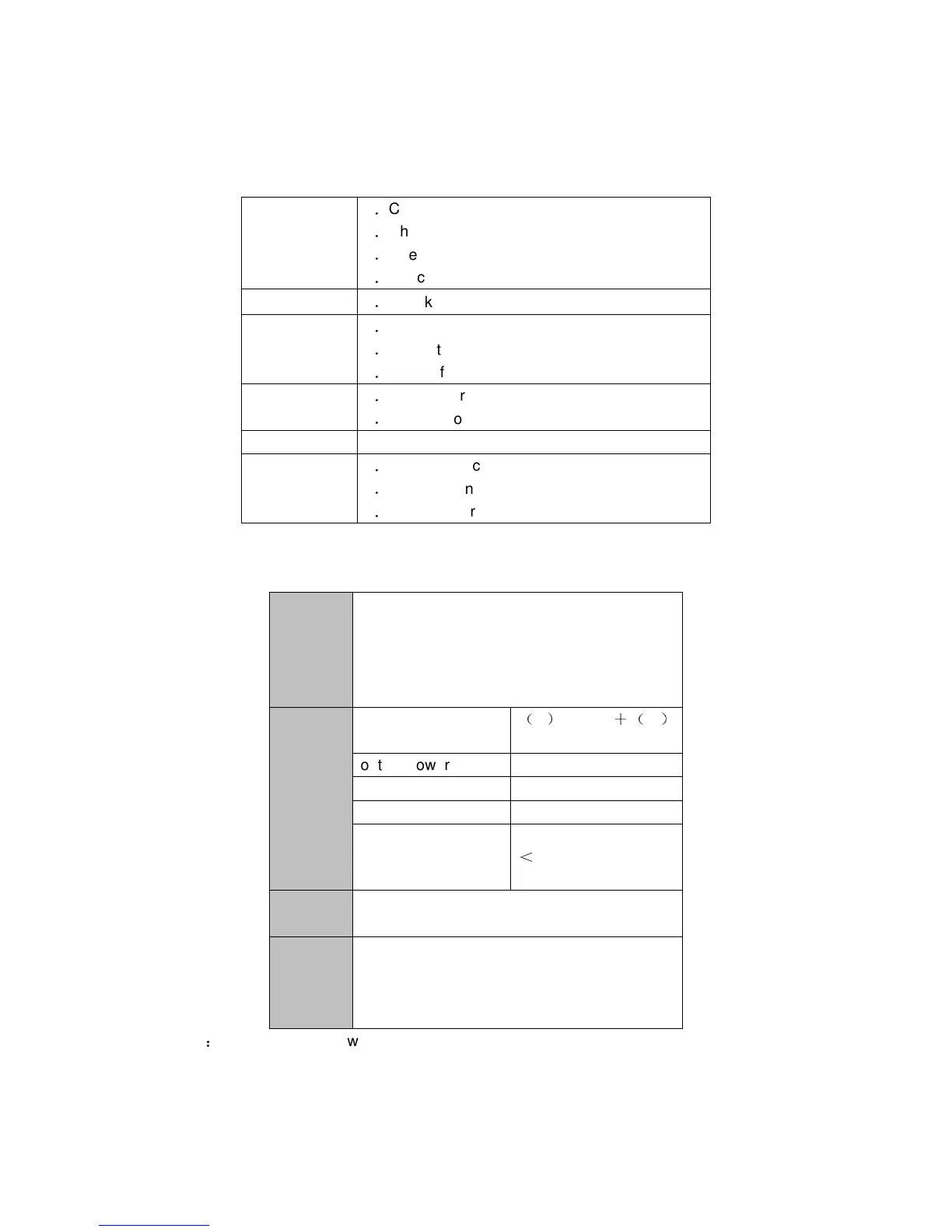
Trouble Shot
Not Open
1
Check if power switch is ON.
2
Check if power is full.
3
Check battery.
4
Check plug of DC5V.
Not re-charge
1
Check power supply plug.
No voice,
Or become
notice
1
Check volume is not 0.
2
Check the music file.
3
Check if low power
Signal sound
1
Low Power
2
Song’s problem
Wrong Display
1. Check OSD language.
Can’t
download
1
Check USB cable is good.
2
Check if connect to PC correctly.
3
Check if there is enough space of Memory
Technical specifications
Built-in
recharge
able
Li-ion
battery
Playing time: 3-5hours Note:According to
the volume
LINE-IN
LINE-OU
T
MP3
Maximum input
L
300mV
R
300mV
output power 2x3W
MP3 bits 8K bps – 320K bps
Signal to Noise Ratio
70dB
Rate of distortion
0.55%
music
format
MP3
Operatin
g
temperat
ure
-5 to 40 degrees
Note
this device cannot work as a portable hard disk.