EasyManua.ls Logo

iCES IMS-100 - User Manual

iCES IMS-100
7 pages
Print Icon
To Next Page IconTo Next Page
Loading...
Manual
IMS-100
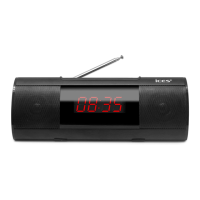
MP3-clock with LED-display
Thank you for purchasing our product. To use the player easily and correctly, please read
the following information particularly.
Note:
1.Please don’t use the player under over hot, cold, dusty, or wet environment.
2.lease don’t crash the player to avoid polishing the surface.
3.Please change the battery under the following situation:
A.The player become power-off, not able to be started.
4.Please connect DC as power supply when use AUX function.
5.Please cut the power and re-start the player if software becomes dead.
6.Don’t plug the USB connection when format the player, otherwise the software maybe
lost.
7.When power on,show clock time only,press
M” Button to select other function.
8.When insert USB or Micro SD card,device read directly.
Keys
Function of Keys
1. “USB DC”. Power supply and USB connection to PC.
2. “LINE IN”. Line-in connection for external sound, like MP3, DVD, and Mobile phone.
3. “TF CARD”. Slot of TF CARD memory card.
4. “USB HOST”. USB host function, read data’s from USB disk, etc.
Question and Answer IconNeed help?

Do you have a question about the iCES IMS-100 and is the answer not in the manual?

Summary

Device Keys and Ports

Connection Ports Overview

Explains the purpose of various connection ports and slots like USB, LINE IN, TF CARD, USB HOST.

Button Functions

Details the functions of buttons like V-, V+, PLAY/PAUSE, MODE, FORWARD, BACK for device operation.

Power and Battery Management

Power Supply Options

Specifies the available power sources, including USB and the internal rechargeable battery.

Device Operation Modes

Alarm Mode Setup

Guide to setting the alarm time, turning the alarm ON/OFF, and selecting alarm sounds.

Troubleshooting and Specifications

Common Issues and Solutions

Provides solutions for common problems like device not opening, no voice, signal sound, and download errors.

iCES IMS-100 Specifications

General IconGeneral
BrandiCES
ModelIMS-100
CategoryMP3 Player
LanguageEnglish