Hidden index menu
in menu Set Plan Page 1 select
the pointer on “i:“ then press and
hold the menu button.
Menu: Hidden index menu
SB: Speed B, Second speed change after
the SA done, after SB done speed back
according to V.
TB: Duration of SB, its can use D (Delay)
or E (Motor Encoder)
After SB done Speed robot will
back to normal speed (V)
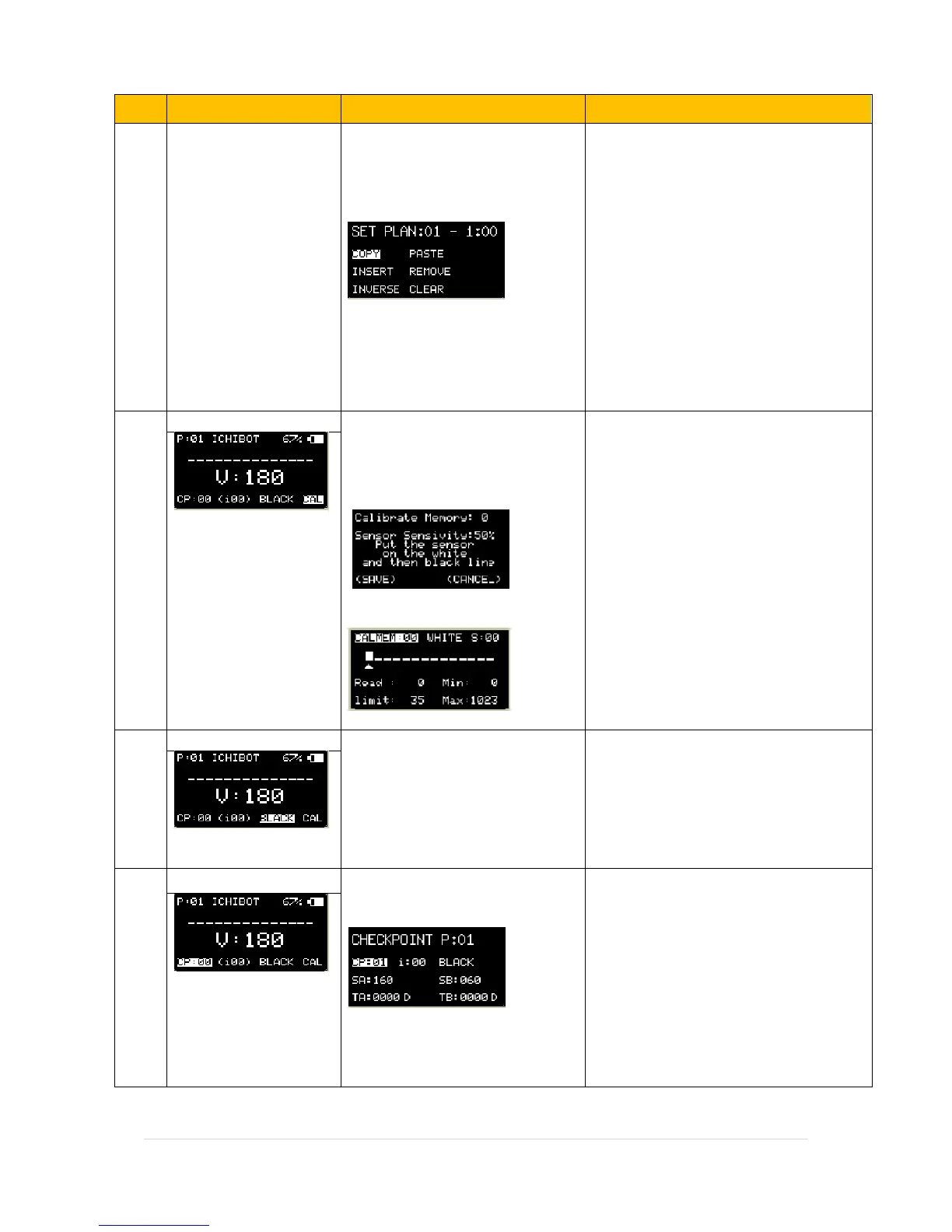
Sensor calibration menu. to adjust
the sensor values, in order to
detect light and dark lines.
Press Button OK L to show :
Menu: Auto Calibrate sensor
Press Button UP R to show :
Menu: Manual Calibrate sensor
Calibrate Memory : there is 0-2 memory
space to save sensor calibration results.
Sensor Sensivity: percentage of sensor
sensitivity
CALMEM : Calibrate Memory
WHITE / BLACK : line Color Mode
Read : sensor value real time
Limit : Limit Calibrate Value
Min : Minimum sensor value
Max : Maximum sensor Value
Menu to instantly change line
color mode
Black: dark colored lines with bright
backgrounds.
White: bright colored lines with dark
backgrounds.
Menu to set start position point
through checkpoint.
Menu: Checkpoint
CP: Checkpoin Number
I: Index Value in this CP
Black / white : line color in this CP
SA: Speed A in this CP
SB: Speed B in this CP
TA: Timer A in this CP
TB: Timer B in this CP


 To Next Page
 Loading...