EasyManua.ls Logo

Icom OPC-2218LU - User Manual

Icom OPC-2218LU
2 pages
Print Icon
To Next Page IconTo Next Page
Loading...
OPC-2218LU
INSTRUCTIONS
DATA CABLE
Thank you for choosing this Icom product.
READ ALL INSTRUCTIONS carefully and completely
before using this product.
Important
SAVE THESE INSTRUCTIONS — These instructions
contain important safety and operating details for the
cable.
The cable is used to connect an Icom transceiver/
receiver to a PC for data cloning, using Icom cloning
software.
Download the USB driver and the installation guide
from the Icom website.
Explicit denitions
WORD DEFINITION
CAUTION Equipment damage may occur.
NOTE
If disregarded, inconvenience only.
No risk of personal injury, re or
electric shock.
Icom is not responsible for the destruction, damage to, or
performance of any Icom or non-Icom equipment, if the
malfunction is because of:
Force majeure, including, but not limited to, res,
earthquakes, storms, oods, lightning, other natural
disasters, disturbances, riots, war, or radioactive
contamination.
The use of Icom products with any equipment that is not
manufactured or approved by Icom.
1
Precautions
CAUTION: USE ONLY INDOORS! NEVER expose
the cables to rain, snow, or any liquids.
NEVER let metal, wire, or other objects touch any
internal part of the connectors.
NEVER place any heavy object on the cable, or
pinch it.
DO NOT use harsh solvents such as benzine or
alcohol when cleaning, as they will damage the
cables.
Disposal
The crossed-out wheeled-bin symbol on your
product, literature, or packaging reminds you
that in the European Union, all electrical and
electronic products, batteries, and accumulators
(rechargeable batteries) must be taken to
designated collection locations at the end
of their working life. Do not dispose of these products as
unsorted municipal waste. Dispose of them according to the
laws in your area.
FCC Information
This equipment has been tested and found to comply with
the limits for a Class B digital device, pursuant to part 15
of the FCC Rules. These limits are designed to provide
reasonable protection against harmful interference in a
residential installation. This equipment generates, uses,
and can radiate radio frequency energy and, if not installed
and used in accordance with the instructions, may cause
harmful interference to radio communications. However,
there is no guarantee that interference will not occur in a
particular installation. If this equipment does cause harmful
interference to radio or television reception, which can be
determined by turning the equipment o󰀨 and on, the user is
encouraged to try to correct the interference by one or more
of the following measures:
Reorient or relocate the receiving antenna.
Increase the separation between the equipment and
receiver.
Connect the equipment into an outlet on a circuit di󰀨erent
from that to which the receiver is connected.
Consult the dealer or an experienced radio/TV technician
for help.
CAUTION: Changes or modications not expressly
approved by Icom Inc. could void the user’s authority to
operate the equipment.
This device complies with part 15 of the FCC Rules.
Operation is subject to the following two conditions: (1) This
device may not cause harmful interference, and (2) this
device must accept any interference received, including
interference that may cause undesired operation.
About CE
The OPC-2218LU complies with the essential
requirements of the 2014/30/EU directive for
Electromagnetic Compatibility.
This compliance is based upon the
harmonised CENELEC generic standard
EN 61000-6-1:2007, EN 61000-6-3:2007/A1:2007.
Question and Answer IconNeed help?

Do you have a question about the Icom OPC-2218LU and is the answer not in the manual?

Summary

Important Safety and Usage Information

Explicit Definitions

Defines key terms like CAUTION and NOTE regarding equipment damage or inconvenience.

General Cable Precautions

Important safety guidelines for handling the cable, including avoiding liquids, foreign objects, and improper cleaning agents.

FCC Information and Compliance

FCC Compliance and Interference Measures

Details FCC compliance for Class B digital devices and provides steps to correct potential radio frequency interference.

CE Electromagnetic Compatibility

Confirms OPC-2218LU compliance with EU Electromagnetic Compatibility directives based on harmonized standards.

Product Disposal Guidelines

Instructions for proper disposal of electrical and electronic products in the European Union, avoiding unsorted municipal waste.

System Requirements and Specifications

Supported Operating Systems

Lists compatible Microsoft Windows operating systems (10, 8.1) and notes on RT versions.

Other System Requirements

Specifies the need for a USB 1.1 or 2.0 port and a note about specific cable labels for compatibility.

Device Specifications

Details cable length, weight, and usable temperature range for the OPC-2218LU and OPC-1637.

Operating Notes and Installation

Operating Notes

Important usage advice including not extending the USB cable and ensuring adequate PC USB port current.

USB Driver and Installation Guide Download

Instructions for downloading and installing the necessary USB driver and installation guide from the Icom website.

Overview

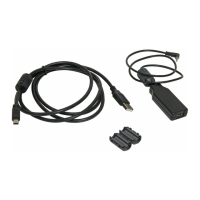
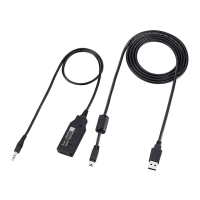
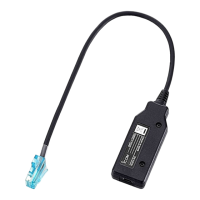
The Icom OPC-2218LU is a data cable designed to connect Icom transceivers/receivers to a personal computer for data cloning, utilizing Icom cloning software. This cable facilitates the transfer of configuration data between the radio and the PC, enabling users to program or backup their radio settings.

Function Description

The primary function of the OPC-2218LU is to establish a communication link between an Icom radio and a PC. This connection is essential for performing data cloning operations, which involve reading settings from the radio, modifying them on the PC using Icom's dedicated cloning software, and then writing the updated settings back to the radio. This process simplifies the management of radio configurations, especially for multiple devices or complex setups. The cable requires the installation of a specific USB driver and an installation guide, both of which are available for download from the Icom website. It's crucial to note that an Internet connection is required for the USB driver installation.

Important Technical Specifications

  • Operating System (OS) Compatibility:
    • Microsoft Windows 10 (32-bit/64-bit)
    • Microsoft Windows 8.1 (32-bit/64-bit), with the exception of Microsoft Windows RT.
    • It is important to confirm that the OPC-2218LU cable has the letter "B" on its label for compatibility with Windows 8.1 and 10. Cables without this "B" are not usable with these operating systems.
  • Other Requirements: A USB 1.1 or 2.0 port on the PC.
  • Usable Temperature Range: 0°C to +60°C (+32°F to +140°F).
  • Cable Length (approximate):
    • OPC-2218LU: 530 mm (20.9 inches)
    • OPC-1637 (USB cable, supplied): 1500 mm (4.9 feet)
  • Weight (approximate):
    • OPC-2218LU: 35 g (1.2 oz)
    • OPC-1637 (USB cable): 49 g (1.7 oz)
  • Current Requirement: Approximately 20 mA of current is required from the USB port. Insufficient current capacity can lead to unstable programming operations and data errors.
  • Compliance: The OPC-2218LU complies with the essential requirements of the 2014/30/EU directive for Electromagnetic Compatibility, based on the harmonized CENELEC generic standard EN 61000-6-1:2007 and EN 61000-6-3:2007/A1:2007. It has also been tested and found to comply with the limits for a Class B digital device, pursuant to part 15 of the FCC Rules.

Usage Features

  • Indoor Use Only: The cable is designed for indoor use and should never be exposed to rain, snow, or any liquids.
  • Direct Connection: It is recommended to connect the cable directly to a PC's USB port or to a self-powered USB hub to ensure stable operation.
  • USB Driver Installation: Users must download and install the latest OPC-2218LU USB driver from the Icom website before connecting the cable to the PC. If the OPC-478UC USB driver is already installed, the OPC-2218LU cable can be used immediately. The installation guide for the driver is also available on the Icom website.
  • System Compatibility Check: Before use, ensure that the PC supports USB port operation by checking the Universal Serial Bus controller in the PC's Device Manager.
  • Avoid Cable Extension: Do not extend the USB cable using a cable other than the one supplied, as this may cause errors.
  • Proper Handling: Avoid placing heavy objects on the cable or pinching it, as this can damage the internal wiring.
  • No Metal Contact: Never allow metal, wire, or other objects to touch any internal part of the connectors to prevent short circuits or damage.

Maintenance Features

  • Cleaning: Do not use harsh solvents such as benzine or alcohol when cleaning the cables, as these can damage the cable materials. A soft, dry cloth is generally sufficient for cleaning.
  • Storage: Store the cable in a clean, dry environment, away from extreme temperatures and direct sunlight, to prolong its lifespan.
  • Disposal: In the European Union, the product, its literature, or packaging marked with a crossed-out wheeled-bin symbol indicates that it should not be disposed of as unsorted municipal waste. Instead, it must be taken to designated collection locations for electrical and electronic products at the end of its working life, in accordance with local laws. This promotes responsible recycling and prevents environmental pollution.
  • Manufacturer's Responsibility: Icom is not responsible for destruction, damage, or performance issues if the malfunction is due to force majeure (e.g., fires, earthquakes, floods, lightning, natural disasters, disturbances, riots, war, radioactive contamination) or if Icom products are used with equipment not manufactured or approved by Icom. Users are advised to use only Icom-approved accessories and follow all instructions to ensure proper functionality and safety. Any changes or modifications not expressly approved by Icom Inc. could void the user's authority to operate the equipment.

Icom OPC-2218LU Specifications

General IconGeneral
BrandIcom
ModelOPC-2218LU
CategoryCables and connectors
LanguageEnglish

Related product manuals