3
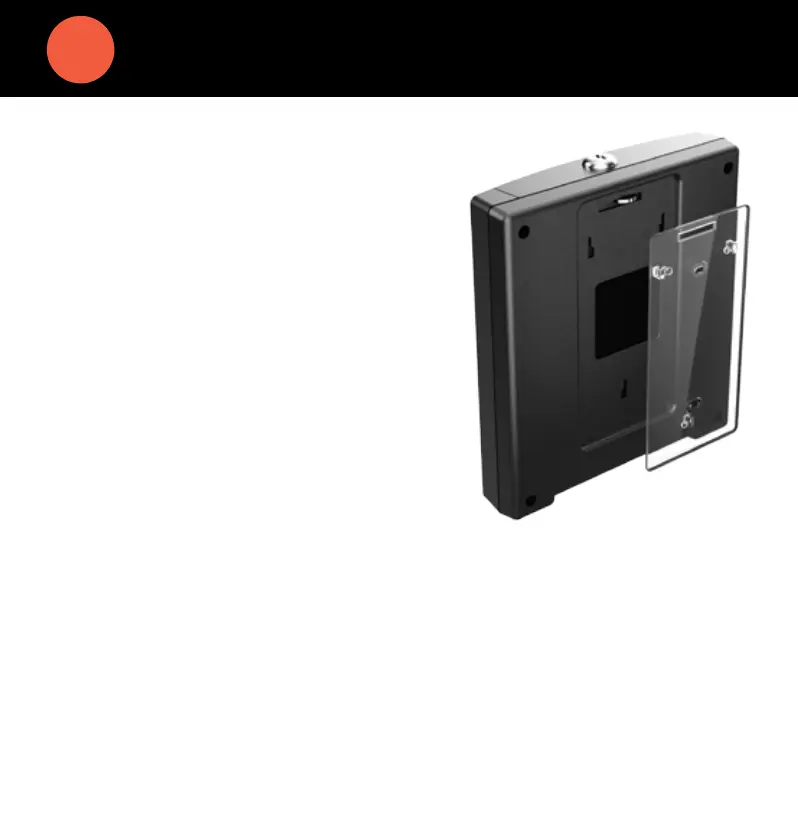
1. Determine your desired height for the clock.
2. Use the 2 wall mount screws provided and
attach the bracket to the wall.
3. Insert the key and turn it clockwise a
quarter of a turn.
4. Push the time clock onto the mounting
bracket so that the tabs fit into the 3
matching slots on the back of the clock.
5. Slide the clock downward until the tabs
click into place.
6. Use the key to lock the clock to the
mounting bracket.
7. Remove the key.
MOUNT YOUR TIME CLOCK TO THE WALL


 To Next Page