EasyManua.ls Logo

ICON I-DJ - User Manual

ICON I-DJ
20 pages
Print Icon
To Next Page IconTo Next Page
Loading...
N16549
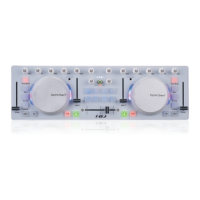
USB MIDI DJ Controller with
TM
OptiSen optical scratch wheels
Question and Answer IconNeed help?

Do you have a question about the ICON I-DJ and is the answer not in the manual?

Summary

Introduction

Whats in the Package

Lists items included with the iDJ controller for user setup and reference.

Features

Front Panel Layout

Key Control Elements

Details scratch wheels, tempo faders, and mixer knobs for core DJ control.

Playback and Mode Controls

Explains buttons for sync, loop, cue, play/pause, and vinyl mode operation.

Crossfader and Curve Adjustment

Adjusts crossfader transition and curve characteristic for effective mixing.

User-Defined Buttons

Customizes button functions via iMap software for personalized user control.

Side Panel Layout

USB Port

Details the B-Type USB port for computer connection and device power.

Getting Started

Setup DJ Software

Instructions for configuring the iDJ controller within DJ or MIDI software.

Import Preset Templates

Guide to loading pre-made templates for efficient software MIDI mapping.

Install iMap Software for Mac OSX

Install iMap Software for Windows

Assigning MIDI Functions with iMap

iMap Software Panel & Overview

Introduces iMap interface, connection requirements, and overview.

Control Assignments

Detailed mapping of MIDI channels/CCs for wheels, faders, buttons, and knobs.

Advanced iMap Features

Covers layers, curve settings, master/slave mode, file management, and factory reset.

Daisy Chain iDJ Controllers

Specifications

Services

Summary

Introduction

Whats in the Package

Lists items included with the iDJ controller for user setup and reference.

Features

Front Panel Layout

Key Control Elements

Details scratch wheels, tempo faders, and mixer knobs for core DJ control.

Playback and Mode Controls

Explains buttons for sync, loop, cue, play/pause, and vinyl mode operation.

Crossfader and Curve Adjustment

Adjusts crossfader transition and curve characteristic for effective mixing.

User-Defined Buttons

Customizes button functions via iMap software for personalized user control.

Side Panel Layout

USB Port

Details the B-Type USB port for computer connection and device power.

Getting Started

Setup DJ Software

Instructions for configuring the iDJ controller within DJ or MIDI software.

Import Preset Templates

Guide to loading pre-made templates for efficient software MIDI mapping.

Install iMap Software for Mac OSX

Install iMap Software for Windows

Assigning MIDI Functions with iMap

iMap Software Panel & Overview

Introduces iMap interface, connection requirements, and overview.

Control Assignments

Detailed mapping of MIDI channels/CCs for wheels, faders, buttons, and knobs.

Advanced iMap Features

Covers layers, curve settings, master/slave mode, file management, and factory reset.

Daisy Chain iDJ Controllers

Specifications

Services

ICON I-DJ Specifications

General IconGeneral
TypeDJ Controller
ConnectivityUSB
Number of Channels2
MIDI CompatibilityYes
Power SupplyUSB Bus Powered
SoftwareVirtual DJ
Software CompatibilityVirtual DJ, Traktor
USBUSB 2.0

Related product manuals