8. Technical specications
English 2/6
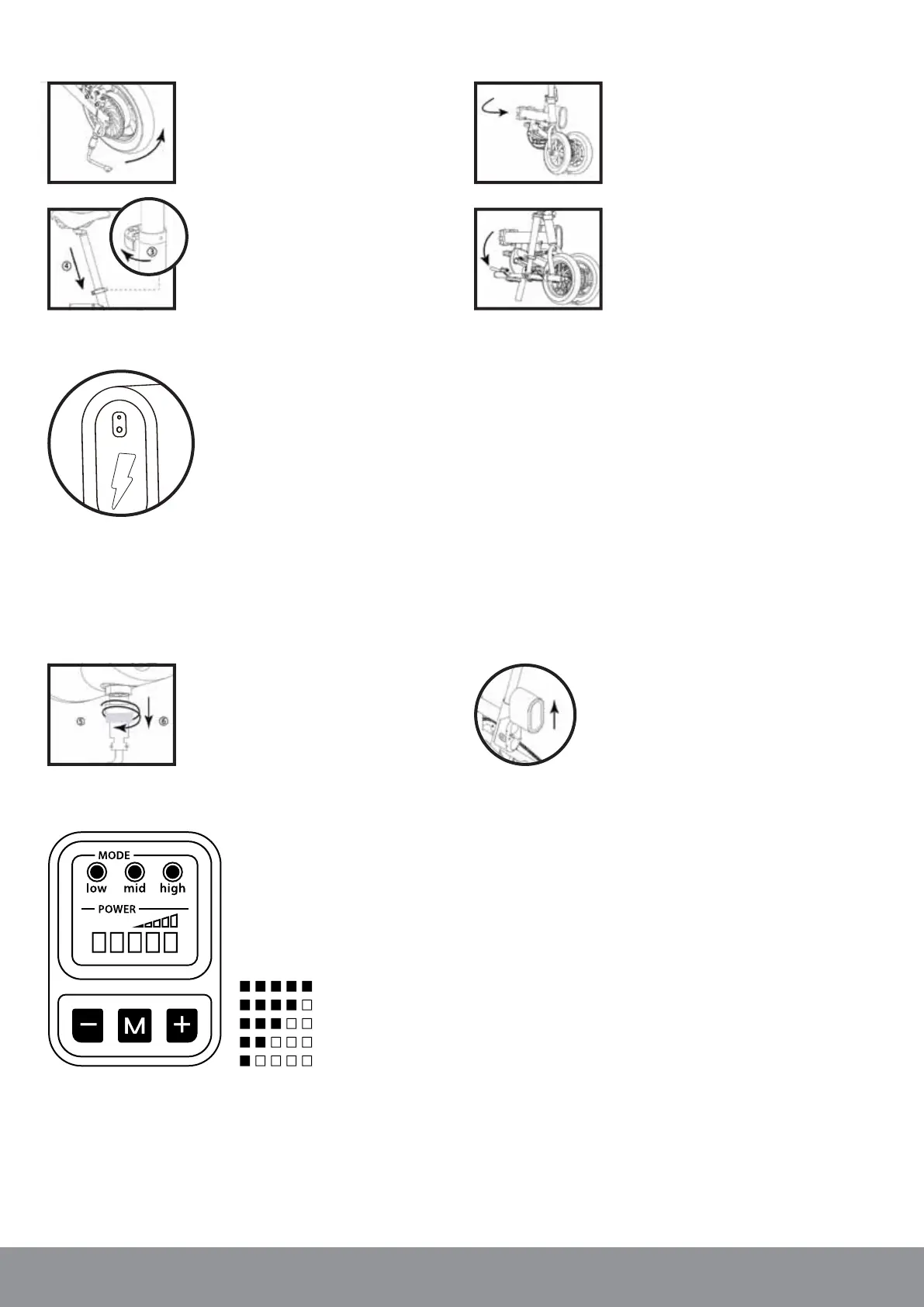
3. How to fold the E-BIKE K7
1. Fold in the Kickstand / bicycle stand.
2. Open the quick release clamp for the seat
pipe to adjust the height to a minimum.
3. Open the quick release clamp for the main
frame to fold the E-BIKE K7 in the middle.
4. Open the quick release clamp for the
steering rod to fold it down.
4. How to start
1. Ensure the E-BIKE K7 is fully assembled and all quick releases levers are tightened.
2. Press the power switch on the rear of the battery
3. Turn on the Controller at the handlebar by pressing the power switch.
4. Fold in the E-BIKE K7 Kickstand / bicycle stand and start your ride.
Note: For the rst 1.5 km please use your bike without the electric assistance like a regular bike.
6. How to take out the battery
1. Unplug the Power cord by unscrewing
counterclockwise and pulling it o.
2. Unlock the combination lock and lift the
battery up to remove it.
7. How to use the Boardcomputer
7.1. TURN ON/OFF
Press and hold the power button (M)
to start the device.
7.2. BATTERY
The Power indicator (5 levels) shows
the remaining capacity
of your battery.
100-80%
80-60%
60-40%
40-20%
0-20 %
7.3. GEAR SHIFT
The gear can be toggled from low to high by pressing on “+” or “-”.
Each gear setting will give a dierent level of acceleration and
maximum speed (low, mid, high).
► Frame:
Aluminum Alloy
► Battery type:
6.0 Ah Lithium battery
► Motor:
36 V 250 W brushless motor
► Max. speed:
25 km/h (assistant mode)
► Tire style:
12’’ inatable tire
► Braking system:
Double disc brake
► Waterproof grade:
IP54
► Maximum weight:
100 kg
► Size / Weight:
123 x 55 x 92 cm / 18 kg
5. Using the combination lock
1. Default combination is 000.
2. Press button to unlock the battery.
3. To set new combination:
1) Remove the battery
2) Hold down the "Hidden Button" while changing the number combination


 To Next Page