Need help?
Do you have a question about the Icron USB 3-2-1 Starling 3251C and is the answer not in the manual?
Route link cable, connect LEX/REX, computer, and USB device.
Connect power if needed, explore ExtremeUSB-CTM features.
Statements on FCC, CE, Industry Canada, and WEEE regulations.
Instructions for intended use, handling, and storage environment.
Details on two-year warranty, remedies, liability, and service.
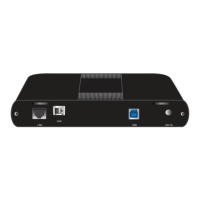
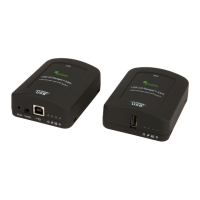
The Icron USB 3-2-1 Starling™ 3251C is a 1-Port USB 3-2-1 Fixed Range Point-to-Point Extender System designed to extend USB connectivity over a custom link cable, ensuring reliable data transmission for various applications. This system comprises two main components: the Local Extender (LEX) and the Remote Extender (REX), which work in tandem to bridge the distance between a host computer and USB devices. The Starling 3251C is built to provide a seamless extension experience, supporting USB 3, 2, and 1 standards, making it versatile for a wide range of peripherals and devices. Its core function is to overcome the typical distance limitations of standard USB cables, allowing for flexible placement of USB devices without compromising performance.
The Icron USB 3-2-1 Starling 3251C system operates by converting USB signals into a format suitable for transmission over a custom link cable, and then converting them back to USB signals at the remote end. The LEX unit connects to the host computer's USB-C port, acting as the local interface. It receives USB data from the computer and prepares it for long-distance transmission. The REX unit, on the other hand, connects to the USB device(s) at the remote location. It receives the transmitted data from the LEX and converts it back into standard USB signals, allowing the connected USB device to function as if it were directly connected to the host computer. This point-to-point architecture ensures a dedicated and robust connection between the host and the remote device.
The system is designed for fixed-range applications, meaning it is intended for installations where the distance between the host and the device is predetermined and consistent. The use of a custom link cable, which is included with the system, is crucial for its operation. This cable is specifically engineered to maintain signal integrity over extended distances, differentiating it from generic network cables. The system's ability to support USB 3, 2, and 1 ensures compatibility with a broad spectrum of USB devices, from high-speed data transfer devices like external hard drives to lower-speed peripherals such as keyboards and mice. This broad compatibility makes the Starling 3251C a flexible solution for various professional and industrial environments where USB extension is required.
A key feature of the Starling 3251C is its "transparent USB extension." This means that the extender system operates in a way that is invisible to the operating system and connected devices. No special drivers or software are required on the host computer or the USB devices for the extender to function. This "true plug and play" capability simplifies installation and deployment, making it accessible even for users without extensive technical expertise. The system is compatible with all major operating systems, including Windows®, macOS™, Linux®, and Chrome OS™, further enhancing its versatility and ease of integration into existing setups.
Setting up the Icron USB 3-2-1 Starling 3251C is a straightforward process, designed for quick deployment. Before installation, it is recommended to ensure that all necessary drivers for the USB device(s) intended for use with the extender are already installed on the host computer. This pre-installation step helps to avoid potential compatibility issues once the extender is in place.
The physical installation begins by routing the custom link cable. For installations involving conduits, the system includes a cable pulling eye, which facilitates the safe and easy passage of the link cable through the conduit, protecting it from damage during installation. Once the cable is routed, the LEX and REX units are placed at their desired locations. The custom link cable is then connected to the "LINK" ports on both the LEX and REX units. It is important to use only the included cable, as it is specifically rated for the product's performance over the specified distance and may be plenum or non-plenum rated depending on the environment.
Next, the LEX unit is connected to the host computer. This is done by plugging the included USB-C cable into the LEX's "HOST USB" port and then into the computer's USB-C port. This establishes the connection between the extender system and the host. Finally, the USB device(s) are connected to the REX unit's "DEVICE USB" port. Once all connections are made, the system should be operational.
The Starling 3251C is designed to be powered by the USB-C connection from the host computer in many scenarios. However, for situations where the connected USB device(s) require more power, or if the power LED on the LEX illuminates amber (indicating a warning), an optional Icron-approved 5V 3A power supply (not included) can be plugged into the LEX. This ensures stable power delivery to the system and connected devices, preventing performance degradation or disconnections due to insufficient power. The availability of an optional power supply provides flexibility for various power-hungry USB devices.
The system's "ExtremeUSB-C™" suite of features underscores its advanced capabilities. This includes transparent USB extension, true plug and play functionality, and broad operating system compatibility. These features collectively contribute to a user-friendly experience, minimizing the need for complex configurations or troubleshooting. The robust design and dedicated link cable ensure a stable and reliable connection, which is critical for applications where data integrity and continuous operation are paramount.
The Icron USB 3-2-1 Starling 3251C is designed for minimal maintenance, emphasizing reliability and durability. The "true plug and play" nature of the system means there are no software drivers to update or manage for the extender itself, simplifying long-term maintenance. The primary focus for maintenance revolves around proper handling and environmental considerations to ensure the longevity and optimal performance of the device.
Users are advised to read and follow all instructions provided with the product and to operate it only for its intended use. A crucial maintenance guideline is to avoid attempting to open the product casing. Doing so can damage the device and will void the warranty, as the internal components are not user-serviceable. This emphasizes the importance of relying on the device's inherent design and not attempting unauthorized repairs or modifications.
For storage, when the product is not in use, it should be kept in a dry location within a specified temperature range. This protects the internal electronics from extreme conditions that could lead to damage or premature failure. Adhering to these storage guidelines helps preserve the device's operational integrity over time.
In terms of troubleshooting, if the power LED on the LEX unit illuminates amber, it indicates a warning, typically related to power. This is a clear visual cue for the user to connect an optional 5V 3A power supply to the LEX, which resolves most power-related issues. This simple indicator and solution make it easy for users to address common operational concerns without needing specialized tools or knowledge.
For more detailed information on configuring and operating the Starling 3251C, a comprehensive user guide is available online. This resource provides in-depth instructions and troubleshooting tips, empowering users to resolve more complex issues if they arise. Additionally, technical support is available through the manufacturer's website, offering a channel for assistance with any problems that cannot be resolved through the user guide.
The product comes with a limited hardware warranty, covering significant defects in material and workmanship for a period of two years from the date of purchase. This warranty extends to the licensee, its customers, and end-users, providing assurance of product quality. However, the warranty does not cover failures caused by misuse, neglect, accident, modification, operation outside a normal operating environment, service by non-authorized servicers, or products for which Icron is not responsible. This highlights the importance of proper usage and adherence to the manufacturer's guidelines to maintain warranty coverage.
In the event of a hardware defect covered by the warranty, Icron's remedy is either a return of the price paid or the repair or replacement of the hardware. To obtain warranty service, users must contact Icron within the warranty period to receive a Return Material Authorization (RMA) number. This process ensures that returns are properly tracked and handled, facilitating efficient service. The product must be packaged appropriately for safe shipment and sent prepaid to Icron Technologies Corporation, with the RMA number clearly marked on the outside of the package. This structured approach to warranty service ensures that users can receive support and resolution for product issues in an organized manner.
 General
| Category | Extender |
|---|---|
| USB Standard | USB 3.2 Gen 1 |
| Data Transfer Rate | 5 Gbps |
| Connector Type (Device) | USB Type-A |
| Humidity | 10% to 90% non-condensing |
| Model | Starling 3251C |
| Maximum Distance | 100 m |
| Operating Temperature | 0°C to 50°C |
| Storage Temperature | -20°C to 70°C |
| Compatibility | USB 1.1, 2.0, 3.0 |


 To Next Page