GENERAL OPERATIONS
Connecng Bluetooth to your smartphone / tablet
Press the STD BY buon to turn on, hold the PAIRING buon to connect your
external Bluetooth device.
On your smartphone / Tablet, turn on Bluetooth and enable device scanning.
When XD8N shows on the your smartphone / tablet, select it to connect it to XD8N
When both devices are successfully connected, you are ready to play music
wirelessly from your device.
Press the PLAY buon to start music playback.
Press / hold the NEXT / PREV buon of unit or press the NEXT / PREV of external
Bluetooth device to switch between music tracks.
Hold the PAIRING buon to reconnect other Bluetooth device.
Power Management Funcon:
Unit will automacally go to standby mode aer 15 minutes without sound output or operaon.
To resume operaon, simply press the STD BY buon to turn on unit
1.
2.
3.
4.
5.
6.
7.
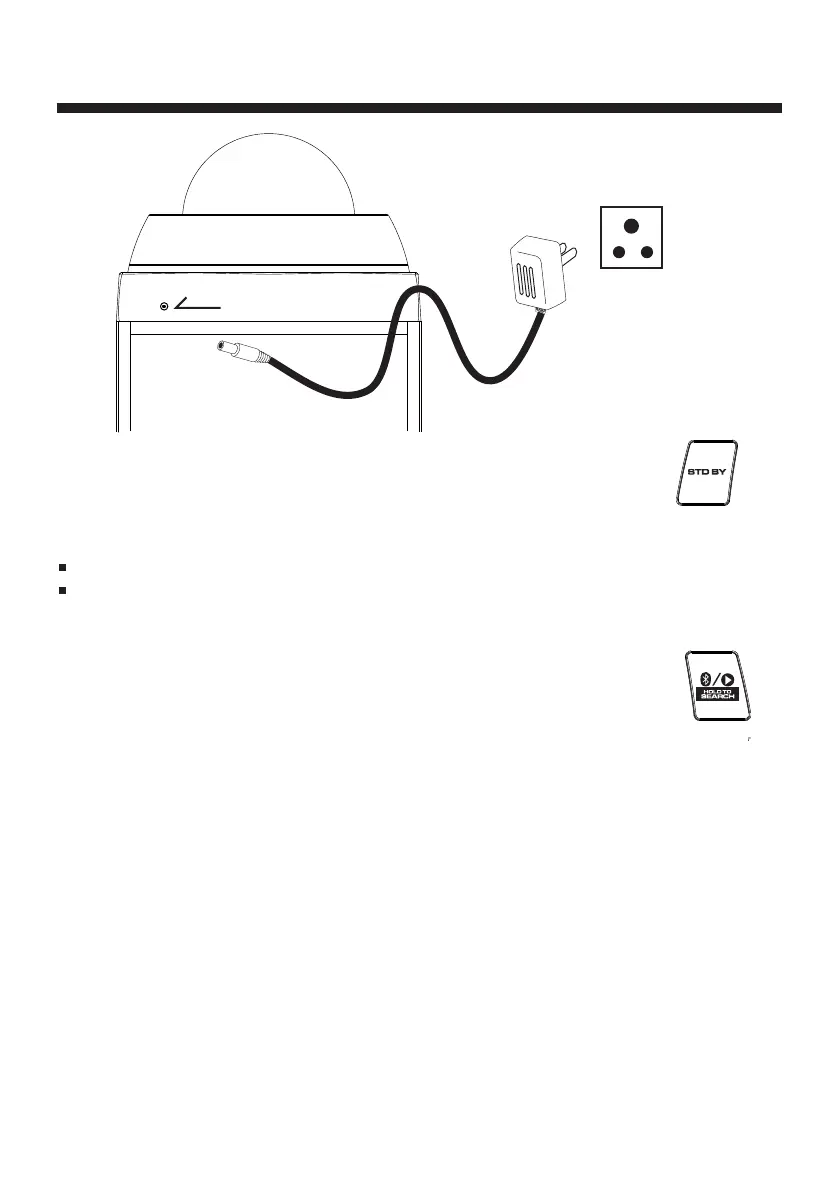
Connect the adapter to the main unit and plug the included adapter into AC wall
socket. Press the STD BY buon to turn on power. Press again turn unit to standby.
E3
If the adapter does not fit properly, turn it over and again.
Unplug the power adapter when the unit not operaon or unused for long periods of the me.
NOTES
REAR OF MAIN UNIT
AC Adapter
AC OUTLET
AC 230-240V, 50Hz


 To Next Page
 Loading...