
 Need help?
Do you have a question about the Ideal Air DUAL MINI-SPLIT and is the answer not in the manual?
Specifies the voltage requirement for the remote control.
Defines the maximum distance for remote signal reception.
Details the operating temperature range for the remote.
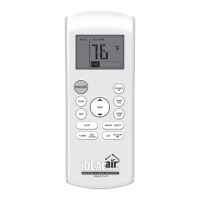
Controls the air conditioner's power ON and OFF states.
Cycles through different operating modes like AUTO, COOL, DRY, HEAT, FAN.
Adjusts the fan speed in various steps (LOW, MEDIUM, HIGH, AUTO).
Activates or deactivates the sleep function for comfort and energy saving.
Enables rapid cooling or heating to reach the set temperature quickly.
Initiates a self-cleaning cycle for the evaporator to maintain freshness.
Increases the indoor temperature setting by 1°F increments.
Decreases the indoor temperature setting by 1°F increments.
Activates or deactivates the SILENCE function for quiet operation.
Sets the auto-on timer for the air conditioner to start automatically.
Sets the auto-off timer for the air conditioner to stop automatically.
Controls the horizontal louver auto-swing feature.
Adjusts the louver movement for desired up/down airflow direction.
Enables the remote to sense and transmit the ambient temperature.
Toggles the indoor unit's screen display ON or OFF.
Shows the currently selected operating mode (AUTO, COOL, DRY, HEAT, FAN).
Displays operational status, power, battery level, and ECO mode availability.
Indicates when the auto-on or auto-off timer is set.
Shows set temperature, room temperature, or timer setting values.
Signals when the unit is operating in SLEEP MODE.
Shows when the FOLLOW ME feature is active.
Displays the selected fan speed (Low, Medium, High, Auto).
Step-by-step guide to setting and starting the AUTO operating mode.
Instructions for operating the unit in COOL, HEAT, or FAN modes.
Guide to operating the unit in DRY mode for dehumidification.
Details how to set auto-on and auto-off timer functions for the unit.
Explains how to program the unit to turn on automatically at a set time.
Explains how to program the unit to turn off automatically at a set time.
Guides on setting both auto-on and auto-off timers concurrently.
Specifies the optimal distance and pointing direction for remote control operation.
Instructions on how to mount and use the optional remote control holder.
Procedures for replacing the remote control's exhausted batteries.
 General
| Power Source | 2 x AAA batteries |
|---|---|
| Compatible Systems | Ideal Air mini-split systems |
| Control Type | Infrared (IR) |
| Functions | Cool, Heat, Fan, Dry |
| Display | LCD |
| Operating Range | Up to 8 meters |
| Buttons | Power, Mode, Fan Speed, Temperature Up/Down, Swing, Timer, Sleep, Turbo |

 To Next Page